Framework hub
Move into the QBCore landing page to compare verified scripts, framework fit, and install-ready products built for modern FiveM servers.
Open QBCore hubOnce you know the direction, jump into the highest-leverage commercial hubs for verified scripts, curated bundles, and framework-specific buying paths.
Framework hub
Move into the QBCore landing page to compare verified scripts, framework fit, and install-ready products built for modern FiveM servers.
Open QBCore hubPremium catalog
Move from research into the main shop to compare real products, framework labels, screenshots, and production-ready quality signals.
Open premium shopLaunch faster
Bundles shorten the path from planning to launch by grouping the highest-leverage scripts into a cleaner commercial starting point.
View bundlesRunning txAdmin without Discord integration means your community has no way to see server status, scheduled restarts, or player counts without launching the game.
Gate access to your FiveM server with a Discord role-based whitelist. Covers three implementation approaches (pure Discord, identifier-based, hybrid), step-by-step bot setup, working QBCore and ESX examples, common mistakes that break auth, and security hardening.
Running a high-quality FiveM server costs money. Between VPS hosting, dedicated DDoS protection, and buying premium FiveM scripts, the month-to-month expenses quickly add up.
Set up a Discord ticket system for a FiveM community with support categories, staff roles, transcript handling, permissions, and response workflows.

Managing support and resolving issues efficiently in a FiveM server can often be challenging without a structured system in place. A Discord ticket system provides an organized and easy-to-manage solution for server administrators, helping to handle everything from support queries to reports and suggestions.
In this guide, we'll walk you through the steps required to create a fully functional ticket system for your FiveM server’s Discord community.
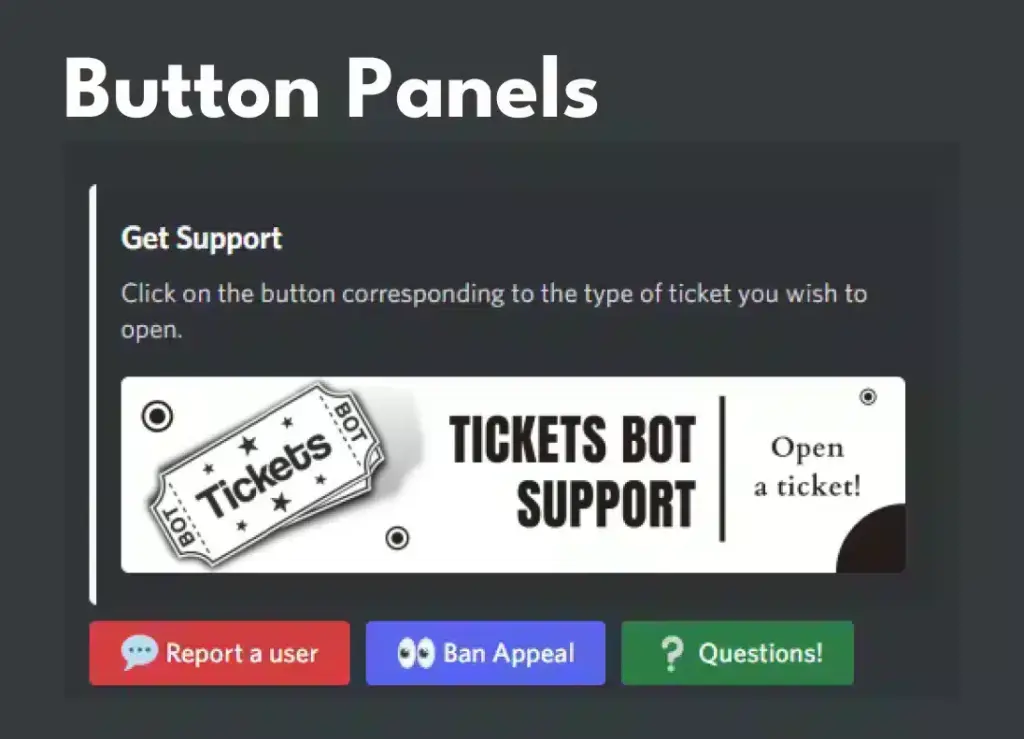
A Discord ticket system allows users to open support tickets in a dedicated channel, where admins and support staff can respond to their queries. Instead of cluttering general channels with requests for support, players can open a private ticket for more personalized help. These tickets can be managed and archived easily, creating a well-structured communication flow.
Having a ticket system provides several key advantages, especially for large communities:
Before setting up the ticket system, you will need:
Ticket Tool is one of the most widely used and feature-rich ticket bots for Discord. It offers customizable ticket systems, auto-closing tickets, and advanced features like transcripts and ticket logs.
Link: Ticket Tool
Tickety is a lightweight, easy-to-use ticket bot for Discord. It’s perfect for servers looking for a simple, no-frills solution to handle support queries.
Link: Tickety
Tickets Bot is another popular option, offering advanced features like ticket categories, auto-assigning tickets to staff, and an intuitive dashboard for easy setup.
Link: Tickets Bot
Support System is a Discord bot that offers ticket creation, staff role assignment, and customizable commands. It’s a solid choice for those looking for a bot with good support and functionality.
Link: Support System Bot
Helper.gg is a versatile Discord bot that not only offers ticket management but also features like customizable forms, automatic ticket assignment, and more. It’s highly customizable and works well for both small and large servers.
Link: Helper.gg
Modmail works slightly differently by allowing users to communicate with staff directly through DMs, which then create a private “ticket” in the staff channel. It’s excellent for private discussions and more personalized support.
Link: Modmail
Dyno Bot is a general-purpose bot but can be set up to manage tickets effectively with its automation features. You can configure Dyno to create tickets, auto-assign them to staff, and close tickets automatically after inactivity.
Link: Dyno Bot
For small servers that don’t need complex features, Tickety or DisTickets are great options. They’re lightweight, easy to set up, and allow users to create tickets with simple commands. Both provide the basic functionalities to handle support tickets without much configuration.
Tickety: Tickety Bot
DisTickets: DisTickets Bot
If you need advanced features like ticket categorization, automatic assignment to staff, logging, and integration with other tools, Ticket Tool and Helper.gg are the best options. They offer comprehensive customization and automation features that are perfect for large or professional communities.
Ticket Tool: Ticket Tool
Helper.gg: Helper.gg
Tickets Bot and Ticket Tool are highly customizable. You can configure these bots with different ticket categories, tailor-made forms, auto-closing options, and advanced permissions. They are perfect if you want full control over how tickets are handled on your server.
Tickets Bot: Tickets Bot
Ticket Tool: Ticket Tool
Yes. If you know how. But we specialized in using already-existing-solutions.
There are several pre-built Discord bots available for managing ticket systems, listed above.
Once you've chosen a bot, the next step is to add the bot to your Discord server. To do this:
For this guide, we'll use Ticket Tool as it is one of the most robust and customizable options available.
#support-tickets.Creating categories for different types of issues (Support, Reports, Refunds, etc.) ensures that tickets are routed to the right staff members. This can be done directly in the Ticket Tool by selecting Add Category under ticket settings.
To prevent tickets from lingering, you can set tickets to auto-close after a certain period of inactivity. This can be done by enabling auto-close in the bot’s settings.
You can add custom commands for ticket , such as /close to close a ticket or /transfer to assign it to another staff member. This ensures smooth operations and clear instructions for both staff and users.
You can also integrate other popular Discord bots like Dyno or Mee6 to automate certain ticket actions, such as assigning roles or sending notifications when a ticket is opened.
For better record-keeping, set up a ticket log channel. Every ticket interaction, including opening and closing, will be automatically recorded in this channel for future reference. This feature is especially useful for resolving disputes or keeping track of common issues.
For deeper integration, you can set up Discord webhooks to notify your FiveM server when a new ticket is opened. For example, players in the game can be notified of ticket responses in real-time via a custom webhook.
Ensure that certain roles (such as Admins, Mods, or Support) are synced between your Discord server and FiveM server. This way, only authorized staff can manage or respond to tickets.
It is critical that tickets remain private between the player and the admin team. Make sure the permissions for the ticket category channels are set to private, allowing only specific roles to view and respond to the tickets.
Additionally, you can enable two-factor authentication (2FA) for all your admins to further secure the system.
While setting up the ticket system, you may encounter a few common issues:
Setting up a Discord ticket system for your FiveM server will dramatically improve how you handle player support and manage reports. By using a bot like Ticket Tool or similar options, you can create an efficient, organized system for addressing player concerns. The customization options available ensure that you can tailor the system to meet the specific needs of your server. Whether you run a small community or a large server with thousands of members, a ticket system will enhance your operations and improve the player experience.
Now that you have a fully functioning ticket system in place, your Discord server will be better equipped to handle any issue that arises, keeping your FiveM community running smoothly!
Use these internal resources to connect How To Use/Add a Ticket System for Discord with setup, framework, marketplace resources, and server operations.



![Italian Pizzeria - Vespucci Pizza [FiveM MLO]](/_next/image?url=https%3A%2F%2Fcdn.fivemx.com%2Ffree-mods%2Fitalian-pizzeria-vespucci-pizza-fivem-mlo%2Fimages%2F2026%2F05%2F5965691a-f4ef-474e-be0e-517c36be86ef-italian-pizzeria-vespucci-pizza-fivem-mlo-featured.webp&w=2048&q=75)


