Compatibilité
- Frameworks
- Standalone
- Mode de jeu
- FiveM

Free download (ad supported)
Free downloads are supported by a brief ad page (Linkvertise) to keep this service running.
Serveur de production ?
Parcourez des scripts payants avec livraison instantanée, signaux de support et sans étape publicitaire.
This tutorial will guide you through creating a FiveM script that synchronizes the in-game clock with real-world time. This ensures that the game environment reflects the actual time, enhancing realism for players.
We'll cover both server-side and client-side scripting, adding functionality to start and stop the synchronization, and setting up the resource for your FiveM server.
Before you begin, ensure you have the following:
resources folder in your FiveM server directory. This is typically found at:bashCode kopierenyour-fivem-server-folder/resources/resources folder, create a new folder named realtime.bashCode kopierenyour-fivem-server-folder/resources/realtime/realtime Folder:This folder will contain all the necessary scripts and configuration files for the real-time synchronization.server.lua)server.lua:Inside the realtime folder, create a new file named server.lua.server.lua:luaCode kopierenRegisterNetEvent("realtime:event") AddEventHandler("realtime:event", function() local hour = tonumber(os.date("%H")) local minute = tonumber(os.date("%M")) local second = tonumber(os.date("%S")) TriggerClientEvent("realtime:event", source, hour, minute, second) end) Explanation:
realtime:event.realtime:event is triggered.client.lua)client.lua:Inside the realtime folder, create a new file named client.lua.client.lua:luaCode kopieren-- Set the duration of one in-game minute in milliseconds SetMillisecondsPerGameMinute(60000) -- 60,000 ms = 1 real-world minute RegisterNetEvent("realtime:event") AddEventHandler("realtime:event", function(hour, minute, second) NetworkOverrideClockTime(hour, minute, second) end) -- Trigger the server event to initiate synchronization TriggerServerEvent("realtime:event") Explanation:
60000 makes 1 in-game minute equal to 1 real-world minute.realtime:event from the server and updates the in-game clock accordingly.To allow toggling the real-time synchronization on and off, we'll add functions to start and stop the synchronization.
client.lua with Stop Functionality:luaCode kopierenlocal syncActive = true local syncThread = nil -- Function to start synchronization function StartRealTimeSync() if not syncActive then syncActive = true syncThread = CreateThread(function() while syncActive do TriggerServerEvent("realtime:event") Wait(60000) -- Wait for 1 minute before next sync end end) end end -- Function to stop synchronization function StopRealTimeSync() if syncActive then syncActive = false if syncThread then -- In Lua, there's no direct way to kill a thread. -- Using a flag to exit the loop effectively stops the thread. syncThread = nil end end end RegisterNetEvent("realtime:event") AddEventHandler("realtime:event", function(hour, minute, second) if syncActive then NetworkOverrideClockTime(hour, minute, second) end end) -- Start synchronization on resource start StartRealTimeSync() -- Example: Command to toggle synchronization RegisterCommand("toggleTimeSync", function() if syncActive then StopRealTimeSync() print("Real-time synchronization stopped.") else StartRealTimeSync() print("Real-time synchronization started.") end end, false) Explanation:
/toggleTimeSync) that players can use to toggle synchronization on or off.fxmanifest.lua)Every FiveM resource requires a manifest file that defines its metadata and dependencies.
fxmanifest.lua:Inside the realtime folder, create a new file named fxmanifest.lua.fxmanifest.lua: fx_version 'cerulean' game 'gta5' author 'YourName' description 'Real-Time Synchronization Script for FiveM' version '1.0.0' server_script 'server.lua' client_script 'client.lua'cerulean is the latest as of writing.gta5).server.cfg.realtime resource starts with the server:rubyCode kopierenensure realtime Note: If you're using start instead of ensure, you can use: start realtimeserver.cfg, restart your FiveM server to load the new resource.For convenience, here's the complete set of files you need to create for the realtime resource.
server.luaRegisterNetEvent("realtime:event")
AddEventHandler("realtime:event", function()
local hour = tonumber(os.date("%H"))
local minute = tonumber(os.date("%M"))
local second = tonumber(os.date("%S"))
TriggerClientEvent("realtime:event", source, hour, minute, second)
end)
client.lualocal syncActive = true
local syncThread = nil
-- Function to start synchronization
function StartRealTimeSync()
if not syncActive then
syncActive = true
syncThread = CreateThread(function()
while syncActive do
TriggerServerEvent("realtime:event")
Wait(60000) -- Wait for 1 minute before next sync
end
end)
end
end
-- Function to stop synchronization
function StopRealTimeSync()
if syncActive then
syncActive = false
if syncThread then
-- In Lua, threads are cooperative; setting syncActive to false will stop the loop
syncThread = nil
end
end
end
RegisterNetEvent("realtime:event")
AddEventHandler("realtime:event", function(hour, minute, second)
if syncActive then
NetworkOverrideClockTime(hour, minute, second)
end
end)
-- Start synchronization on resource start
StartRealTimeSync()
-- Example: Command to toggle synchronization
RegisterCommand("toggleTimeSync", function()
if syncActive then
StopRealTimeSync()
print("Real-time synchronization stopped.")
else
StartRealTimeSync()
print("Real-time synchronization started.")
end
end, false)
fxmanifest.luafx_version 'cerulean' game 'gta5' author 'YourName' description 'Real-Time Synchronization Script for FiveM' version '1.0.0' server_script 'server.lua' client_script 'client.lua'
Here you can download the script we've just created:
https://github.com/HiFiveM/fivem-realtime/archive/refs/heads/main.zip
You've successfully created a FiveM resource that synchronizes the in-game clock with real-world time. This script enhances the gaming experience by ensuring that the game environment reflects the actual time, adding a layer of realism for players.
You can further customize the script by adjusting synchronization intervals, adding more commands, or integrating it with other server features.
Feel free to expand upon this foundation to suit your server's unique needs!
Premium Alternative
Get premium scripts with dedicated support, lifetime updates, and one-click installation.
Réponses rapides basées sur les informations publiées pour FiveM Real-Time Sync.
Vous avez une autre question ? Consultez la description du mod ci-dessus pour plus de détails.
Découvrez plus de ressources pour votre serveur FiveM ou GTA 5.
Free mods are a good starting point. When your server needs stronger support, cleaner installs, and premium systems, move into the commercial hubs below.
Premium catalog
See paid scripts, framework labels, bundles, and install-ready products once the free version no longer covers your server needs.
Open premium shopMoney page
Add police, mechanic, gang, and economy systems around this mod with stronger commercial scripts.
See job scriptsLaunch faster
Bundles shorten setup time by grouping the highest-leverage systems into one commercial starting point.
View bundlesRédigé par l'équipe éditoriale FiveMX sur la base de l'artefact CitizenFX actuel et du framework cible — non copié du post original.
resources/[standalone]/fivem-real-time-sync sur votre serveur. Conservez le nom du dossier tel quel — la plupart des manifests le référencent directement.ensure fivem-real-time-sync à votre server.cfg.ensure fivem-real-time-sync dans la console en direct pour confirmer que le mod se charge sans erreurs rouges. Si vous rencontrez une erreur de dépendance, le mod a probablement besoin de ox_lib ou ox_inventory — installez-les d'abord, puis réessayez.D'autres mods gratuits populaires qui pourraient être utiles pour votre serveur.
Le téléchargement reste gratuit, mais comparez des scripts et packs serveur prêts pour la production avant d'intégrer cette ressource dans un serveur roleplay en ligne.

This mod will make the streets european (German Roads)! Hand-crafted mod, for your server. With the Roads mod, you'll experience an authentic European feel with every step you take. Hand-crafted with precision and attention to detail, this mod is designed to give your server a unique touch
4,49 $US
Voir le produit
FiveM Anticheat script/mod | OPTIMIZED and perfect for ESX detects modders and ban them instantly. Many server owners struggle because of cheaters, modders and hackers. There are a couple of hacks and mod menus for FiveM and money hacks for ESX framework. ? Hackers are quite annoying but the
21,99 $US
Voir le produit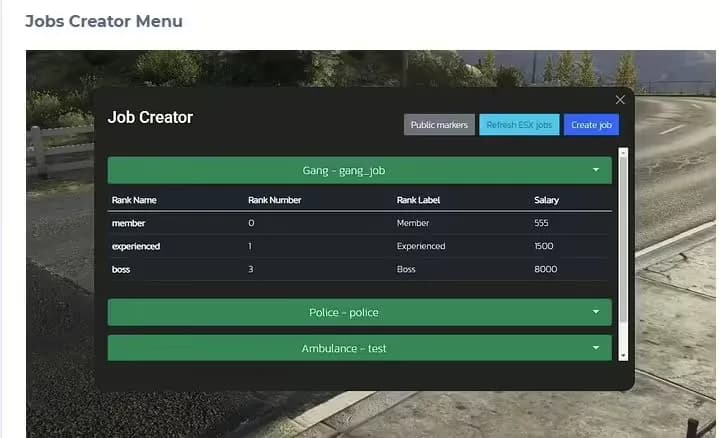
The #1 FiveM Jobs Creator Script - that allows server administrators to easily create generic jobs with many customizable interaction points.
22,99 $US
Voir le produit
100 luxury residential properties in Mirror Park with detailed interiors, custom exteriors, optimized FiveM streaming, and housing-script compatibility.
6,99 $US
Voir le produit