FiveMX
ShopFiveM Mods
Scripts
MLOs
Full ServersTop
Free Mods
Tools
Guides
All Products
FiveMX

Start building your server today.

Curated FiveM resources, instant delivery, free starter mods, and practical guides in one calm marketplace.

Browse the shopsupport@fivemx.com

Shop

  • Shop
  • FiveM Mods
  • All Products
  • Free Mods
  • Best Scripts & Mods
  • FiveM Scripts

Frameworks

  • QBCore Scripts
  • ESX Scripts
  • QBox
  • Standalone

Community

  • Blog
  • Support
  • Creators
  • Affiliate

Legal

  • Privacy Policy
  • Terms of Service
  • Refund Policy
  • Digital Delivery
  • Cookie Policy
  • GDPR Compliance
  • DMCA
  • Imprint
  • Editorial Policy

Server Templates

  • QBCore Server Template
  • ESX Server Template
  • NoPixel Server Template
  • Server Packs
  • Free Server Templates
  • Tebex Alternative
© 2026 FiveMX. All rights reserved.·FiveMX is not affiliated with Rockstar Games, Take-Two Interactive, or CFX.re. All trademarks are property of their respective owners.
GitHubDiscordDocs
Compatibility:

LB Phone v2

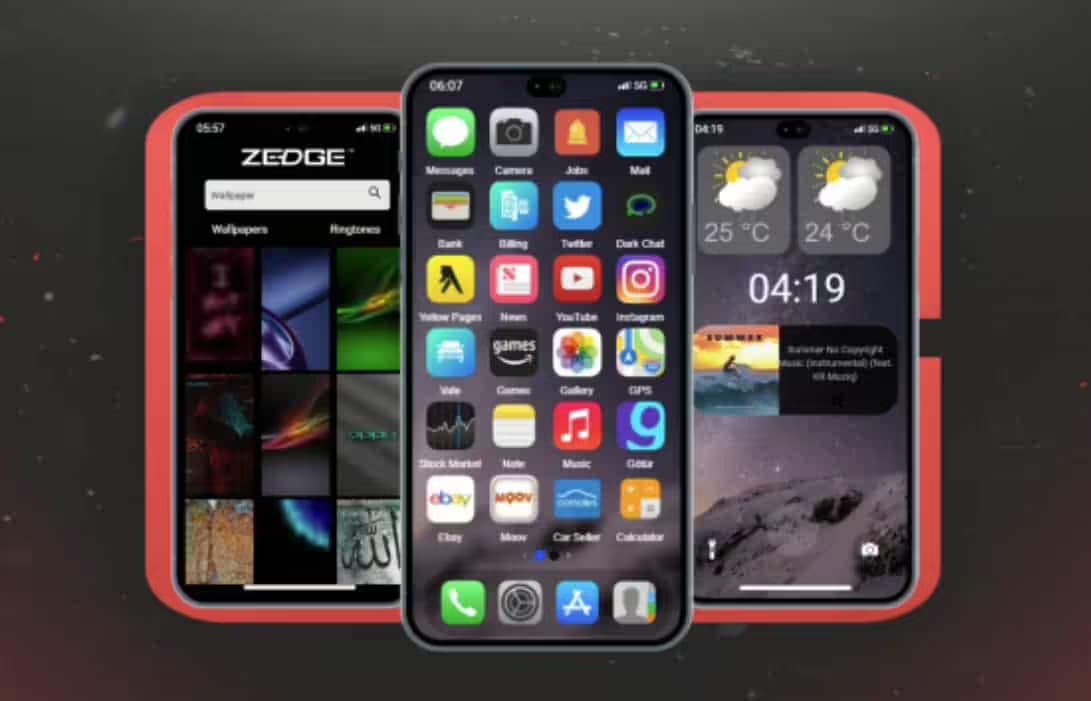
LB Phone v2 - An advanced phone for FiveM with unique features and good performance. Compatible with ESX framework for FiveM servers.

11 sold
$42.00
Secure Checkout
Instant file access after payment
Support and refund policy shown before checkout
Instant Access
SSL Encrypted
Card, Klarna, wallets
Frameworksesx, qbcore, qbox, standalone
RequirementsPublished on this page
PreviewAvailable

Support expectation

Support covers download access, missing delivered files, and questions based on the published setup notes.

Custom installation, framework conversion, live server setup, and custom feature work are not included unless stated on the product page.

Ask before buying if your server uses heavily modified framework, inventory, or database resources.

Ask support before buyingRead refund policyView FiveM bundles

Description

https://www.youtube.com/watch?v=CirWSvYno70

Custom Apps

LB Phone allows you to add apps that either have a UI or simply trigger functions when opening the app. To add an app that triggers a function upon opening it, go to lb-phone/config/config.lua and add the app to the Config.CustomApps table, like this:

lb-phone/config/config.lua
Config.CustomApps = {    [app_identifier] = { -- A unique identifier for the app, not shown to the user        name = App Name, -- The name of the app, shown to the user        description = App Description, -- The description of the app, shown to the user        developer = LB Phone, -- OPTIONAL the developer of the app        defaultApp = true, -- OPTIONAL if set to true, app should be added without having to download it,        game = false, -- OPTIONAL if set to true, app will be added to the game section        size = 59812, -- OPTIONAL in kB        images = { your-image-url.jpg }, -- OPTIONAL array of images for the app on the app store        ui = resource-name/ui/index.html, -- OPTIONAL        icon = https://cfx-nui- .. GetCurrentResourceName() .. /ui/icon.png, -- OPTIONAL app icon        price = 0, -- OPTIONAL, Make players pay with in-game money to download the app        landscape = false, -- OPTIONAL, if set to true, the app will be displayed in landscape mode        keepOpen = true, -- OPTIONAL, if set to true, the app will not close when the player opens the app (only works if ui is not defined)        onUse = function() -- OPTIONAL function to be called when the app is opened            -- do something        end,        onServerUse = function(source) -- OPTIONAL server side function to be called when the app is opened            -- do something        end    }}
&]:nx-opacity-100 focus-within:nx-opacity-100 nx-flex nx-gap-1 nx-absolute nx-m-[11px] nx-right-0 nx-top-8>

Custom apps using UI

If you want to use a custom UI for your app, you need to create a seperate script and provide the path of the HTML file and send it as ui.

The recommended way to create an app with UI is to create it using exports. We have template apps that you can use for reference.

If the user has dark mode enabled, data-theme will be set to dark. Otherwise, it will be set to light.

Adding the app

To add the app, use the AddCustomApp export.

Removing the app

To remove the app, use the RemoveCustomApp export.

Sending a message to the UI

To send a message to the UI, you need to use the SendCustomAppMessage export instead of using SendNUIMessage. You would listen for it the same way in the frontend.

Imported components & functions

When the app gets loaded on the phone, a few functions are imported into the globalThis object.

NameTypeDescription
resourceNamestringThe name of the resource that added the custom app
appNamestringThe app name
settingsobjectThe settings of the phone
componentsobjectUseful components for the app

Components

The following components can be accessed via globalThis.components. You can view a TypeScript declaration file at lb-reactts/ui/src/components.d.ts.

createGameRender

Creates a game render, which renders the game to a canvas. This is used to create a camera in your app, and should be used with the camera exports.

const gameRender = components.createGameRender(canvas) // set the aspect ratiogameRender.resizeByAspect(9 / 16) // pause the renderinggameRender.pause() // unpause the renderinggameRender.resume() // take a photoconst blob: Blob = await gameRender.takePhoto() // take a videoconst recorder = gameRender.startRecording((blob: Blob) => {    const video = URL.createObjectURL(blob)}) await new Promise((resolve) => setTimeout(resolve, 5000)) recorder.stop() // destroy the game rendergameRender.destroy()
&]:nx-opacity-100 focus-within:nx-opacity-100 nx-flex nx-gap-1 nx-absolute nx-m-[11px] nx-right-0 nx-top-0>

uploadMedia

Uploads media and returns a promise with the URL.

// Upload type can be 'Video' | 'Image' | 'Audio'const url = await components.uploadMedia('Video', blob)
&]:nx-opacity-100 focus-within:nx-opacity-100 nx-flex nx-gap-1 nx-absolute nx-m-[11px] nx-right-0 nx-top-0>

saveToGallery

Saves a URL to the gallery and returns a promise with the ID

const id = await components.saveToGallery(url)
&]:nx-opacity-100 focus-within:nx-opacity-100 nx-flex nx-gap-1 nx-absolute nx-m-[11px] nx-right-0 nx-top-0>

setColorPicker

components.setColorPicker({    onSelect(color) {},    onClose(color) {}})
&]:nx-opacity-100 focus-within:nx-opacity-100 nx-flex nx-gap-1 nx-absolute nx-m-[11px] nx-right-0 nx-top-0>

setPopUp

components.setPopUp({    title: 'Popup Menu',    description: 'Confirm your choice',    buttons: [        {            title: 'Cancel',            color: 'red',            cb: () => {                console.log('Cancel')            }        },        {            title: 'Confirm',            color: 'blue',            cb: () => {                console.log('Confirm')            }        }    ]})
&]:nx-opacity-100 focus-within:nx-opacity-100 nx-flex nx-gap-1 nx-absolute nx-m-[11px] nx-right-0 nx-top-0>

setContextMenu

components.setContextMenu({    title: 'Context menu',    buttons: [        {            title: 'Phone Notification',            color: 'blue',            cb: () => {                sendNotification({ title: notificationText })            }        },        {            title: 'GTA Notification',            color: 'red',            cb: () => {                fetchNui('drawNotification', { message: notificationText })            }        }    ]})
&]:nx-opacity-100 focus-within:nx-opacity-100 nx-flex nx-gap-1 nx-absolute nx-m-[11px] nx-right-0 nx-top-0>

setContactSelector

components.setContactSelector({    onSelect(contact) {        components.setPopUp({            title: 'Selected contact',            description: `${contact.firstname ?? '??'} ${contact.lastname ?? ''} ${contact.number}`,            buttons: [                {                    title: 'OK'                }            ]        })    }})
&]:nx-opacity-100 focus-within:nx-opacity-100 nx-flex nx-gap-1 nx-absolute nx-m-[11px] nx-right-0 nx-top-0>

setShareComponent

See the AirShare export for what data to send.

components.setShareComponent({    type: 'image',    data: {        isVideo: false,        src: 'https://docs.lbscripts.com/images/icons/icon.png'    }})
&]:nx-opacity-100 focus-within:nx-opacity-100 nx-flex nx-gap-1 nx-absolute nx-m-[11px] nx-right-0 nx-top-0>

setEmojiPickerVisible

components.setEmojiPickerVisible({    onSelect: (emoji) => {        components.setEmojiPickerVisible(false)        components.setPopUp({            title: 'Selected emoji',            description: emoji.emoji,            buttons: [                {                    title: 'OK'                }            ]        })    }})
&]:nx-opacity-100 focus-within:nx-opacity-100 nx-flex nx-gap-1 nx-absolute nx-m-[11px] nx-right-0 nx-top-0>

setGifPickerVisible

components.setGifPickerVisible({    onSelect(gif) {        components.setPopUp({            title: 'Selected GIF',            attachment: { src: gif },            buttons: [                {                    title: 'OK'                }            ]        })    }})
&]:nx-opacity-100 focus-within:nx-opacity-100 nx-flex nx-gap-1 nx-absolute nx-m-[11px] nx-right-0 nx-top-0>

setGallery

components.setGallery({    includeVideos: true,    includeImages: true,    allowExternal: true,    multiSelect: false,     onSelect(data) {        components.setPopUp({            title: 'Selected media',            attachment: { src: Array.isArray(data) ? data[0].src : data.src },            buttons: [                {                    title: 'OK'                }            ]        })    }})
&]:nx-opacity-100 focus-within:nx-opacity-100 nx-flex nx-gap-1 nx-absolute nx-m-[11px] nx-right-0 nx-top-0>

setFullscreenImage

components.setFullscreenImage('https://docs.lbscripts.com/images/icons/icon.png')
&]:nx-opacity-100 focus-within:nx-opacity-100 nx-flex nx-gap-1 nx-absolute nx-m-[11px] nx-right-0 nx-top-0>

setHomeIndicatorVisible

components.setHomeIndicatorVisible(true)
&]:nx-opacity-100 focus-within:nx-opacity-100 nx-flex nx-gap-1 nx-absolute nx-m-[11px] nx-right-0 nx-top-0>

Functions

fetchNui(event, data, scriptName?)

fetchNui('test', {    foo: 'bar'})
&]:nx-opacity-100 focus-within:nx-opacity-100 nx-flex nx-gap-1 nx-absolute nx-m-[11px] nx-right-0 nx-top-0>

onNuiEvent

Listen for NUI messages sent via SendCustomAppMessage

onNuiEvent('test', (data) => {    console.log(data)})
&]:nx-opacity-100 focus-within:nx-opacity-100 nx-flex nx-gap-1 nx-absolute nx-m-[11px] nx-right-0 nx-top-0>

onSettingsChange

Listen for settings changes

onSettingsChange((newSettings) => {    console.log(newSettings)})
&]:nx-opacity-100 focus-within:nx-opacity-100 nx-flex nx-gap-1 nx-absolute nx-m-[11px] nx-right-0 nx-top-0>

createCall

createCall({    number: '1234567890', // you can send `company` instead of `number` to call a company    videoCall: false,    hideNumber: false})


&]:nx-opacity-100 focus-within:nx-opacity-100 nx-flex nx-gap-1 nx-absolute nx-m-[11px] nx-right-0 nx-top-0>

Related Phone Scripts

  • CS Stories
  • JPR Phone-System
  • Yordi Phone
  • CrewPhone (SaltyChat)

Installation notes

FiveM server with ESX, QBCore, QBox, or compatible standalone bridge. Database and resource installation access required. Review phone, inventory, notification, and dispatch integrations before replacing an existing phone resource.
Installation notes
FiveM server with ESX, QBCore, QBox, or compatible standalone bridge. Database and resource installation access required. Review phone, inventory, notification, and dispatch integrations before replacing an existing phone resource.

Buy this when it saves setup time

Use this checklist to decide quickly whether the resource fits your current server build, framework, and support expectations.

Server-owner payoff

LB Phone v2 is positioned to reduce Phone Scripts instead of making you rebuild the same system from scratch.

Compatibility

Works with esx, qbcore, qbox, standalone. Check the requirements block before adding it to a live stack.

Purchase confidence

Instant download, Stripe checkout, support access, and refund policy context are shown before payment.

Decision assets

Requirements, Preview video, Product Q&A

Product fit, setup, and proof at a glance

Use the published facts on this page to confirm whether LB Phone v2 matches your server before checkout.

Compatibility

Frameworks
ESX, QBCore, QBOX, Standalone
Category
Phone Scripts

Setup & requirements

Install flow
Download → resources folder → ensure in server.cfg
Requirements
Published on this page
File size
15.42 MB

Proof & buyer questions

Reviews
No reviews yet
Sales
11

Only the facts published on this page should be treated as confirmed. If you need more detail, review the description, requirements, changelog, reviews, and product Q&A before checkout.

DescriptionRequirementsPreview video
Phone Scripts
Compatibility:
ESX
QBCore
QBOX
Standalone

LB Phone v2

Review process

LB Phone v2 - An advanced phone for FiveM with unique features and good performance. Compatible with ESX framework for FiveM servers.

11 sold
$42.00
Secure Checkout
Instant file access after payment
Support and refund policy shown before checkout
Instant Access
SSL Encrypted
Card, Klarna, wallets
Frameworksesx, qbcore, qbox, standalone
RequirementsPublished on this page
PreviewAvailable

Support expectation

Support covers download access, missing delivered files, and questions based on the published setup notes.

Custom installation, framework conversion, live server setup, and custom feature work are not included unless stated on the product page.

Ask before buying if your server uses heavily modified framework, inventory, or database resources.

Ask support before buyingRead refund policyView FiveM bundles
Home
Shop
Phone Scripts
Phone Scripts
ESX
QBCore
QBOX
Standalone
Review process

Key Features

  • Custom Apps with UI or Function Triggers

    LB Phone allows you to add apps that either have a UI or simply trigger functions when opening the app.

  • Configuration via Config.lua

    Add apps to the Config.CustomApps table in lb-phone/config/config.lua with customizable properties like name, description, developer, and icon.

  • Optional App Pricing

    Make players pay with in-game money to download apps by setting the price parameter in the custom app configuration.

  • Landscape Mode Support

    Apps can be displayed in landscape mode when the landscape parameter is set to true.

  • Dark Mode Theme Support

    When users have dark mode enabled, data-theme is set to dark; otherwise it is set to light.

Frequently Asked Questions

Related Products

$33.00
$39.00
$42.00
$26.00

Related Tutorials & Guides

Learn more about setting up, configuring, and using this type of resource.

ESX vs QBCore vs QBOX: Technical Framework Comparison 2026

ESX vs QBCore vs QBOX: Technical Framework Comparison 2026

Choosing a framework is the single most consequential decision when building a FiveM server. It determines which scripts you can use, how your developers write code, the…

FiveM Frameworks Explained: Complete Guide to ESX, QBCore & QBOX

FiveM Frameworks Explained: Complete Guide to ESX, QBCore & QBOX

FiveM frameworks form the backbone of roleplay servers. They're not just code libraries—they're complete systems that manage player identity, jobs, inventory, permissions,…

QBox Framework Guide: Migrate from QBCore and Boost Performance (2026)

QBox Framework Guide: Migrate from QBCore and Boost Performance (2026)

QBox has firmly established itself as the natural successor to QBCore in the FiveM roleplay ecosystem.

Continue Building Your FiveM Server

Use this product as part of a larger setup. Explore related categories, alternative frameworks, premium bundles, and free companion downloads.

Explore HUDs
Explore Inventory Scripts
Browse all scripts
Phone Scripts scripts
esx scripts
Try QBCore instead
Try QBox instead
Free FiveM mods
Compare bundles
CrewPhone (best gcPhone)

CrewPhone (best gcPhone)

GKSPhone (ESX)

GKSPhone (ESX)

CodeM Phone (mPhone 2.0)

CodeM Phone (mPhone 2.0)

Chezza Phone V2

Chezza Phone V2