




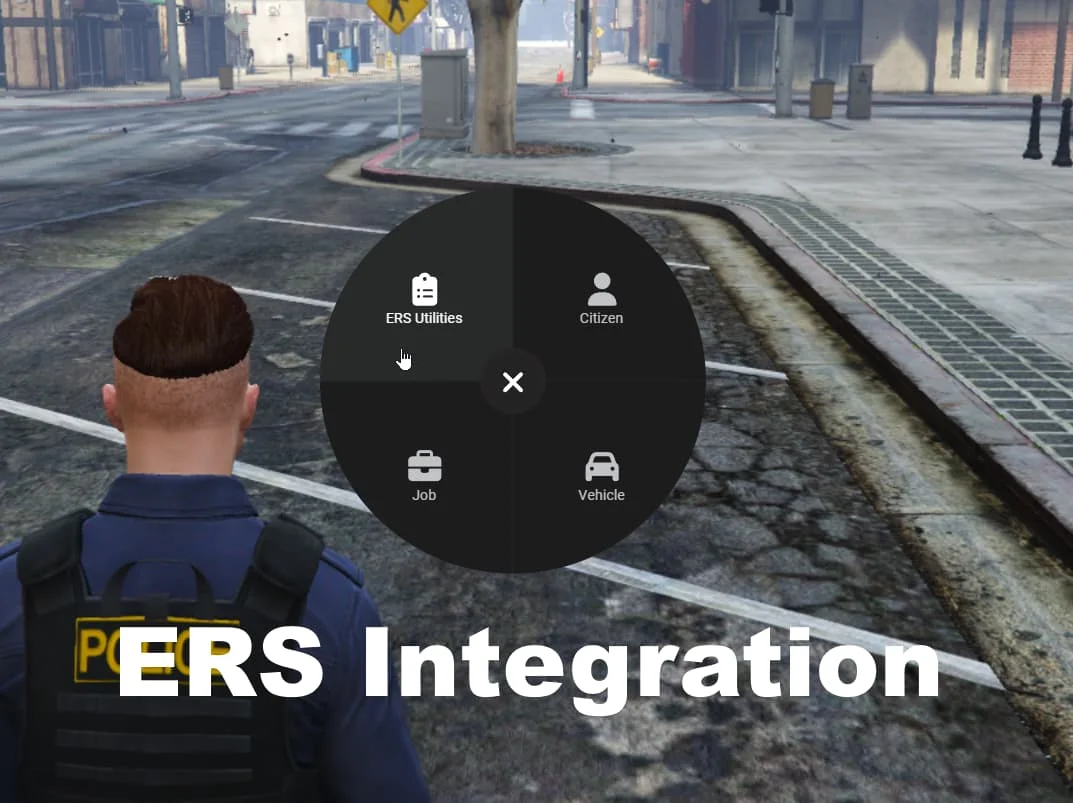
ERS Integration Demo
This ERS Integration script links Emergency Response Simulator (ERS) to QBCore and QBox servers, providing documented dispatch, radial menu controls, and automated reward handling for scene cleanups. Designed to extend ERS functionality, the script integrates with ps-dispatch and qbx-radialmenu to provide real-time notifications, easy player interaction, and flexible admin customization. Images and video previews are included in the resource to illustrate UI behavior and in-game workflows.
Installation and setup
– Back up your current resources before making any changes. – Open the INSTALL ME folder included with the resource. It contains the new ps-dispatch alerts and radial menu items required by the script. These additions must be installed manually; they are not automatic drag-and-drop additions. – In your ps-dispatch resource, open the shared config file and add the Alert blips from add.config.lua into the Config.Blips section. – In the ps-dispatch client folder, open the alerts file and append the alerts from add.alerts.lua at the bottom. – For qbx-radialmenu, open the config folder and edit client.lua. Copy the menu items from config.client and paste them under the appropriate menu items or job items section. – Place the ers_integration script in your resources folder and ensure it is started after ERS and ps-dispatch in your server.cfg. – Verify dependencies are installed and up to date before starting the script.
Notes about installation
– Manual insertion of config snippets is required for ps-dispatch and qbx-radialmenu; follow each step carefully to ensure alerts and radial entries register correctly. – Ensure resource start order places ERS and ps-dispatch before the integration script to avoid initialization errors.
Known bugs
– ps-dispatch blip error may appear in certain configurations. – Dispatch entries may occasionally fail to display detailed callout information.
Dependencies
– QBCore or QBox framework (one or the other required) – Emergency Response Simulator (ERS) – ps-dispatch (dispatch system) – ox_lib (utility library)
Optional integrations
– Wk-wars2x Radar (Wraith ARS 2X) for advanced radar support – ps-mdt for MDT integration with QBCore
Script details
– Code accessible: Yes – Subscription required: No – Approximate lines of code: 1000 – Primary requirement: QBCore (or QBox) – Support: Provided
Features
– QBCore and QBox Integration: Fully compatible with both QBCore and QBox frameworks, allowing servers to run the integration regardless of which framework they use. – Radial Menu Support: Adds qbx-radialmenu entries for quick access to ERS actions. Players can trigger core functions from the radial menu without needing chat commands. Radial menu supports requesting or canceling services while inside a vehicle. – ps-dispatch Integration: integration notes with ps-dispatch to deliver real-time dispatch notifications and allow multiple players to attach to calls. Supports both persistent and non-persistent dispatch notifications based on call state and completion. – Custom Command Functions: Exposes basic command triggers so server admins can bind actions to custom commands or extend functionality with additional scripts. – Dynamic Event Handling: Listens for game events such as pullover events, dispatch responses, and on-scene arrivals, and interacts with ERS systems to update call states and notify participants. – Player Rewards: Issues automatic bank payment bonuses for players who complete scene cleanup, encouraging follow-through and proper scene management. – Self Dispatch Option: Allows players to self dispatch using ps-dispatch and radial menu options, enabling flexible solo or coordinated responses. – Persistent vs Non-persistent Notifications: Dispatch entries can be configured to remain active or clear automatically depending on how the call progresses and whether it is completed. – Manual Configuration Requirements: Includes clear instructions for adding alert blips and radial menu items to ps-dispatch and qbx-radialmenu configs to ensure proper operation. – Lightweight and Extensible: Designed to be straightforward to extend with custom commands and additional event hooks for server-specific workflows.