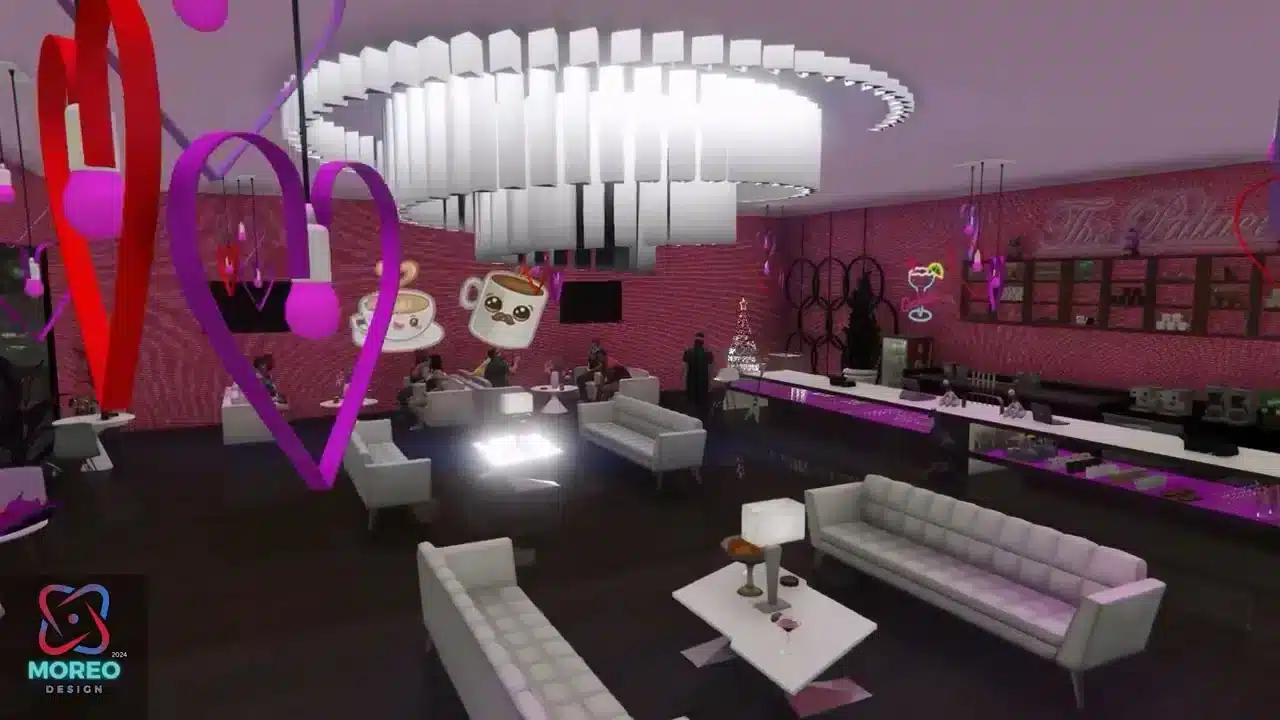
The Coffee House MLO adds a beautifully crafted interior to the game, located conveniently within the city for easy access. This mod enhances the game’s aesthetics and adds a new, social venue where players can gather, interact, and role-play in a vibrant and cozy coffee shop setting. It comes with all the trappings of a real coffee shop, from a barista counter to comfortable seating arrangements, making it a perfect addition for any server looking to offer more diverse and immersive environments.
Video Preview
Download here
Click here to download the MLO
Installation Instructions
FiveM
- Download the Coffee Cute Map mod file.
- Extract the “moreo_coffee” folder.
- Copy and paste the “moreo_coffee” folder into your FiveM server’s resources directory.
- Open the
server.cfgfile in the server’s root directory. - Add the following line to the
server.cfgfile:ensure moreo_coffee - Save the
server.cfgfile and restart your server.
Server Compatibility
This MLO is compatible with FiveM servers running GTA V. No specific framework is required — works on ESX, QBCore, QBOX, vRP, and standalone. Requires a FiveM server with up-to-date server artifacts.
Frequently Asked Questions
- Is this MLO free to use on my server?
- Yes — Coffee House MLO is available for free. Always check the original creator’s license before redistributing or modifying it.
- Does this require OpenIV?
- No. FiveM MLOs are loaded server-side via
server.cfgand do not require OpenIV or any single-player modifications. - Is it compatible with ESX and QBCore?
- Yes. MLOs are framework-agnostic — they work with ESX, QBCore, QBOX, vRP, and standalone servers alike.
- Can I request help or report bugs?
- Check the original mod’s release thread or GitHub page for a bug tracker. Most creators are active on the CFX community forum.