
  • Instant digital delivery
  • Lifetime updates on selected products
  • Trusted by server owners
FiveMX
Shop
Full ServersBundlesNew releases
FiveMX

Start building your server today.

Curated FiveM resources, instant delivery, free starter mods, and practical guides in one calm marketplace.

Browse the shopsupport@fivemx.com

Shop

  • Shop
  • FiveM Mods
  • All Products
  • Free Mods
  • Best Scripts & Mods
  • FiveM Scripts

Frameworks

  • QBCore Scripts
  • ESX Scripts
  • QBox
  • Standalone

Community

  • Blog
  • Support
  • Creators
  • Affiliate

Legal

  • Privacy Policy
  • Terms of Service
  • Refund Policy
  • Digital Delivery
  • Cookie Policy
  • GDPR Compliance
  • DMCA
  • Imprint
  • Editorial Policy

Server Templates

  • QBCore Server Template
  • ESX Server Template
  • NoPixel Server Template
  • Server Packs
  • Free Server Templates
  • Tebex Alternative
© 2026 FiveMX. All rights reserved.·FiveMX is not affiliated with Rockstar Games, Take-Two Interactive, or CFX.re. All trademarks are property of their respective owners.
DiscordDocs
Compatibility:

CodeM Admin Menu

Limited-time price

Save $1.53 (18% off)

$8.49 - $6.96
Flash Sale
Weekend Sale
$6.96$8.492 sold

Secure Checkout

Cards, Apple Pay, Google Pay, iDEAL/Wero, Bancontact, EPS, Przelewy24, and optional Crypto where available via Stripe.

Instant file access after paymentSupport and refund policy shown before checkout
Ask support before buyingRead refund policy
Instant Access
SSL Encrypted
Cards, wallets, bank redirects
Frameworksesx, qbcore, qbox, standalone
Setup

Requires a FiveM server, ESX or QBCore, access to server resources, and permission to restart the resource after configuration.

RequirementsPublished on this page
PreviewAvailable

Description

CodeM Admin Menu - Professional Server Administration System for FiveM

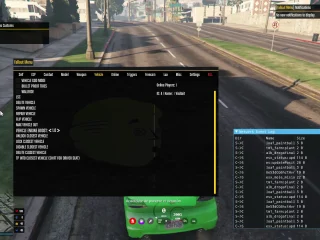
Take control of your FiveM server with the CodeM Admin Menu. This comprehensive administration tool gives staff members powerful controls for player management, vehicle spawning, teleportation, moderation actions, and server oversight. With an intuitive interface and extensive features, CodeM Admin Menu is the professional choice for server administrators who need reliable, efficient management tools.

What's Included

CodeM Admin Menu delivers a complete server administration suite. You'll get player management tools for kicking, banning, warning, and monitoring players, vehicle spawning with search and customization options, teleportation system for moving to players, waypoints, or coordinates, weather and time control for environmental management, item and money management for economy oversight, noclip and godmode for administrative freedom, spectator mode for watching player activity, extensive permission system with rank-based access control, logging system that tracks all admin actions, modern UI interface that's clean and easy to navigate, and compatibility with major frameworks (ESX, QBCore, standalone).

Key Features

  • Player Management - Kick, ban, warn, freeze, bring, and goto players
  • Vehicle Spawning - Spawn any vehicle with search function and customization
  • Teleportation - Teleport to players, waypoints, coordinates, or bring players to you
  • Weather & Time - Control server weather patterns and time of day
  • Money & Items - Give or remove money and items for economy management
  • Admin Powers - Noclip, godmode, invisibility, and super speed
  • Spectator Mode - Watch players invisibly to investigate reports
  • Permission Ranks - Multiple admin levels with customizable permissions
  • Action Logging - Complete logs of all administrative actions
  • Modern Interface - Clean, responsive UI that's easy to use

Perfect For

  • Roleplay servers needing professional administration tools
  • Communities with multiple staff ranks (moderator, admin, superadmin)
  • Servers requiring detailed admin action logging
  • Staff teams that need quick access to player management
  • Servers wanting a polished, professional admin interface
  • Communities needing economy and item oversight tools

Player Management Features

The player management system gives admins complete control. View all online players with their IDs, jobs, and locations. Kick troublemakers with custom messages. Issue temporary or permanent bans with reason tracking. Freeze players to prevent movement during investigations. Bring players to your location for conversations or move yourself to them. Spectate players invisibly to watch for rule violations. Search player inventories and view their stats. Send private admin messages. Revive downed players or heal injuries. The comprehensive toolset handles any moderation scenario.

Vehicle and World Control

Admins can spawn any vehicle using the built-in search function. Type a vehicle name or browse categories to find what you need. Customize spawned vehicles with colors, modifications, and liveries. Delete nearby vehicles to clean up clutter. Fix or flip vehicles for players experiencing issues. Control server weather - switch between clear, rainy, foggy, or stormy conditions. Adjust time of day for events or testing. Freeze time for specific scenarios. These world controls let admins create the perfect environment for events or resolve issues quickly.

Technical Details

  • Framework: Works with ESX, QBCore, QBOX, or standalone
  • Database: Stores admin logs and ban records
  • Performance: Optimized menu with minimal resource usage
  • Permissions: Discord role integration or config-based ranks
  • UI: Modern, responsive interface with keyboard shortcuts

Installation

  1. Download and extract CodeM Admin Menu to your resources folder
  2. Import the SQL database file for admin logs and bans
  3. Configure admin ranks and permissions in config.lua
  4. Set up admin identifiers (license, Discord, Steam) for authorized staff
  5. Choose framework integration (ESX, QBCore, or standalone)
  6. Add to server.cfg and restart your server
  7. Test admin access with configured staff accounts

Permission System Explained

CodeM Admin Menu supports multiple permission tiers. Configure ranks like Moderator, Admin, and Superadmin with different access levels. Moderators might only kick and warn, while Admins can ban and teleport, and Superadmins have full access including money/item commands. Set permissions per command - decide exactly what each rank can do. Integrate with Discord roles to automatically grant permissions based on server roles. Use Steam IDs, license identifiers, or Discord IDs for access control. The flexible system adapts to any staff structure.

Framework Compatibility

  • ✅ ESX - Full integration with ESX money, items, jobs, and player data
  • ✅ QBCore - Complete QB support including money, items, and jobs
  • ✅ QBOX - Compatible with QBOX framework
  • ✅ Standalone - Works without framework using native FiveM functions

Action Logging and Accountability

Every admin action gets logged to the database. See who kicked, banned, or teleported, when they did it, and why. Review logs to investigate staff abuse or verify legitimate actions. Export logs for record-keeping or dispute resolution. The logging system creates accountability - staff know their actions are tracked. Some servers display logs in Discord webhooks for real-time transparency. This feature is essential for professional communities that value responsible staff behavior.

What Makes It Stand Out

CodeM Admin Menu combines power with polish. The interface is cleaner and more intuitive than many admin menus, making it easy for new moderators to learn. The extensive feature set means you don't need multiple admin scripts - it's all-in-one. Permission customization lets you fine-tune access for different staff levels. The logging system provides accountability that basic admin tools lack. Framework flexibility means it works regardless of your server's setup. With 99+ sales, CodeM Admin Menu has earned its reputation as a reliable, professional administration solution.

Moderation Best Practices

Use CodeM Admin Menu responsibly to maintain community trust. Always document ban reasons so future admins understand the context. Use spectator mode to gather evidence before taking action - don't act on reports alone. Issue warnings before kicks when appropriate, giving players a chance to correct behavior. Review logs regularly to ensure staff are using powers appropriately. Set clear staff guidelines about when to use specific commands. The powerful tools require responsible use to maintain a healthy community.

Event and RP Support

Beyond moderation, CodeM Admin Menu excels at supporting events. Teleport participants to event locations quickly. Spawn custom vehicles for races or showcases. Control weather and time for immersive scenarios (rainy funeral, sunset wedding, clear day for car shows). Give temporary items or money for event participation. Freeze time during organized competitions. The administrative tools double as event management features that enhance roleplay experiences.

Video Preview

Watch the full feature demonstration and interface walkthrough:

https://www.youtube.com/watch?v=0DnvjIS8nOE

Related Products You Might Like

  • ESX Plugin For EasyAdmin - Enhanced admin integration trusted by 219+ servers
  • Police System CAD/MDT - Complete dispatch and records management with 304+ sales
  • Super ESX Server - Complete server package with 306+ satisfied customers
  • QBCore Framework Server - Professional QB server base for roleplay communities

Installation notes

Requires a FiveM server, ESX or QBCore, access to server resources, and permission to restart the resource after configuration.
Installation notes
Requires a FiveM server, ESX or QBCore, access to server resources, and permission to restart the resource after configuration.

Buy this when it saves setup time

Use this checklist to decide quickly whether the resource fits your current server build, framework, and support expectations.

Server-owner payoff

CodeM Admin Menu is positioned to reduce Admin Tools instead of making you rebuild the same system from scratch.

Compatibility

Works with esx, qbcore, qbox, standalone. Check the requirements block before adding it to a live stack.

Purchase confidence

Instant download, Stripe checkout, support access, and refund policy context are shown before payment.

Decision assets

Requirements, Preview video, Product Q&A

Product fit, setup, and proof at a glance

Use the published facts on this page to confirm whether CodeM Admin Menu matches your server before checkout.

Compatibility

Frameworks
ESX, QBCore, QBOX, Standalone
Category
Admin Tools

Setup & requirements

Install flow
Download → resources folder → ensure in server.cfg
Requirements
Published on this page
File size
87.36 MB

Proof & buyer questions

Reviews
No reviews — be the first
Sales
2

Only the facts published on this page should be treated as confirmed. If you need more detail, review the description, requirements, changelog, reviews, and product Q&A before checkout.

DescriptionRequirementsPreview video
Admin Tools
Compatibility:
ESX
QBCore
QBOX
Standalone

CodeM Admin Menu

Review process

Limited-time price

Save $1.53 (18% off)

$8.49 - $6.96
Flash Sale
Weekend Sale
$6.96$8.492 sold

Secure Checkout

Cards, Apple Pay, Google Pay, iDEAL/Wero, Bancontact, EPS, Przelewy24, and optional Crypto where available via Stripe.

Instant file access after paymentSupport and refund policy shown before checkout
Ask support before buyingRead refund policy
Instant Access
SSL Encrypted
Cards, wallets, bank redirects
Frameworksesx, qbcore, qbox, standalone
Setup

Requires a FiveM server, ESX or QBCore, access to server resources, and permission to restart the resource after configuration.

RequirementsPublished on this page
PreviewAvailable
Home
Shop
Admin Tools
Admin Tools
ESX
QBCore
QBOX
Standalone
Review process

Key Features

  • Player Management System

    Kick, ban, warn, freeze, bring, and goto players with custom messages and reason tracking for moderation scenarios

  • Vehicle Spawning with Customization

    Spawn any vehicle using built-in search function with ability to customize colors, modifications, and liveries

  • Teleportation System

    Teleport to players, waypoints, coordinates, or bring players to your location for administrative control

  • Weather and Time Control

    Control server weather patterns including clear, rainy, foggy, or stormy conditions and adjust time of day

  • Admin Powers

    Access noclip, godmode, invisibility, and super speed for administrative freedom

Frequently Asked Questions

Related Products

$21.99
$4.49
$18.99
$4.49

More from CodeM

CodeM xPawnshop — Advanced Pawn Shop Script

CodeM xPawnshop — Advanced Pawn Shop Script

CodeM mHunting — Hunting & Wildlife System

CodeM mHunting — Hunting & Wildlife System

CodeM mTaxiJob — Advanced Taxi Script

CodeM mTaxiJob — Advanced Taxi Script

Codem - Chat (chat-theme) [ESX][QB][PAID]

Codem - Chat (chat-theme) [ESX][QB][PAID]

View all from CodeM

Related Tutorials & Guides

Learn more about setting up, configuring, and using this type of resource.

ESX vs QBCore vs QBOX: Technical Framework Comparison 2026

ESX vs QBCore vs QBOX: Technical Framework Comparison 2026

Choosing a framework is the single most consequential decision when building a FiveM server. It determines which scripts you can use, how your developers write code, the…

FiveM Frameworks Explained: Complete Guide to ESX, QBCore & QBOX

FiveM Frameworks Explained: Complete Guide to ESX, QBCore & QBOX

FiveM frameworks form the backbone of roleplay servers. They're not just code libraries—they're complete systems that manage player identity, jobs, inventory, permissions,…

QBCore Admin Commands — Complete FiveM Reference

QBCore Admin Commands — Complete FiveM Reference

Complete QBCore admin command reference for FiveM servers: permissions, admin menu commands, player moderation, vehicle tools, money/job commands, reports, warnings, and troubleshooting.

Continue Building Your FiveM Server

Use this product as part of a larger setup. Explore related categories, alternative frameworks, premium bundles, and free companion downloads.

Explore Police ScriptsExplore Economy & BankingBrowse all scriptsAdmin Tools scriptsesx scriptsTry QBCore insteadTry QBox insteadFree FiveM modsCompare bundles
FiveM AntiCheat 2025 (updated)

FiveM AntiCheat 2025 (updated)

ESX Plugin For EasyAdmin

ESX Plugin For EasyAdmin

FiveM Admin Menu

FiveM Admin Menu

ESX Menu List

ESX Menu List