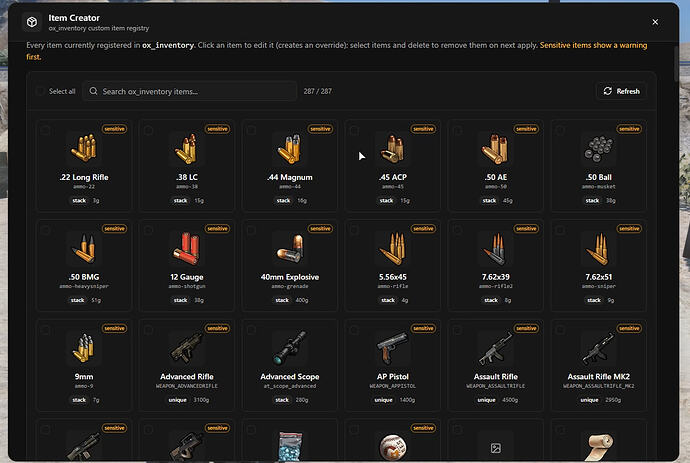
Create and manage custom ox_inventory items directly in-game without editing files or restarting your server.
Preview
Overview
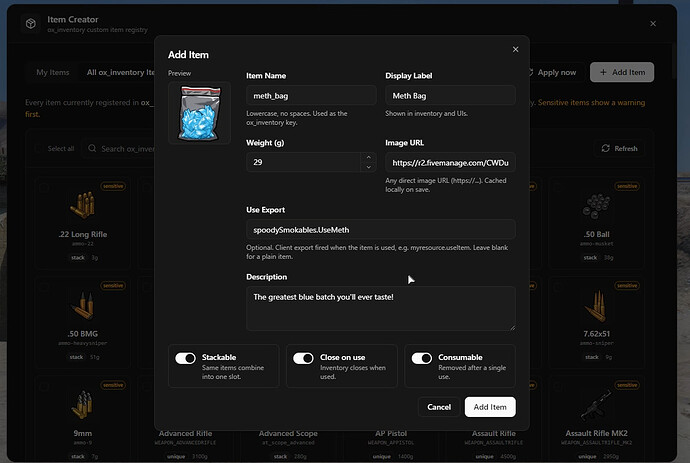
This tool lets you add, edit, and delete ox_inventory items from inside FiveM. Use /itemcreator (admin only) to open a clean panel instead of editing items.lua manually.
Changes sync to all players instantly—no server restart or relog needed. You can browse all registered items, tweak values, paste image URLs for auto-download, and define item actions via client exports.
Key Features
- Add, edit, and delete items from a panel instead of a text editor
- Browse all ox_inventory items — yours, stock, and from other resources
- Paste a direct image URL and it downloads into ox_inventory/web/images
- Items written as native [‘name’] = { … } entries, matching manual edits
- Point an item at a client export to define its use action
- New and edited items appear for connected players instantly
- Cleans up after itself: deleting an item removes it from items.lua and only its downloaded image
Download
Admin workflow and safety checks
An in-game item creator is useful when staff frequently add food, tools, evidence items, crafting parts, or event rewards. The main benefit is speed: admins can create or adjust ox_inventory items without editing items.lua by hand and restarting the server.
The risk is the same speed. Limit access to trusted admins, keep a backup of item definitions, and test item exports before giving players access. A bad item name, broken image URL, or unsafe client export can create confusing inventory behavior.
Official reference:
Related FiveMX paths: