



KS Loadingscreen – Modern Custom Loading Screen for FiveM Servers
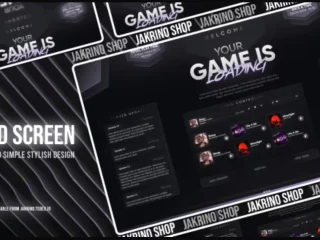
Give your FiveM server a professional first impression with KS Loadingscreen, a sleek and customizable loading screen that welcomes players with style. This modern loading solution displays your server branding, rules, and information while players connect. With support for background videos or images, animated progress bars, music integration, and social media links, KS Loadingscreen transforms the standard connection experience into an engaging introduction to your community. The clean, responsive design works perfectly on all screen sizes and loads quickly without slowing down the connection process.
What’s Included
KS Loadingscreen provides a complete loading screen solution with all the features modern servers need. Display your server logo, name, and tagline prominently while showing server rules, staff information, or community guidelines. The animated progress bar syncs with the actual loading status, so players know exactly how long until they spawn in. Add background videos for visual impact or use image slideshows to showcase your server features. Social media buttons make it easy for players to join your Discord, follow your Twitter, or visit your website while waiting to connect.
Key Features
- Customizable Backgrounds – Support for videos, images, or slideshows
- Animated Progress Bar – Real-time loading status display
- Music Integration – Optional background music during connection
- Server Information – Display rules, staff, and server details
- Social Media Links – Discord, website, and social platform buttons
- Responsive Design – Works on all screen sizes and resolutions
- Easy Configuration – Simple config file for all settings
- Fast Loading – Optimized to not slow down connection times
- Modern UI – Clean, professional aesthetic
built for
- Servers wanting professional branding from first connection
- Roleplay communities with rules to display
- Servers promoting Discord or social media
- Communities that value polished user experience
Technical Details
- File Type: HTML/CSS/JavaScript
- Framework: Universal (works with ESX, QBCore, standalone)
- Performance: Lightweight and optimized
- Customization: Full HTML/CSS control
Installation
- Download and extract to resources folder
- Configure your server name, logo, and background in config
- Add social media links and server information
- Set loading screen resource in server.cfg
- Customize colors and styling to match your brand
Framework Compatibility
- ✅ ESX – Full support
- ✅ QBCore – Full support
- ✅ Standalone – Works with any framework
Customization Options
Customize every aspect of your loading screen to match your server brand. Change background videos or images, adjust colors and fonts, add or remove information sections, modify the progress bar style, and configure which social links to display. The HTML/CSS structure makes it easy to add custom elements or integrate additional features. Upload your server logo, set custom text for rules and welcome messages, and even add music that plays during the loading process.
What Makes It differentiate the setup
KS Loadingscreen delivers a premium loading experience without the complexity. The clean, modern design looks professional out of the box, while the simple configuration makes customization accessible even for server owners without coding experience. The responsive layout ensures your loading screen looks great whether players connect on 1080p or 4K displays. With fast load times and smooth animations, players get essential information about your server without frustrating delays. The social media integration helps grow your community by making it easy for new players to find and join your Discord or other platforms during the connection process.


Tiana (verified owner) –
Great resource for GTA RP servers.
Grover (verified owner) –
Quite easy to use, nice design, surely will buy again
FalconRed694 (verified owner) –
The integration with [ESX/QBCore/Qbox] was smooth and required minimal changes.
Isabelle (verified owner) –
Got some issues, but it works for me.
ZaneZero (verified owner) –
Thank you guys for this amazing creation! Absolutely mind-blowing!
Jade (verified owner) –
Think everyone should know about this, it’s just beyond my expectations
Erica (verified owner) –
Great balance between simplicity and customization. You can use it immediately or configure every detail.
Gerda (verified owner) –
Been using it for a while, I usually don’t write a review but this time I am truly convinced to write.
Arnulfo (verified owner) –
Good response from the support.