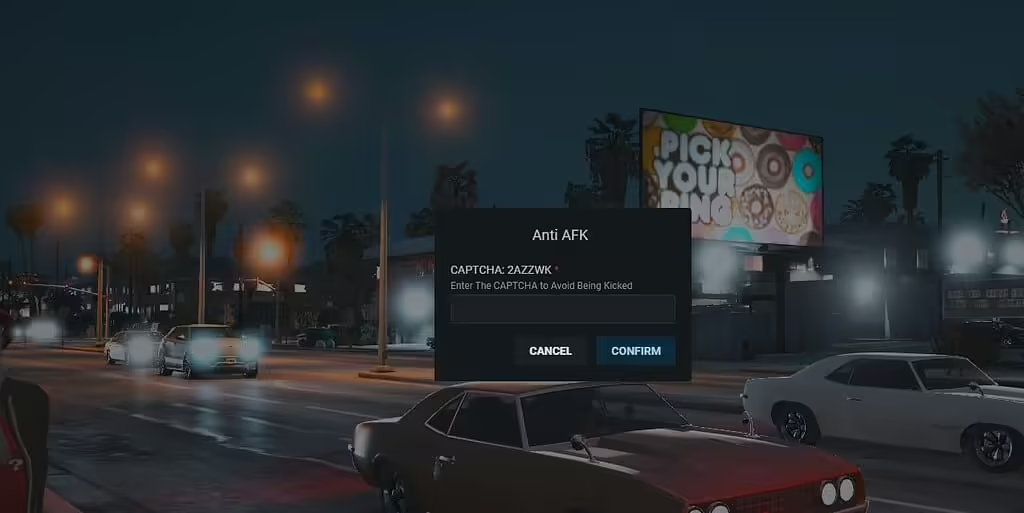
Ben je het zat dat spelers AFK (Away From Keyboard) gaan tijdens je gamesessies? Je bent niet de enige! Als je je server levendig en interactief wilt houden, overweeg dan om het gratis CAPTCHA AFK Script te installeren. Deze mod biedt een leuke en effectieve oplossing om met AFK-spelers om te gaan door hen uit te dagen met een CAPTCHA-verificatieproces. Laten we bekijken hoe je dit script kunt installeren en je gameomgeving boeiend kunt houden.
Wat is het CAPTCHA AFK Script?
Het CAPTCHA AFK Script is speciaal ontworpen voor FiveM-servers. Wanneer een speler een bepaalde tijd AFK is (de duur is aanpasbaar in het config.lua-bestand), wordt hij/zij gevraagd een CAPTCHA-uitdaging te voltooien met behulp van OX_LIB. Als hij/zij de CAPTCHA niet kan oplossen, ontvangt hij/zij een melding in de chat en krijgt hij/zij nog een kans om te antwoorden. Reageert hij/zij echter helemaal niet, dan wordt hij/zij automatisch uit het spel verwijderd, wat zorgt voor een actievere en meer betrokken spelersbasis.
Kenmerken van het Script
- bruikbaar: Dit script is eenvoudig en makkelijk in te stellen, zonder abonnementen of ingewikkelde processen.
- Open source: De code is vrij toegankelijk, zodat je deze kunt aanpassen en finetunen naar de behoeften van je server.
- Matige omvang: Met ongeveer 200 regels code is het lichtgewicht en efficiënt.
Vereisten
Zorg ervoor dat je OX_LIB hebt geïnstalleerd voordat je met de installatie begint. Deze afhankelijkheid is essentieel voor een correcte werking van de CAPTCHA-functionaliteit.
Het CAPTCHA AFK Script installeren
- Download het script:
Ga naar de GitHub-repository waar het script wordt gehost. Je vindt het hier. Klik op de groene “Code”-knop en kies vervolgens “Download ZIP” om de scriptbestanden te downloaden.
- Pak de bestanden uit:
Zodra het is gedownload, zoek je het ZIP-bestand en pak je het uit naar een map op je computer.
- Toevoegen aan je FiveM-server:
- Kopieer de uitgepakte map (meestal met de naam RK_AntiAFK) naar de resources-map van je FiveM-server.
- Open je serverconfiguratiebestand (server.cfg) en voeg de regel
ensure RK_AntiAFK aan het bestand toe. Dit zorgt ervoor dat het script wordt geladen wanneer je server start.
- Het script configureren:
- Navigeer naar het config.lua-bestand in de RK_AntiAFK-map.
- Stel de gewenste AFK-timeoutduur in volgens je voorkeuren.
- Herstart uw Server:
Nadat u deze wijzigingen hebt aangebracht, start u uw FiveM-server opnieuw om het nieuwe script toe te passen.
- Test het script:
Ga naar uw server en probeer AFK te gaan om de CAPTCHA-uitdaging in werking te zien. Dit helpt u bevestigen dat alles correct werkt.
Conclusie
Het implementeren van het CAPTCHA AFK-script is een fantastische manier om de betrokkenheid van spelers op uw FiveM-server te vergroten. Het houdt de gameplay levendig en zorgt ervoor dat spelers actief blijven, waardoor uw game-ervaring voor iedereen plezierig wordt. Download dus vandaag nog het script en zet een stap naar een dynamischere serveromgeving!
Bron
Original Cfx.re release