







Wilt u de communicatie op uw server verbeteren? De feedbackformulier-mod is een fantastische toevoeging waarmee spelers eenvoudig feedback kunnen geven aan servereigenaren. Hier is een eenvoudige handleiding om u op weg te helpen met het installeren van deze essentiële tool.
Wat is de Feedbackformulier-mod?
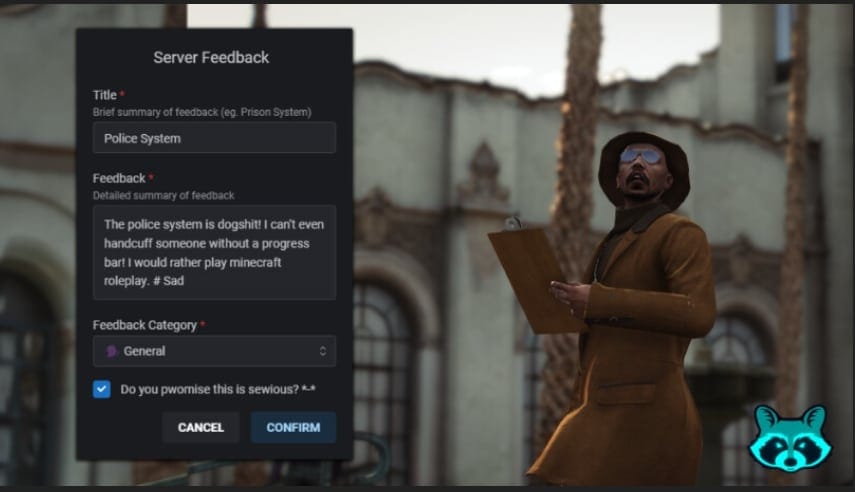
De feedbackformulierenmod stelt spelers op je server in staat om hun gedachten en suggesties direct aan jou, de servereigenaar, te communiceren. Het is een bruikbare tool waarmee je commando's kunt aanpassen en webhooks kunt instellen voor gestroomlijnde informatie-uitwisseling. Deze mod is compatibel met populaire frameworks zoals ESX, QBCore en Qbox en ondersteunt meerdere talen, waaronder Engels, Spaans en Nederlands.
Functies
- Gemak van communicatie: Spelers kunnen eenvoudig hun feedback en suggesties versturen.
- Framework-compatibiliteit: Werkt met ESX, QBCore en Qbox.
- Meertalige ondersteuning: Beschikbaar in Engels, Spaans en Nederlands.
Hoe installeer ik de Feedbackformulier-mod?
Volg deze stappen om de feedbackformulier-mod succesvol op uw server te installeren:
Download de Mod
- Begin met het downloaden van het mod-bestand. Klik op de meegeleverde link om download het bestand.
Pak de bestanden uit
- Zodra het is gedownload, zoek het gecomprimeerde bestand en pak het uit naar een tijdelijke map op uw computer.
Kopieer de bestanden naar uw server
- Identificeer de directory van uw server. Meestal gaan mod-bestanden naar een specifieke “resources”-map.
- Kopieer de uitgepakte bestanden naar de juiste directory op uw server, zorg ervoor dat ze zijn georganiseerd volgens het framework dat u gebruikt.
Stel de opdracht in
- Pas de opdracht aan voor het feedbackformulier volgens de operationele behoeften van uw server. Dit wordt meestal gedaan door een configuratiebestand aan te passen dat in het gedownloade pakket zit.
Webhooks configureren
- Volg de instructies in het mod-pakket om webhooks in te stellen. Dit omvat het invoeren van de URL waar u feedback wilt ontvangen, zodat uw personeel de inzendingen zonder problemen kan bekijken.
Afhankelijkheden
- Voordat u uw installatie voltooit, zorg ervoor dat u de benodigde afhankelijkheden hebt. Deze mod vereist:
- stevo_lib (versie 1.6.9)
- ox_lib (versie 3.24.0)
- Zorg ervoor dat deze bibliotheken op uw server zijn geïnstalleerd.
- Voordat u uw installatie voltooit, zorg ervoor dat u de benodigde afhankelijkheden hebt. Deze mod vereist:
- Start je server
- Start uw server opnieuw op om de wijzigingen toe te passen. Controleer of de feedbackopdracht naar behoren werkt.
Conclusie
Zodra je deze stappen hebt voltooid, is je feedbackformulier-mod klaar voor gebruik. Doordat spelers hun feedback duidelijk kunnen communiceren, krijg je waardevolle inzichten om je serverervaring te verbeteren. Het is een eenvoudig maar krachtig hulpmiddel dat betere interactie binnen je gaminggemeenschap bevordert. Geniet van het effectiever verbinden met je spelers!