


  • Instant digital delivery
  • Lifetime updates on selected products
  • Trusted by server owners
FiveMX
Shop
Full ServersBundlesNew releases
FiveMX

Start building your server today.

Curated FiveM resources, instant delivery, free starter mods, and practical guides in one calm marketplace.

Browse the shopsupport@fivemx.com

Shop

  • Shop
  • FiveM Mods
  • All Products
  • Free Mods
  • Best Scripts & Mods
  • FiveM Scripts

Frameworks

  • QBCore Scripts
  • ESX Scripts
  • QBox
  • Standalone

Community

  • Blog
  • Support
  • Creators
  • Affiliate

Legal

  • Privacy Policy
  • Terms of Service
  • Refund Policy
  • Digital Delivery
  • Cookie Policy
  • GDPR Compliance
  • DMCA
  • Imprint
  • Editorial Policy

Server Templates

  • QBCore Server Template
  • ESX Server Template
  • NoPixel Server Template
  • Server Packs
  • Free Server Templates
  • Tebex Alternative
© 2026 FiveMX. All rights reserved.·FiveMX is not affiliated with Rockstar Games, Take-Two Interactive, or CFX.re. All trademarks are property of their respective owners.
DiscordDocs
Compatibility:

okokChat

$8.49

Secure Checkout

Cards, Apple Pay, Google Pay, iDEAL/Wero, Bancontact, EPS, Przelewy24, and optional Crypto where available via Stripe.

Instant file access after paymentSupport and refund policy shown before checkout
Ask support before buyingRead refund policy
Instant Access
SSL Encrypted
Cards, wallets, bank redirects
Frameworksesx
Setup

Requires a FiveM server, esx, access to server resources, and permission to restart the resource after configuration.

RequirementsPublished on this page
PreviewAvailable

Description

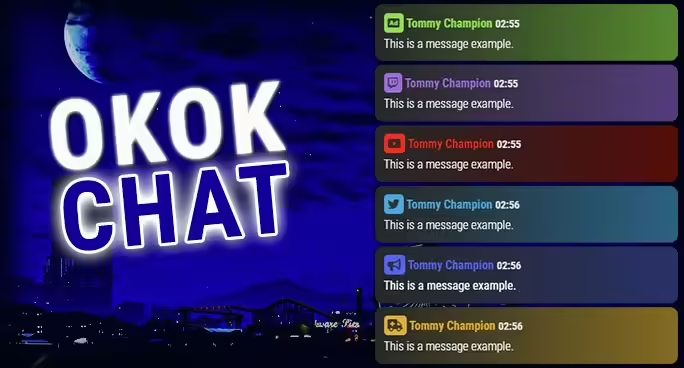
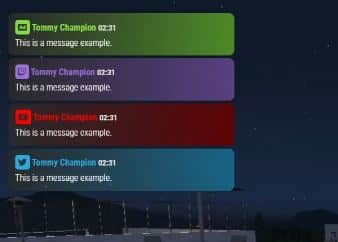
Chat script / resource for FiveM ESX, QBUS. esx_rp_chat like [Funcionality & Interfaces]
Chat Input
Advertisement - Allows your players to make an advertisement
On the config file you are able to:
  • Enable/disable the command
  • Set the command name
  • Set the advertisement price
  • Set the advertisement cooldown
STAFF ONLY - Allows your server admins to talk with each other without the players seeing it
On the config file you are able to:
  • Enable/disable the command
  • Set the command name
  • Set the allowed groups to do it
STAFF Announcement - Allows your server admins to make an announcement to all the players
On the config file you are able to:
  • Enable/disable the command
  • Set the command name
  • Set the allowed groups to do it
Twitch - Allows your server streamers to advertise their Twitch channel
On the config file you are able to:
  • Enable/disable the command
  • Set the command name
  • Set the allowed users to do it
Youtube - Allows your server youtubers to advertise their Youtube channel
On the config file you are able to:
  • Enable/disable the command
  • Set the command name
  • Set the allowed users to do it
Twitter - The usual /twitter command
On the config file you are able to:
  • Enable/disable the command
  • Set the command name
Police Announcement - Allows the Police to make an announcement to all the players
On the config file you are able to:
  • Enable/disable the command
  • Set the command name
  • Set the job that is allowed to do it
Ambulance Announcement - Allows the EMS to make an announcement to all the players
On the config file you are able to:
  • Enable/disable the command
  • Set the command name
  • Set the job that is allowed to do it
OOC - Allows you to talk out of character to the near players
On the config file you are able to:
  • Enable/disable the command
  • Set the command name
  • Set the distance that the message will be displayed
System Messages (that are only shown to the user itself)
With this you can change all your default system messages.
Clear chat
On the config file you are able to:
  • Enable/disable the command
  • Set the command name
  • Allow the players to clear their chat by using the /clear command
  • Allow the admins to clear EVERYONE’S chat by using the /clearall command
Long messages
  • Just to show that it supports very long messages
ADDITIONAL INFORMATIONS
  • You can easily change the chat to the right side (explained in the README file).
right1920×1080 137 KB
  • It comes with a complete tutorial on how to use it.

Related Products You Might Like

  • CrewPhone - Best gcPhone alternative trusted by 231+ servers for communication
  • GKSPhone (ESX) - Advanced phone system with modern UI for ESX servers
  • Super ESX Server - Complete server package with chat and jobs included
  • Premium Inventory Script - UI-consistent inventory system for enhanced roleplay

Installation notes

Requires a FiveM server, esx, access to server resources, and permission to restart the resource after configuration.
Installation notes
Requires a FiveM server, esx, access to server resources, and permission to restart the resource after configuration.

Buy this when it saves setup time

Use this checklist to decide quickly whether the resource fits your current server build, framework, and support expectations.

Server-owner payoff

okokChat is positioned to reduce UI & Communication instead of making you rebuild the same system from scratch.

Compatibility

Works with esx. Check the requirements block before adding it to a live stack.

Purchase confidence

Instant download, Stripe checkout, support access, and refund policy context are shown before payment.

Decision assets

Requirements, Preview video, Product Q&A

Product fit, setup, and proof at a glance

Use the published facts on this page to confirm whether okokChat matches your server before checkout.

Compatibility

Frameworks
ESX
Category
UI & Communication

Setup & requirements

Install flow
Download → resources folder → ensure in server.cfg
Requirements
Published on this page
File size
17.34 KB

Proof & buyer questions

Reviews
No reviews yet
Answered Q&A
Ask before buying

Only the facts published on this page should be treated as confirmed. If you need more detail, review the description, requirements, changelog, reviews, and product Q&A before checkout.

DescriptionRequirementsPreview video
UI & Communication
Compatibility:
ESX

okokChat

Review process
$8.49

Secure Checkout

Cards, Apple Pay, Google Pay, iDEAL/Wero, Bancontact, EPS, Przelewy24, and optional Crypto where available via Stripe.

Instant file access after paymentSupport and refund policy shown before checkout
Ask support before buyingRead refund policy
Instant Access
SSL Encrypted
Cards, wallets, bank redirects
Frameworksesx
Setup

Requires a FiveM server, esx, access to server resources, and permission to restart the resource after configuration.

RequirementsPublished on this page
PreviewAvailable
Home
Shop
UI & Communication
UI & Communication
ESX
Review process

Key Features

  • Advertisement System

    Allows players to make advertisements with configurable command name, price per ad, and cooldown period between posts

  • Staff-Only Chat

    Enables server administrators to communicate privately with each other without messages visible to regular players, with configurable allowed groups

  • Multi-Channel Announcements

    Includes Staff Announcements to all players, Police job announcements, and Ambulance/EMS job announcements, each with restricted access by group or job

  • Content Creator Support

    Dedicated Twitch and YouTube advertisement commands allowing streamers and content creators to promote their channels to allowed users

  • Out-of-Character Chat

    OOC command enables players to communicate out of character to nearby players with configurable message distance

Frequently Asked Questions

Related Products

$18.99
$12.49
$21.99
$7.49

Related Tutorials & Guides

Learn more about setting up, configuring, and using this type of resource.

ESX Admin Commands List: /setjob, /car, /dv, /setgroup & More

ESX Admin Commands List: /setjob, /car, /dv, /setgroup & More

A practical ESX admin commands list for FiveM: user commands, admin commands, aliases, arguments, examples, and permission notes for es_extended.

ESX vs QBCore vs QBOX: Technical Framework Comparison 2026

ESX vs QBCore vs QBOX: Technical Framework Comparison 2026

Choosing a framework is the single most consequential decision when building a FiveM server. It determines which scripts you can use, how your developers write code, the…

ESX Legacy Guide 2026: Is It Still Worth Using?

ESX Legacy Guide 2026: Is It Still Worth Using?

ESX is the original FiveM roleplay framework, and despite newer alternatives, it remains one of the most widely used frameworks in 2026.

Continue Building Your FiveM Server

Use this product as part of a larger setup. Explore related categories, alternative frameworks, premium bundles, and free companion downloads.

Browse all scriptsUI & Communication scriptsesx scriptsTry QBCore insteadTry QBox insteadFree FiveM modsCompare bundles
Audio Speaker Script

Audio Speaker Script

KQ Shell Builder

KQ Shell Builder

Origen Radio

Origen Radio

2NA Chat

2NA Chat