



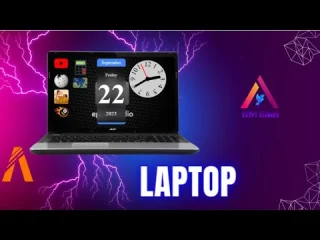
PC/Computer/Tablet System – Advanced Computing Interface for FiveM
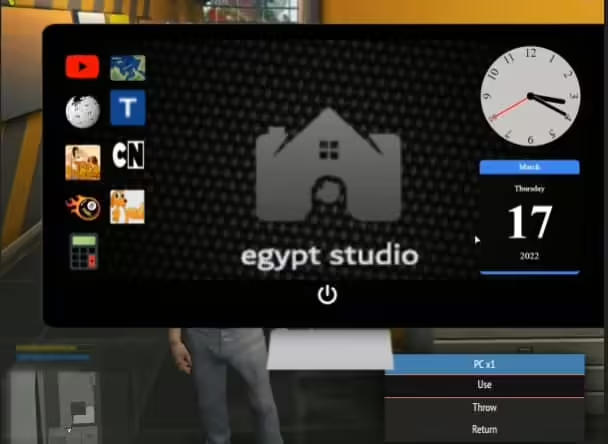
Bring realistic computer and tablet functionality to your FiveM server with this comprehensive computing system that allows players to interact with virtual computers, laptops, and tablets for work, communication, and roleplay activities. This standalone system provides a fully functional computing environment complete with applications, internet browsing simulation, email, documents, and custom app development capabilities. Perfect for office roleplay, cybercrime scenarios, hacking mechanics, or any situation requiring realistic computer interaction.
What’s Included
This complete computing system provides everything needed for realistic digital device roleplay:
- Desktop computers, laptops, and tablet devices
- Functional operating system interface with customizable desktop
- Email client with inbox, sent items, and messaging
- Document creation and editing (text documents, spreadsheets)
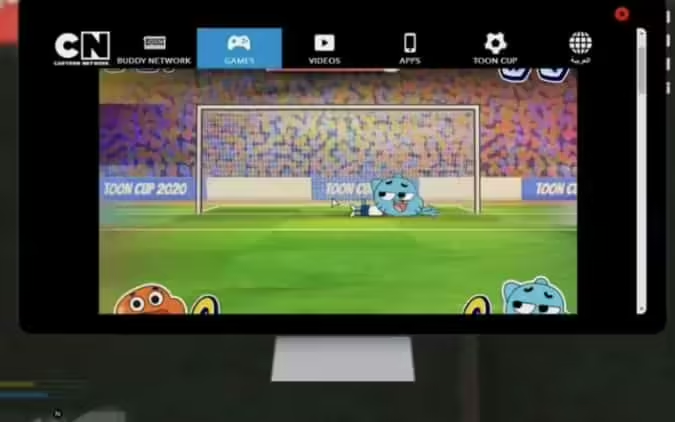
- Internet browser with simulated websites
- File management system (create, organize, delete files)
- Multi-app ecosystem with expandable applications
- Admin panel for creating custom apps and websites
Key Features
- Standalone Operation – Works independently of specific frameworks (ESX, QBCore) while remaining compatible with all
- Multiple Device Types – Players can use desktop computers, portable laptops, and handheld tablets depending on situation
- Realistic UI – Operating system-style interface with desktop, taskbar, windows, and familiar computer interactions
- Email System – Players can send and receive emails, creating communication trails for investigation roleplay
- Document Creation – Create contracts, reports, invoices, or any documents needed for business/legal roleplay
- Internet Simulation – Browse simulated websites created by admins for immersive information gathering
- Custom App Development – Server owners can create custom applications for specific server needs (banking, stocks, etc.)
- Hacking Integration – Compatible with hacking scripts for cybercrime and security breach roleplay
Perfect For
- Office and business roleplay requiring realistic work environments
- Law enforcement servers needing police database and MDT systems
- Cybercrime roleplay with hacking, data theft, and digital forensics
- Legal/lawyer servers requiring document preparation and case files
- News/media servers with journalists researching and writing articles
- Government roleplay with bureaucratic paperwork and record-keeping
- Tech company roleplay with programmers and IT professionals
Application Ecosystem
Built-In Applications
- Email Client – Full inbox, sent items, drafts, and contact management
- Text Editor – Create and edit text documents, contracts, reports
- Spreadsheet – Basic spreadsheet functionality for financial records, inventory lists
- File Explorer – Browse, organize, and manage virtual files and folders
- Web Browser – Navigate simulated internet with admin-created websites
- Calendar – Schedule events, meetings, and reminders
- Notes App – Quick note-taking for tasks, ideas, clues
- Settings – Customize desktop appearance, notifications, preferences
Optional/Custom Applications
- Banking App – Online banking integration for account management
- Stock Market – Real-time trading simulation for investment roleplay
- Police Database – Law enforcement records, warrants, criminal history
- Medical Records – Hospital patient information and treatment history
- News Portal – Read and publish news articles, server announcements
- Social Media – Internal social network for character interaction
- Company Intranet – Business-specific internal systems
Device Types & Usage
Desktop Computers
- Placement: Fixed locations in offices, police stations, hospitals
- Use Cases: Office work, dispatch systems, database access
- Features: Full-screen interface, all applications available
Laptops
- Placement: Portable items players can carry in inventory
- Use Cases: Mobile work, field investigations, remote access
- Features: Same functionality as desktops but portable
Tablets
- Placement: Handheld devices, easily accessible
- Use Cases: Quick information checks, mobile apps, communication
- Features: Streamlined interface optimized for quick tasks
Installation
- Download Package – Extract the computer system files to a working directory
- Database Setup – Import included SQL file to create tables for emails, files, and user data
- Resource Installation – Place the computer system resource in your server’s resources folder
- Configuration – Edit config file to set computer locations, device types, and permissions
- Item Setup – Add laptop and tablet items to your inventory system if using portable devices
- Website Creation – Use admin panel to create simulated websites for players to browse
- App Configuration – Enable/disable built-in apps and configure custom applications
- Framework Integration – Link to your framework for job permissions, item usage (optional)
- Server Restart – Reload server to activate the computer system
Framework Compatibility
- ✅ Standalone – Works independently without framework requirements
- ✅ ESX – Full integration with ESX job system and inventory
- ✅ QBCore – Compatible with QBCore job permissions and qb-inventory
- ✅ QBOX – Works seamlessly with QBOX framework
- ✅ Custom Frameworks – Adaptable to any server setup with minimal configuration
What Makes It Stand Out
This computer system goes far beyond simple prop interaction. It creates a fully functional digital environment within your server that opens up entirely new roleplay dimensions. Players can conduct business transactions via email, law enforcement can build case files with documented evidence, journalists can research and write articles, and criminals can plan heists through encrypted communications. The ability to create custom websites and applications means server owners can build unique digital experiences tailored to their community – whether that’s a stock market, a dating app, or a dark web marketplace for criminal activity.
Roleplay Scenarios
- Corporate Work – Office employees processing emails, creating reports, managing projects
- Police Investigations – Detectives researching suspects, accessing databases, documenting cases
- Legal Proceedings – Lawyers drafting contracts, reviewing case files, emailing clients
- Journalism – Reporters researching stories, writing articles, communicating with sources
- Cybercrime – Hackers infiltrating systems, stealing data, covering digital trails
- Medical Records – Doctors documenting patient visits, accessing treatment histories
- Government Work – Bureaucrats processing paperwork, maintaining records
- Tech Support – IT professionals troubleshooting issues, managing systems
Admin Features
- Website Creator – Build custom websites with pages, links, and content
- App Developer – Create custom applications with unique functionality
- Email Management – Monitor communications, create official announcements
- Access Control – Restrict certain apps/websites to specific jobs or permissions
- Data Management – View, edit, or delete player files and emails as needed
- Template System – Pre-create document templates for consistent formatting
Video
Video
Integration Ideas
- Banking: Link to banking scripts for online account management
- Stock Market: Create stock trading app for investment roleplay
- MDT Systems: Use as foundation for police Mobile Data Terminal
- Company Systems: Build business-specific intranet applications
- Dark Web: Create hidden websites for criminal marketplaces
- Social Networks: Build in-character social media platforms
Technical Details
- Performance: Optimized UI rendering for smooth operation even on lower-end systems
- Data Storage: Efficient database structure for emails, files, and user data
- UI Framework: Modern, responsive interface that works at all resolutions
- Security: Built-in protections against exploits and unauthorized access
- Customization: Extensive configuration options for tailoring to server needs
Requirements
- FiveM server with MySQL database
- Server restart capability
- Inventory system if using portable laptops/tablets (ox_inventory, qb-inventory, etc.)
- ox_lib recommended for UI components
- Framework optional (ESX, QBCore, or standalone)
Related ESX Scripts
https://www.youtube.com/watch?v=sP-xCFBwyh8[/embed


Cassandra (verified owner) –
Clean, optimized, and reliable.
Luis (verified owner) –
Good response from the support.
Darrick (verified owner) –
An awesome product with great flexibility. The customer support is superb. I recommend this without any doubt.
Bethany (verified owner) –
The support alone makes this worth purchasing. Fast answers and practical solutions.
Roma (verified owner) –
Been using it for a while, I usually don’t write a review but this time I am truly convinced to write.
Lizzie (verified owner) –
Great item. Easy to use and really clean. Worked perfectly!
Maiya (verified owner) –
Excellent value for the price. The resource includes more features than I expected and has been reliable so far.
Hannah (verified owner) –
This has quickly become one of my favorite resources on our server.