$ USD
Galileo Mansion (FiveM) – FiveMX
Testujesz bezpłatną mapę?
Darmowe moduły MLOs są przydatne w prototypach. W przypadku serwera RP, przed uruchomieniem należy porównać wnętrza premium i pakiety serwerowe.
Przegląd
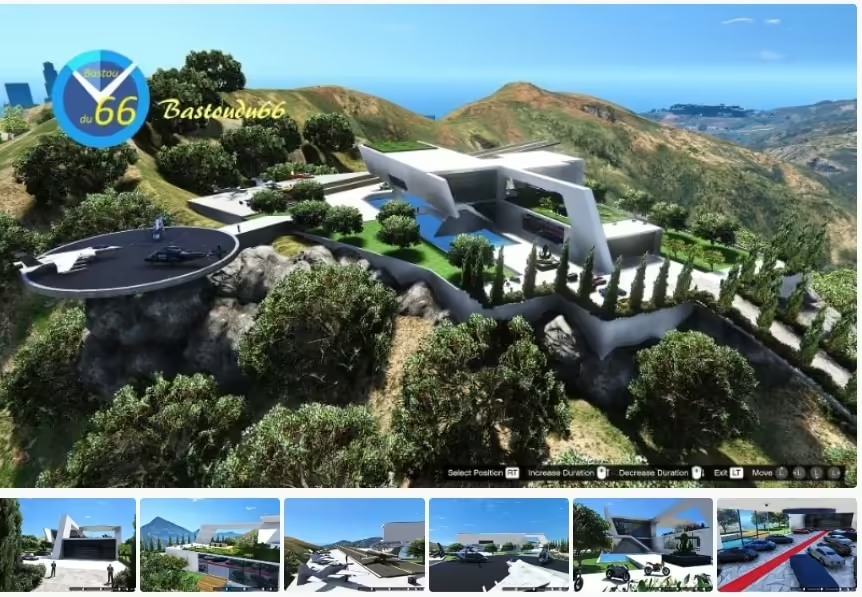
Welcome to the Galileo Michael Mansion, an exquisite new residence for Michael in GTA V. This mansion is perfect for Michael to move in with his family and enjoy peaceful days. The mansion includes detailed features and stunning aesthetics, making it a standout addition to your game.
Cechy
- Version: 2.0
- Download Size: 21.5 MB
- Total Downloads: 294,227
- Rating: 4.43 / 5 stars (54 votes)
Description
The Galileo Michael Mansion is finally complete, providing Michael with a luxurious place to reside. Trevor and Franklin are present in the heist room, adding more credibility to the gameplay when you play as Michael. This version adds a smaller variant of the rezydencja by removing the heist room, garage, and access road.
Podgląd wideo
Wymagania
To fully enjoy the Galileo Michael Mansion, ensure you have the following tools installed:

Instrukcje Instalacji
To install the Galileo Michael Mansion, follow these steps carefully to avoid any bugs:
- Download the Galileo Michael Mansion and the required tools.
- Install Map Builder by OmegaKingMods using OpenIV.
- Zastępować
water.xmlwmods/common.rpf/data/level/gta5with the one included in the archive. - Install the LAST Map Editor by Guadmaz.
- Copy
Galileo1.xml,Galileo2.xml, orazGalileo3.xmlfrom the archive to your GTA main folder. - Launch GTA V, press F7 to open the Map Editor, select “load map”, and load the XML files in order (1, 2, 3).
Download Mirror
Podsumowanie zasobu
Galileo Mansion (FiveM) – FiveMX is listed as a free FiveM resource. Treat it as a candidate resource: review the source, test it on a staging server, and confirm framework compatibility before using it on a live roleplay server.
Zgodność
Sprawdź oryginalną stronę źródłową i pliki wewnątrz zasobu pod kątem ESX, QBCore, QBOX, standalone, zależności i notatek wersji. Jeśli zasób dotyczy prac, pojazdów, ekwipunku, map, ubrań, HUD lub zdarzeń serwerowych, przetestuj go z istniejącymi skryptami przed udostępnieniem graczom.
Instrukcje instalacji
- Pobierz zasób z zweryfikowanego źródła lub zaufanej listy.
- Przeskanuj archiwum i przejrzyj pliki konfiguracyjne przed przesłaniem.
- Umieść folder w katalogu zasobów serwera i dodaj poprawną
zapewnićlinię doserver.cfg. - Uruchom ponownie na stagingu i sprawdź błędy konsoli, brakujące zależności oraz wydajność klienta.
Źródło / pobieranie