







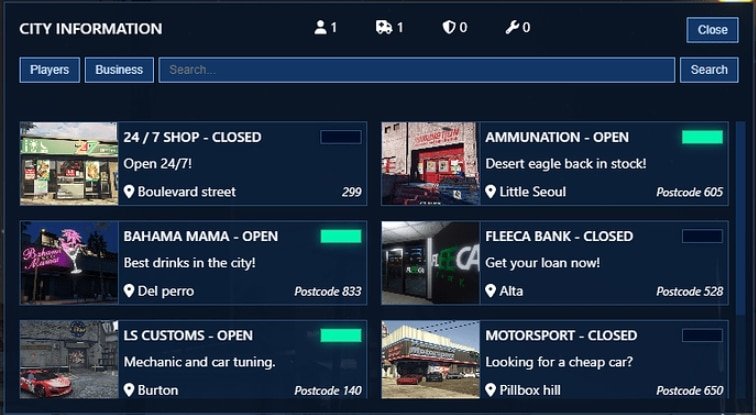
Zaawansowana tablica wyników w grze: Śledzenie graczy w czasie rzeczywistym i zarządzanie biznesem dla FiveM
Przegląd
Witamy w ostatecznym doświadczeniu tablicy wyników w grze! Nasza zaawansowana tablica wyników w grze poprawia doświadczenie na serwerze FiveM dzięki śledzeniu graczy w czasie rzeczywistym i dynamicznym funkcjom zarządzania biznesem. Śledź graczy online, zarządzaj biznesami i daj administratorom kontrolę nad każdym aspektem w grze, zapewniając udokumentowane, ulepszone doświadczenie dla wszystkich użytkowników.
O nas | Zaawansowana tablica wyników w grze
Nasza zaawansowana tablica wyników w grze to nie byle jaka tablica. Jest wyposażona w mnóstwo funkcji zaprojektowanych, aby uczynić Twoje doświadczenie z FiveM bardziej zorganizowanym i angażującym:
- Śledzenie graczy w czasie rzeczywistym: Miej na oku wszystkich aktywnych graczy na swoim serwerze w każdej chwili.
- Zarządzanie biznesem: Zarządzaj statusami biznesów na podstawie uprawnień stopnia pracy, umożliwiając płynne działanie.
- Możliwości administratora: Administratorzy mogą dodawać, edytować i usuwać biznesy bezpośrednio z gry, upraszczając zadania zarządzania.
- Interaktywne powiadomienia: Otrzymuj alerty, gdy biznes jest otwierany lub zamykany.
- Niestandardowy styl: Dostosuj wygląd tablicy wyników za pomocą 100% niestandardowego CSS, oferując unikalny wygląd pasujący do stylu Twojego serwera.
- Front-end oparty na React: Nasza tablica wyników jest zbudowana przy użyciu React, co zapewnia responsywne i płynne wrażenia użytkownika.
Pobierz
Jak zainstalować
Postępuj zgodnie z tymi prostymi krokami, aby zainstalować zaawansowaną tablicę wyników w grze na serwerze FiveM:
- Rozpakuj pliki modyfikacji:
- Rozpakuj sf-scoreboard folder do katalogu zasobów swojego serwera.
- Uruchom zapytanie SQL:
- Przejdź do swojego menedżera baz danych i wykonaj zapytanie znalezione w
install_sql_table.sqlplik do utworzenia niezbędnych tabel.
- Przejdź do swojego menedżera baz danych i wykonaj zapytanie znalezione w
- Skonfiguruj Identyfikator:
- Otwórz
config.luaw plikusf-scoreboardfolder i ustaw preferowany identyfikator.
- Otwórz
- Edytuj Konfigurację:
- Dostosuj
config.luado wymagań Twojego serwera, takich jak stopnie stanowisk i nazwy firm.
- Dostosuj
- Zapewnij Ładowanie Zasobu:
- Dodaj
ensure sf-scoreboardw pliku konfiguracyjnym serwera, aby zasób ładował się poprawnie.
- Dodaj
Zgodność
Ten mod jest kompatybilny z najnowszą wersją FiveM. Upewnij się, że Twój serwer jest zaktualizowany, aby uniknąć problemów z kompatybilnością. W razie jakichkolwiek problemów skontaktuj się z naszym wsparcie zespołem.
Popraw funkcjonalność serwera dzięki zaawansowanej tablicy wyników w grze. Po więcej niesamowitych modów sprawdź nasze Darmowe Mody, w tym Darmowy MLO i Darmowy Scripts.
Zachęcamy do kontaktu z pytaniami lub uwagami. Ciesz się płynniejszym i bardziej wydajnym doświadczeniem FiveM dzięki naszej zaawansowanej tablicy wyników w grę!
FiveMX uwaga dotycząca bezpieczeństwa
Ten starszy, darmowy zasób jest udostępniany użytkownikom, ale jest oznaczony jako noindex, dopóki nie zostanie potwierdzone czystsze źródło podstawowe lub wyższa wartość strony. Jeśli go pobierzesz, przeskanuj pliki, przejrzyj kod, przetestuj na serwerze staging i zrób kopię zapasową przed dodaniem go do działającego serwera FiveM.
Aby znaleźć czystsze alternatywy, przeglądaj FiveM resources, płatne skrypty FiveM, lub FiveM MLOs.