$ USD
Boosting Performance: FiveM Optimize Scripts
Testujesz darmowy skrypt?
Darmowe skrypty są wystarczające do szybkich kontroli. W przypadku serwerów produkcyjnych porównaj pełne pakiety serwerowe lub płatne skrypty, korzystając z frameworka i przypadku użycia.
If you’re a FiveM server owner or developer, you know the importance of optimizing your server scripts to ensure smooth and efficient gameplay. In this guide, we’ll walk you through the process of optimizing your FiveM scripts to boost performance and provide a better experience for your players.
NEW: Use our Script Optimizer here
Step 1: Identify Performance Bottlenecks
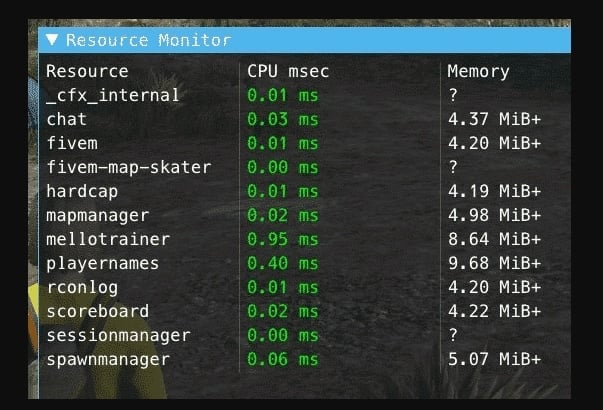
Before you begin optimizing, it’s crucial to identify the scripts or resources causing performance issues. Use the built-in FiveM tools like the profiler to monitor resource usage.
- Press
F8to open the console. - Typ
resmon 1to display the Resource Monitor. - Observe which scripts consume the most CPU or memory.
Step 2: Optimize Server-Side Scripts
Server-side scripts can significantly impact performance. Here are some tips to optimize them:
Reduce Resource Intensity
Limit the number of times intensive operations are performed.
Zanim:
AddEventHandler('playerSpawned', function()
  -- Intense operation
  LoadHeavyAssets()
end)
Po:
local assetsLoaded = false
AddEventHandler('playerSpawned', function()
  if not assetsLoaded then
    LoadHeavyAssets()
    assetsLoaded = true
  końcu
end)
Optimize Database Queries
Use asynchronous queries to prevent blocking the main thread.
Using MySQL.Async for non-blocking database calls:
MySQL.Async.fetchAll('SELECT * FROM users', {}, function(result)
  -- Handle results
end)
NEW: Use our Script Optimizer here
Step 3: Optimize Client-Side Scripts
Client-side optimization is equally important to ensure smooth gameplay.
Efficient Event Handling
Use event handlers efficiently to avoid unnecessary processing.
Zanim:
Citizen.CreateThread(function()
  while true do
    -- Intensive checks
    PerformChecks()
    Citizen.Wait(0)
  końcu
end)
Po:
AddEventHandler('onResourceStart', function(resourceName)
  if GetCurrentResourceName() == resourceName then
    PerformChecks()
  końcu
end)
Reduce Frame Time
Minimize the operations performed each frame.
Zanim:
function DrawTextOnScreen()
  SetTextFont(0)
  SetTextProportional(1)
  SetTextScale(0.0, 0.55)
  SetTextColour(255, 255, 255, 255)
  SetTextEntry("STRING")
  AddTextComponentString("Optimized Text")
  DrawText(0.5, 0.5)
końcu

Citizen.CreateThread(function()
  while true do
    DrawTextOnScreen()
    Citizen.Wait(0)
  końcu
end)
Po:
Citizen.CreateThread(function()
  while true do
    if ShouldDrawText then
      DrawTextOnScreen()
    końcu
    Citizen.Wait(100) -- Reduce frequency of checks
  końcu
end)
Step 4: Utilize Performance Optimization Tools
There are several tools and resources available to help you optimize your Skrypty FiveM:
- TxAdmin: A powerful tool for managing and optimizing your FiveM server.
- FiveM Artifacts: Keep your server updated with the latest FiveM artifacts to benefit from performance improvements.
Additional Tips
Here are some additional best practices and tips derived from the community:
Removing Native for Coord Distance Calculation
Natives are slow. For distance checks, use vector operations instead of natives.
Zanim:
local distance = GetDistanceBetweenCoords(coords.x, coords.y, coords.z, v.coords.x, v.coords.y, v.coords.z, true)
Po:
local distance = #(coords - v.coords)Splitting Up Loops
Refactor loops to minimize their impact on performance. Instead of running all checks every tick, split them up if possible.
Use Events
Use events to handle actions instead of checking conditions continuously. For example, use baseevents to handle vehicle entry and exit instead of checking every few milliseconds. (How to improve FiveM re…)
Optimizing your Skrypty FiveM is key to maintaining a smooth and enjoyable experience for your players. By following these steps and continually monitoring your server’s performance, you can ensure your Serwer FiveM runs at its best.
For more tips and resources, visit HiFiveM.com – your one-stop destination for FiveM mods, scripts, downloads, and resources.
Didn’t help? Make sure to run your server on a good FiveM Server Hoster
Practical checklist
Use this guide as a staging checklist before changing a live FiveM server. Confirm the current server artifact version, framework version, resource dependencies, database changes, and any client-side files before you apply the change.
- Back up the affected configuration files and database tables.
- Apply the change on a test server first.
- Watch the server console and client F8 console for errors.
- Check whether the change affects jobs, inventory, vehicles, maps, voice, permissions, or player data.
- Document the exact file, command, or setting you changed so it can be reverted quickly.
Testing before production
After the first test, join with a normal player account and repeat the flow from the player perspective. If the topic involves performance, measure before and after with the same player count, route, and resource set. If it involves admin tools or permissions, verify both allowed and denied users.
Common mistakes
Most FiveM issues come from missing dependencies, stale cache, wrong folder names, framework mismatch, or configuration copied from another server. Avoid changing multiple systems at once; make one change, test it, and then continue.
Related resources
For production-ready assets, compare paid resources in the FiveMX shop. For free resources, browse free FiveM scripts and test each resource before using it publicly.
Production rollout notes
Before using this guidance on a live FiveM server, define the exact outcome you expect from the change. For Boosting Performance: FiveM Optimize Scripts, that means checking which resource, setting, command, or workflow is affected and confirming that the change fits your current framework, artifact version, and server rules. Keep the rollout small enough that you can reverse it quickly if players report errors.
Use a staging server with the same framework, database schema, resource order, and key dependencies as production. If the topic changes gameplay, permissions, visuals, voice, vehicles, maps, inventory, or economy behavior, test with at least one admin account and one normal player account. Watch server console output, client F8 logs, and resource timing while repeating the exact player flow that will happen on the live server.
Rollback checklist
- Save the previous configuration file, resource folder, and database state before changing anything.
- Record the resource version, commit, download page, or setting value you tested.
- Restart only the affected resource first when possible, then restart the full server if dependencies require it.
- If errors appear, revert the single changed resource or setting before testing another fix.
Maintenance guidance
Review this setup again after FiveM artifact updates, framework updates, or major resource changes. A configuration that works today can break after dependency updates, renamed exports, changed events, or database migrations. Keep notes with your server documentation so future admins understand what was changed, why it was changed, and how to verify it again.
Ongoing review
Recheck Boosting Performance: FiveM Optimize Scripts after major FiveM artifact updates, framework changes, or resource migrations. Confirm that the advice still matches current server behavior, that any linked source remains available, and that installation steps still match the files a server owner will actually download or configure.
For public servers, keep a short changelog beside your server documentation. Note what was tested, what changed, which accounts were used for verification, and how to roll back. This makes future maintenance faster and prevents old setup notes from becoming unclear or unsafe for players.