• Instant digital delivery
  • Lifetime updates on selected products
  • Trusted by server owners
FiveMX
Shop
Full ServersBundlesNew releases
FiveMX

Start building your server today.

Curated FiveM resources, instant delivery, free starter mods, and practical guides in one calm marketplace.

Browse the shopsupport@fivemx.com

Shop

  • Shop
  • FiveM Mods
  • All Products
  • Free Mods
  • Best Scripts & Mods
  • FiveM Scripts

Frameworks

  • QBCore Scripts
  • ESX Scripts
  • QBox
  • Standalone

Community

  • Blog
  • Support
  • Creators
  • Affiliate

Legal

  • Privacy Policy
  • Terms of Service
  • Refund Policy
  • Digital Delivery
  • Cookie Policy
  • GDPR Compliance
  • DMCA
  • Imprint
  • Editorial Policy

Server Templates

  • QBCore Server Template
  • ESX Server Template
  • NoPixel Server Template
  • Server Packs
  • Free Server Templates
  • Tebex Alternative
© 2026 FiveMX. All rights reserved.·FiveMX is not affiliated with Rockstar Games, Take-Two Interactive, or CFX.re. All trademarks are property of their respective owners.
DiscordDocs

2 product images available.

Compatibility:

Aquiver - Inventory System 4

$13.492 sold

Secure Checkout

Cards, Apple Pay, Google Pay, iDEAL/Wero, Bancontact, EPS, Przelewy24, and optional Crypto where available via Stripe.

Instant file access after paymentSupport and refund policy shown before checkout
Ask support before buyingRead refund policy
Instant Access
SSL Encrypted
Cards, wallets, bank redirects
Frameworksesx, qbcore, qbox
Setup

Requires a FiveM server, ESX or QBCore, access to server resources, and permission to restart the resource after configuration.

RequirementsPublished on this page
PreviewAvailable

Description

Aquiver - Inventory System 4 | Next-Gen Grid-Based Inventory for FiveM

Transform your server's player experience with Aquiver Inventory System 4, a modern grid-based inventory solution designed for serious roleplay servers. This isn't just another inventory script - it's a complete item management overhaul that gives players the visual clarity and functionality they expect from premium servers. With drag-and-drop simplicity, weight management, and framework flexibility, Aquiver delivers the professional inventory experience your community deserves.

What Makes Aquiver Stand Out

  • Grid-Based Visual System - Clean, intuitive grid layout that makes item management feel natural and organized
  • Smart Weight Management - Built-in weight calculations prevent inventory abuse while maintaining realistic carry limits
  • Dual Framework Support - Seamlessly works with both ESX and QBCore frameworks without modification
  • Drag-and-Drop Interface - Smooth, responsive item movement that feels premium and polished
  • Advanced Item Metadata - Support for durability, quality levels, custom descriptions, and item-specific properties
  • Performance Optimized - Lightweight codebase runs at 0.00-0.01ms resmon even during peak usage

Perfect For

  • Roleplay servers wanting a professional, modern inventory experience
  • Communities migrating from outdated inventory systems to something more reliable
  • Server owners who need framework flexibility (ESX or QBCore compatibility)
  • Developers building custom item systems with advanced metadata requirements

Key Features

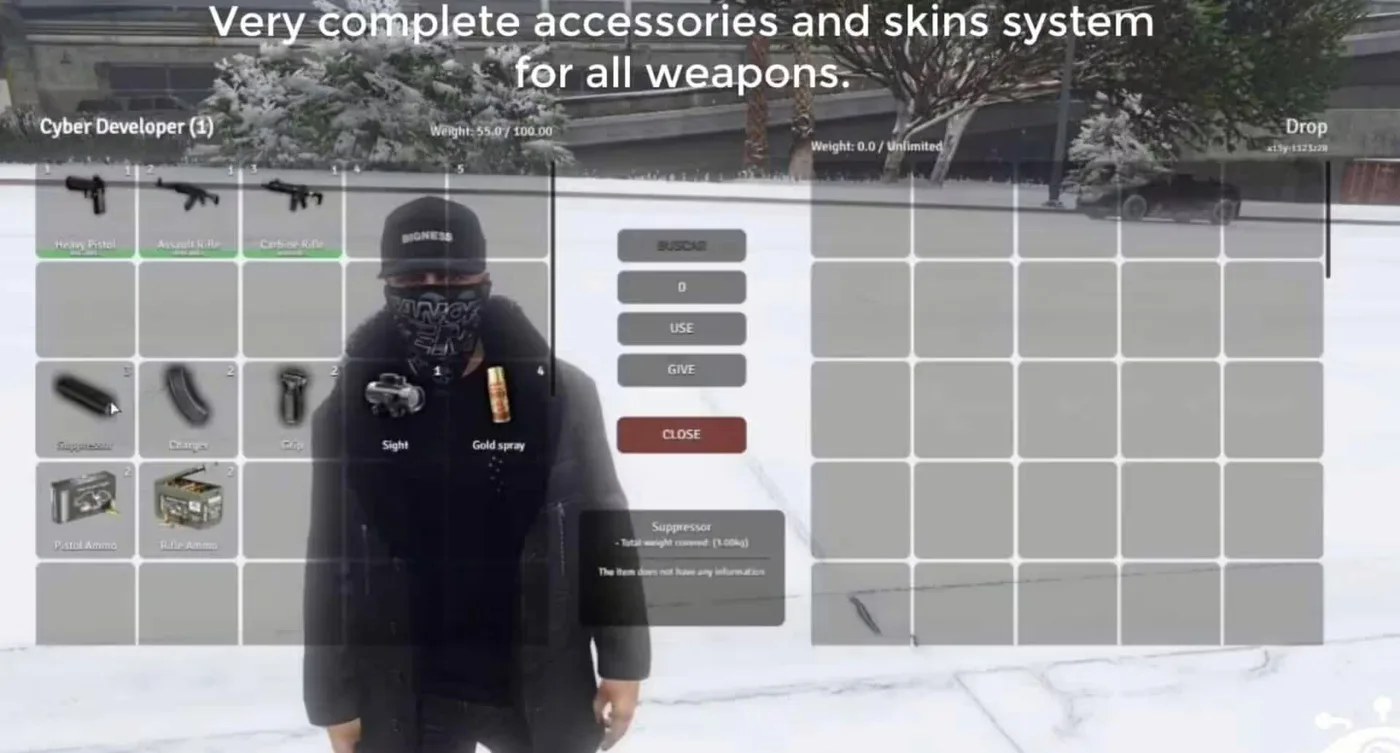
  • Hotbar System - Quick-access slots for frequently used items (1-5 keys)
  • Item Stacking - Intelligent stacking for consumables and materials
  • Container Support - Gloveboxes, trunks, properties, and custom storage
  • Search Functionality - Find items instantly in large inventories
  • Item Actions - Use, give, drop, and custom item-specific actions
  • Weapon Attachments - Visual display of weapon modifications and ammo counts

Framework Compatibility

  • ✅ ESX Legacy - Full support for ESX 1.9.x and ESX Legacy (1.10.x+)
  • ✅ QBCore - Native QBCore integration with all standard items
  • ✅ Standalone Items - Works with any framework-agnostic item scripts

Installation & Setup

  1. Extract the resource to your server's resources folder
  2. Configure framework settings in config.lua (ESX or QBCore)
  3. Import the SQL file to add inventory database tables
  4. Add your custom items to the items configuration
  5. Restart server and verify functionality with /inventory command

Technical Details

  • Performance: 0.00-0.01ms resmon (idle and active states)
  • Dependencies: ESX or QBCore framework, MySQL database
  • File Size: Lightweight package under 5MB
  • Update Policy: Lifetime updates included with purchase

Why Server Owners Choose Aquiver

Aquiver Inventory System 4 represents the evolution of FiveM inventory management. Unlike bloated alternatives that slow down your server, Aquiver maintains microscopic performance impact while delivering features players actually use. The grid-based visual design reduces player confusion and support tickets, while the framework flexibility means you're never locked into one ecosystem. When your server needs an inventory system that just works - reliably, beautifully, and efficiently - Aquiver is the answer.

Related FiveM Weapon Mods

  • QBCore Advanced Shops: Store/Vehicle/Weapons/Movable
  • 0r Craft
  • FiveM Property/Housing System
  • ESX Train Heist (AV)

Installation notes

Requires a FiveM server, ESX or QBCore, access to server resources, and permission to restart the resource after configuration.
Installation notes
Requires a FiveM server, ESX or QBCore, access to server resources, and permission to restart the resource after configuration.

Buy this when it saves setup time

Use this checklist to decide quickly whether the resource fits your current server build, framework, and support expectations.

Server-owner payoff

Aquiver - Inventory System 4 is positioned to reduce Inventory Scripts instead of making you rebuild the same system from scratch.

Compatibility

Works with esx, qbcore, qbox. Check the requirements block before adding it to a live stack.

Purchase confidence

Instant download, Stripe checkout, support access, and refund policy context are shown before payment.

Decision assets

Requirements, Preview video, Product Q&A

Product fit, setup, and proof at a glance

Use the published facts on this page to confirm whether Aquiver - Inventory System 4 matches your server before checkout.

Compatibility

Frameworks
ESX, QBCore, QBOX
Category
Inventory Scripts

Setup & requirements

Install flow
Download → resources folder → ensure in server.cfg
Requirements
Published on this page
File size
19.64 MB

Proof & buyer questions

Reviews
No reviews — be the first
Sales
2

Only the facts published on this page should be treated as confirmed. If you need more detail, review the description, requirements, changelog, reviews, and product Q&A before checkout.

DescriptionRequirementsPreview video
Inventory Scripts
Compatibility:
ESX
QBCore
QBOX

Aquiver - Inventory System 4

Review process
$13.492 sold

Secure Checkout

Cards, Apple Pay, Google Pay, iDEAL/Wero, Bancontact, EPS, Przelewy24, and optional Crypto where available via Stripe.

Instant file access after paymentSupport and refund policy shown before checkout
Ask support before buyingRead refund policy
Instant Access
SSL Encrypted
Cards, wallets, bank redirects
Frameworksesx, qbcore, qbox
Setup

Requires a FiveM server, ESX or QBCore, access to server resources, and permission to restart the resource after configuration.

RequirementsPublished on this page
PreviewAvailable
Home
Shop
Inventory Scripts
Inventory Scripts
ESX
QBCore
QBOX
Review process

Key Features

  • Grid-Based Visual System

    Clean, intuitive grid layout that makes item management feel natural and organized

  • Smart Weight Management

    Built-in weight calculations prevent inventory abuse while maintaining realistic carry limits

  • Dual Framework Support

    Seamlessly works with both ESX and QBCore frameworks without modification

  • Drag-and-Drop Interface

    Smooth, responsive item movement that feels premium and polished

  • Advanced Item Metadata

    Support for durability, quality levels, custom descriptions, and item-specific properties

Frequently Asked Questions

Related Products

$18.99
$4.49
$8.49
$8.49

Related Tutorials & Guides

Learn more about setting up, configuring, and using this type of resource.

ESX vs QBCore vs QBOX: Technical Framework Comparison 2026

ESX vs QBCore vs QBOX: Technical Framework Comparison 2026

Choosing a framework is the single most consequential decision when building a FiveM server. It determines which scripts you can use, how your developers write code, the…

FiveM Frameworks Explained: Complete Guide to ESX, QBCore & QBOX

FiveM Frameworks Explained: Complete Guide to ESX, QBCore & QBOX

FiveM frameworks form the backbone of roleplay servers. They're not just code libraries—they're complete systems that manage player identity, jobs, inventory, permissions,…

QBox vs QBCore Migration Guide: Compatibility, Scripts & Performance (2026)

QBox vs QBCore Migration Guide: Compatibility, Scripts & Performance (2026)

Compare QBox vs QBCore in 2026, check script compatibility, and follow a practical migration plan for ox_lib, ox_inventory, banking, jobs, and testing.

Continue Building Your FiveM Server

Use this product as part of a larger setup. Explore related categories, alternative frameworks, premium bundles, and free companion downloads.

Explore Economy & BankingExplore Drug ScriptsBrowse all scriptsInventory Scripts scriptsesx scriptsTry QBCore insteadTry QBox insteadFree FiveM modsCompare bundles
Premium Inventory Script

Premium Inventory Script

Cooking Script

Cooking Script

ESX Inventory HUD V16

ESX Inventory HUD V16

Chezza Inventory

Chezza Inventory