Brutal Banking (ESX/QB)
Limited-time price
Save $1.80 (18% off)
Secure Checkout
Cards, Apple Pay, Google Pay, iDEAL/Wero, Bancontact, EPS, Przelewy24, and optional Crypto where available via Stripe.
Requires a FiveM server, ESX or QBCore, access to server resources, and permission to restart the resource after configuration.
Description
Brutal Banking - Advanced Multi-Account Banking System for ESX and QBCore
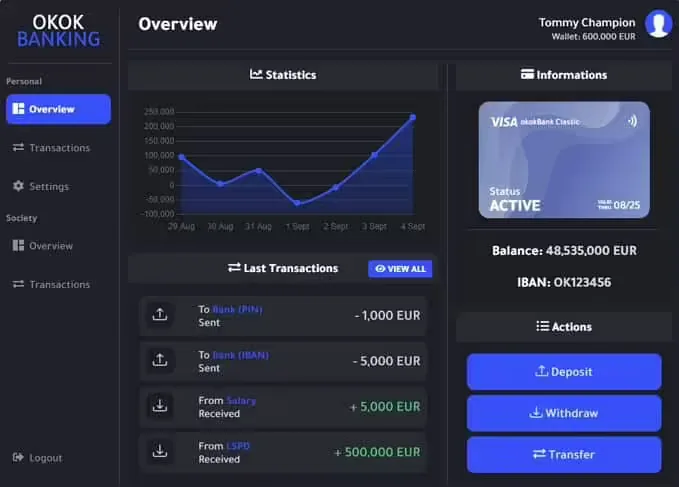
Elevate your FiveM server's economy with a professional banking system that goes far beyond basic money transfers. Brutal Banking delivers enterprise-level features designed specifically for serious roleplay communities, including sub-accounts, partner management, group transfers, and daily spending limits. Whether you're running a business-focused server or managing complex organization finances, this system provides the tools your players need for realistic financial management.
What's Included
Brutal Banking transforms your server's financial infrastructure with a feature-rich system that handles everything from simple ATM withdrawals to complex multi-user business accounts. Players can create specialized sub-accounts for different purposes, add trusted partners for quick transfers, and manage organizational finances with granular permission controls. The system is designed to make complex financial operations feel natural and intuitive while maintaining security and accountability.
Key Features
- Advanced Sub-Account System - Create multiple specialized bank accounts under one profile, perfect for separating personal funds, business finances, and investment money. Each sub-account operates independently with its own balance and transaction history.
- Multi-User Account Management - Add other players to your sub-accounts with customizable permission ranks. Ideal for gang finances, business partnerships, or organization treasuries where multiple people need controlled access to shared funds.
- Daily Spending Limits - Set daily transaction limits for sub-account members to prevent unauthorized large withdrawals. Perfect for business owners who want employees to access petty cash without risking the entire company account.
- Partner Management System - Create a trusted partner list for instant transfers to frequently contacted players. No more typing out full names or IDs - send money to business associates, employees, or friends with a single click.
- Offline Transfer Support - Send money to players even when they're not online. Transfers process instantly and funds are available when recipients log in, eliminating coordination headaches for business transactions.
- Group Transfer Functionality - Send identical payments to multiple recipients simultaneously. Perfect for gang payouts, employee salaries, or distributing profits to business partners without tedious individual transfers.
- Comprehensive Discord Logs - Every transaction, account creation, and permission change is logged to Discord with detailed information. Track suspicious activity, audit business finances, or investigate player reports with complete transparency.
- Customizable UI Themes - Choose from multiple panel themes and color schemes to match your server's branding. Players can personalize their banking interface for a more comfortable user experience.
- Automatic ATM Placement - ATMs are strategically placed throughout the map automatically, ensuring convenient access across Los Santos without manual prop placement or coordinate configuration.
- Responsive NUI Design - The banking interface scales perfectly across all screen resolutions and aspect ratios, from standard 16:9 monitors to ultrawide displays and everything in between.
- Easy Localization - Complete translation support allows you to offer banking services in your community's preferred language with simple config edits.
Perfect For
- Serious roleplay servers with active business economies
- Gang servers requiring shared treasury management
- Whitelisted communities with complex organizational structures
- Business-focused servers where players own companies and pay employees
- Servers wanting detailed financial logging for administration
- Communities that need offline transaction capabilities
Sub-Account System Deep Dive
The sub-account system is where Brutal Banking truly shines. Create separate accounts for different purposes - a personal savings account, a business operating account, an investment fund, whatever your server's economy demands. Each sub-account can have multiple authorized users with different permission levels.
For example, a nightclub owner could create a sub-account for the business, add bartenders with limited withdrawal permissions (maybe $5,000 daily limit for supplies), add managers with higher limits, and keep full control themselves. All transactions are tracked separately, making financial auditing straightforward.
Gang leaders can create organizational accounts where trusted lieutenants can access funds for operations while soldiers might only be able to view the balance. This creates realistic financial hierarchies that mirror real-world business structures.
Partner System Benefits
The partner management system eliminates the friction from frequent transfers. Business owners paying weekly salaries, gang leaders distributing heist cuts, or players sending rent payments can all save trusted contacts to their partner list. Future transfers become two-click operations instead of searching for player names or IDs every single time.
Combined with group transfers, this makes mass payments incredibly efficient. Paying your entire employee roster their weekly wages? Select all partners in the employee group and send identical amounts to everyone simultaneously. What used to take 10 minutes now takes 30 seconds.
Technical Details
- Performance - Fully optimized with 0.00-0.02ms resource usage, ensuring zero impact on server performance even during heavy transaction periods
- Framework Compatibility - Works with all ESX versions (Legacy included) and all QBCore/QBOX versions
- Server Requirements - Server Artifacts version 5848 or higher, Game build 2189 or higher
- License Requirement - Server license key must match the Tebex purchase account for activation
- Activation - Automatic activation after server restart, no manual key entry needed
Framework Compatibility
- ✅ ESX - All versions including Legacy and older frameworks
- ✅ QBCore - Full compatibility with all QB versions
- ✅ QBOX - Fully supported for modern QB forks
What Makes It Stand Out
Most banking scripts offer basic transfer functionality and call it done. Brutal Banking understands that modern FiveM economies need sophisticated financial tools. The sub-account system with permission ranks creates realistic business hierarchies. The partner system eliminates tedious repetitive transfers. The daily limit feature prevents abuse while enabling delegation.
The offline transfer capability alone sets this apart from competitors. Players shouldn't have to coordinate schedules just to complete a business transaction. In the real world, you can send money to anyone's account anytime - this system brings that convenience to FiveM.
Discord logging provides accountability that's essential for server administration. When players report stolen funds or suspicious transactions, admins have complete audit trails to investigate. For whitelist servers, this transparency builds trust in the financial system.
Installation and Setup
- Ensure your server meets the minimum artifact and game build requirements
- Verify your server license key matches your Tebex purchase account
- Install the resource and configure Discord webhook for transaction logs
- Customize UI colors and themes to match your server branding
- Translate interface text if needed for your community language
- Restart server to activate - players can begin using the system immediately
Dependencies
- ESX or QBCore/QBOX framework (all versions supported)
- Server Artifacts version 5848 or higher
- Game build 2189 or higher
- Matching server license and Tebex purchase account
Use Case Examples
Car Dealership Owner: Create a dealership sub-account, add sales staff with $50,000 daily limits so they can process customer purchases, add accountant with view-only access to track revenue, and maintain full control as owner. Track every sale through transaction history.
Gang Leader: Set up gang treasury sub-account, add officers with withdrawal permissions for operational expenses, set daily limits to prevent someone emptying the account, use group transfers to distribute heist cuts to all members after successful jobs.
Business Empire: Create separate sub-accounts for each business you own - nightclub account, import/export account, weapon dealing account. Keep finances separated for better tracking and assign managers to specific businesses without giving them access to everything.