https://www.youtube.com/watch?v=Y9Y8lDniLVQ
CodeM MDT - Police Mobile Data Terminal
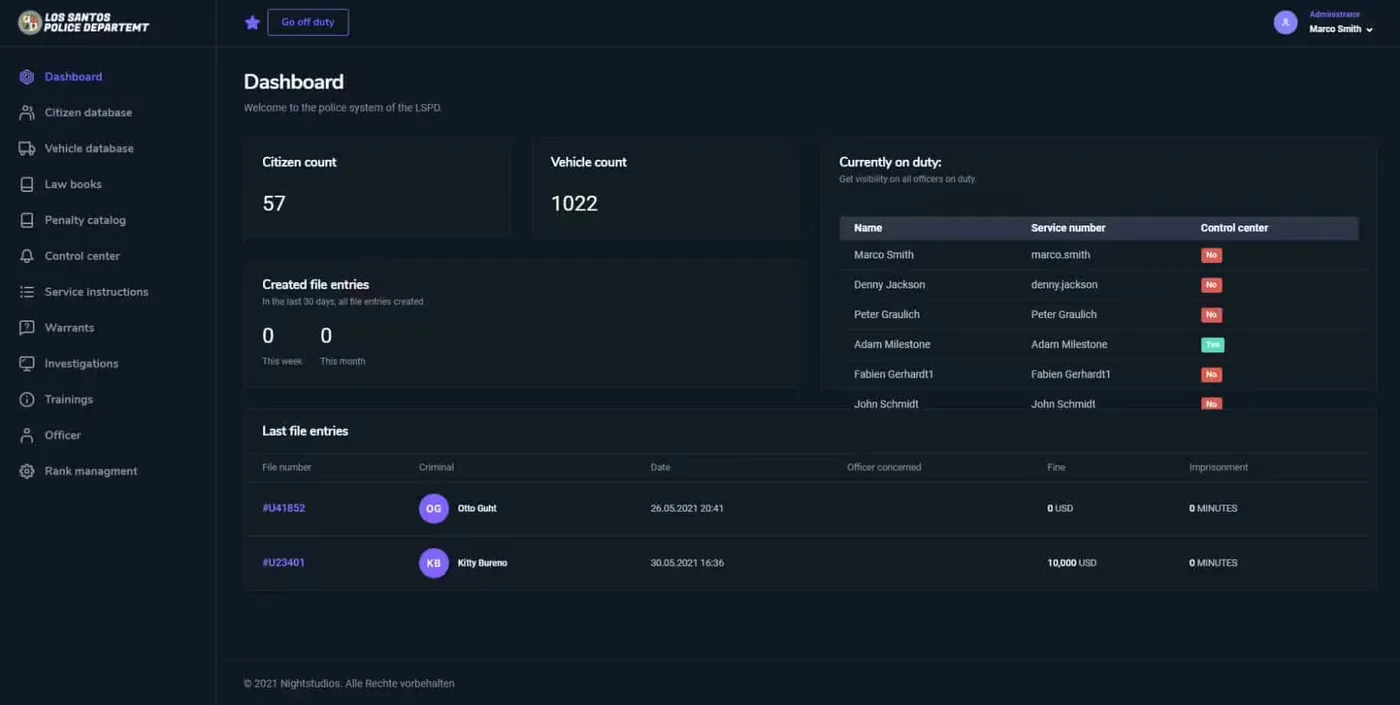
Bring professional law enforcement technology to your FiveM server with this comprehensive Mobile Data Terminal system. Designed for police departments seeking realistic investigation tools, this MDT provides officers with the same digital infrastructure real police use - case management, suspect databases, vehicle lookups, evidence tracking, and unit coordination, all accessible from patrol vehicles or station computers.
What Makes It Professional
This isn't just another menu system. CodeM MDT replicates actual police computer systems, giving officers the tools to conduct thorough investigations rather than relying on meta-knowledge or admin commands. The interface balances realism with usability - complex enough to feel authentic, streamlined enough to use during active situations.
The system creates paper trails and accountability. Every report filed, every warrant issued, every vehicle lookup creates a database record. Supervisors can review officer activity, detectives can access case histories, and investigations can span multiple officers and shifts through shared documentation.
Core Features
- Case & Report Management - Create, edit, and store incident reports with standardized formats
- Suspect Database - Search profiles including criminal history, active warrants, and known associates
- Vehicle Lookups - Instant registration checks with ownership details and flag status
- Evidence Tracking - Attach evidence items, photos, and notes to active cases
- Officer Tools - Manage unit assignments, active calls, and BOLOs (Be On the Lookout)
- Modern UI - Clean, professional interface optimized for quick access during patrols
- Warrant System - Issue and track arrest warrants and search warrants
- Performance Optimized - Lightweight code ensuring smooth operation even on busy servers
Investigation & Case Management
The report system structures police work around proper documentation. Officers create incident reports for traffic stops, arrests, investigations, and community contacts. Each report includes fields for location, involved parties, narrative description, evidence collected, and officer notes.
Reports feed into case files, allowing detectives to track ongoing investigations across multiple incidents. Link related reports, identify patterns, build comprehensive case files on suspects, and coordinate with other units through shared documentation.
The evidence attachment system lets officers document their work thoroughly. Attach collected items, witness statements, crime scene photos, and investigative notes directly to reports. Prosecutors and supervisors can review complete case packages without requesting additional information.
Suspect & Vehicle Databases
Suspect Profiles: Search by name, date of birth, or description to access detailed criminal histories. View prior arrests, convictions, active warrants, known addresses, vehicle registrations, and gang affiliations. The database creates institutional knowledge that persists beyond individual officer memories.
Vehicle Registry: Run plates instantly to check registration status, owner information, and flagged vehicle markers (stolen, involved in crimes, BOLO). The system displays insurance status, inspection validity, and any notes from previous stops.
These databases enable proper investigative work. Instead of metagaming criminal backgrounds, officers use the MDT to research suspects, build intelligence, and make informed decisions based on documented history.
Active Operations Tools
The BOLO (Be On the Lookout) system broadcasts alerts to all units about wanted suspects, stolen vehicles, or persons of interest. Officers add descriptions, last known locations, and danger warnings. The system displays active BOLOs prominently, keeping them front of mind during patrols.
Unit management shows which officers are on duty, their current status (available, busy, en route), and assigned vehicles. Supervisors coordinate resources, dispatchers assign calls efficiently, and officers see backup availability at a glance.
The active calls interface tracks ongoing incidents - location, priority level, assigned units, and status updates. Officers mark en route, on scene, and clear through the MDT, creating automatic logs of response times and unit activity.
Warrant System
Officers with proper authorization can issue arrest warrants directly through the MDT. Input suspect information, offense details, supporting evidence, and judicial approval. Once issued, warrants appear in suspect profiles and BOLO systems automatically.
Search warrants follow similar processes - specify location, probable cause, items sought, and authorization. The system tracks warrant execution, evidence seized, and case connections.
Department Coordination
The shared database nature of the MDT creates department-wide intelligence networks. When one officer documents a gang member's vehicle, every officer has that information during future stops. When detectives issue warrants, patrol officers see them immediately during routine encounters.
This coordination transforms police work from isolated individual actions into cohesive department operations. Investigation teams build on patrol officer reports, supervisors monitor activity across shifts, and institutional knowledge accumulates in the database rather than being lost when officers log off.
Modern User Interface
The UI emphasizes quick access to critical information. Search functions return results instantly, commonly used features occupy prominent positions, and the layout remains readable whether accessing from vehicles during pursuits or sitting at desks during investigations.
Color coding and visual indicators highlight priority information - active warrants appear in red, flagged vehicles show warning icons, high-priority calls blink for attention. The design reduces cognitive load during high-stress situations.
Technical Features
- Database Integration - MySQL backend for persistent data storage
- Permission System - Role-based access controls (patrol, detective, supervisor, admin)
- Real-Time Updates - Changes sync across all connected officers immediately
- Search Optimization - Fast queries even with thousands of database records
- Backup Compatible - Regular database backups preserve all reports and records
- Audit Logging - Track who created, modified, or accessed sensitive records
Installation
- Download and extract MDT files
- Import the SQL database structure into your MySQL server
- Configure database connection in config file
- Add
ensure codem-mdt to server.cfg
- Set up permission levels through your framework
- Configure keybinds for MDT access
- Test with multiple officer accounts to verify synchronization
Technical Details
- File Size: ~8 MB (includes UI assets)
- Performance: 0.01-0.02ms average (database queries optimized)
- Database: MySQL required for data persistence
- Dependencies: Framework (ESX/QB/QBOX) for job detection
- Client/Server: Both (UI client, data server)
Framework Compatibility
- ✅ ESX - Full integration with esx_policejob and society systems
- ✅ QBCore - Compatible with qb-policejob and management framework
- ✅ QBOX - Works with QBOX police and job systems
- ✅ Custom Frameworks - Adaptable to proprietary police systems
Perfect For
- Serious RP servers emphasizing realistic police procedures
- Whitelisted PD departments with detective units
- Communities running court systems requiring documented cases
- Servers with criminal justice storylines needing investigation mechanics
- Large player bases where officer coordination is critical
- Departments with rank structures needing supervisor oversight tools
Why Departments Choose CodeM MDT
This system transforms policing from reactive button-pressing into proactive investigation work. Officers build cases over time, detectives piece together criminal networks from accumulated intelligence, and supervisors oversee operations through comprehensive data. The MDT creates depth and progression in law enforcement roleplay while providing the professional tools that make police work engaging long-term. It's the foundation of departments that take policing seriously.
Related FiveM Police Scripts