ESX Menu Design
Secure Checkout
Cards, Apple Pay, Google Pay, iDEAL/Wero, Bancontact, EPS, Przelewy24, and optional Crypto where available via Stripe.
Requires a FiveM server, ESX or QBCore, access to server resources, and permission to restart the resource after configuration.
Description
ESX Menu Design - Premium Visual Overhaul for esx_menu_default
Upgrade your server's visual identity with this polished redesign of esx_menu_default that transforms ESX's functional but bland default menus into a modern, professional interface players actually enjoy using. This isn't a radical UI overhaul that requires learning new navigation - it's a visual refinement that makes existing ESX menus look premium while maintaining the familiar interaction patterns your players already know.
Default esx_menu_default works but looks dated, with basic styling that screams unmodified framework. This premium design gives your inventory, job menus, shops, and admin panels a cohesive aesthetic that matches modern FiveM expectations. Players judge server quality by visual polish - this menu design immediately signals you've invested in quality presentation beyond just installing ESX and calling it done.
What This Design Changes
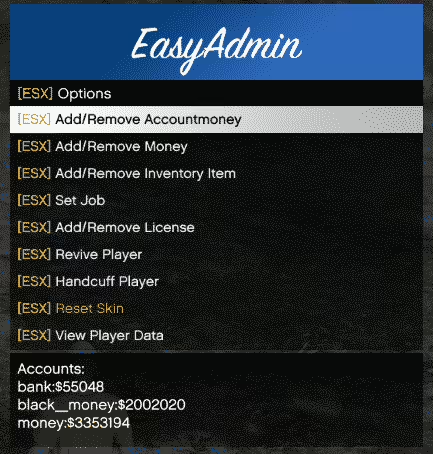
The redesign touches every visual aspect of esx_menu_default while preserving all functionality. You get updated color schemes with modern gradients, refined typography for better readability, smooth CSS animations on menu interactions, custom header graphics that match the theme, and improved spacing that makes menu options easier to scan. The result feels like a complete UI system rather than patchwork menus.
More importantly, the design maintains consistency across all ESX menus. Your inventory looks cohesive with job menus, which match shop interfaces, which align with admin panels. This visual consistency is what separates professional servers from those running default assets. Players subconsciously register that your server has been carefully curated when every menu shares the same polished aesthetic.
Key Design Improvements
- Modern Color Palette - Refined colors with subtle gradients replacing flat default backgrounds
- Enhanced Typography - Better font choices with improved readability and visual hierarchy
- Smooth Animations - CSS keyframe animations on menu item selection and transitions
- Custom Headers - Professional header graphics (400x90px) instead of plain text titles
- Improved Spacing - Better padding and margins making menus less cramped and easier to navigate
- Visual Feedback - Clear hover states and selection indicators for better usability
- Minimalist Design - Clean layout without unnecessary clutter or distracting elements
- Consistent Theme - Unified visual language across all ESX menu types
Perfect For These Server Types
- Established communities upgrading from default ESX styling
- New servers wanting professional polish from day one
- Roleplay communities prioritizing immersive user experience
- Servers with custom branding wanting cohesive visual identity
- Communities seeking competitive advantage through quality presentation
- Development teams building public-facing showcase servers
Why Visual Polish Matters
Players form first impressions within seconds of joining a server. When they open their first menu and see polished, modern styling instead of bare-bones default UI, it signals quality. They're more likely to stick around, explore further, and give your server a fair chance. Visual presentation is the difference between another generic ESX server and this community actually cares about quality.
The effect compounds across the player experience. Every menu interaction reinforces the impression of professionalism. When shopping, managing inventory, accessing job functions, or using admin commands, the consistent premium design reminds players they're on a well-maintained server worth investing time in. This psychological impact on retention is hard to quantify but very real.
Installation and Customization
- Download the ESX Menu Design package
- Backup your existing esx_menu_default resource
- Replace the default esx_menu_default files with the new design files
- Customize colors in app.css if you want to match your server branding
- Replace header images (400x90px PNGs) with custom graphics if desired
- Adjust font choices and sizes to match your aesthetic preferences
- Restart your server to apply the new menu design
- Test all menu types to ensure consistent appearance
Customization Options
The design is built on standard CSS, making customization straightforward for anyone familiar with web styling. The app.css file contains all color variables, typography settings, spacing values, and animation parameters. Want to match your Discord server colors? Update the CSS variables. Prefer different fonts? Change the font-family declarations. Need larger text for readability? Adjust the font-size values.
Header customization is equally simple - create 400x90px PNG images matching your server branding and replace the default header graphics. Some servers use their logo, others create themed headers for different menu types (inventory gets one style, shops get another). This flexibility lets you adapt the design to your specific branding without touching HTML structure.
Technical Specifications
- File Size - 2-5 MB including custom graphics and CSS
- Performance Impact - Negligible (CSS animations are GPU-accelerated)
- Compatibility - Works with all ESX versions using esx_menu_default
- Browser Support - Optimized for FiveM's NUI browser (Chromium-based)
- Dependencies - None beyond standard esx_menu_default requirements
Framework Compatibility
- ✅ ESX Legacy - Full support for 1.10.x and newer
- ✅ ESX 1.2/1.9 - Compatible with older ESX versions
- ✅ ESX Final - Works with latest ESX Final branch
- ✅ All Menu Types - Inventory, shops, job menus, admin panels
- ✅ Custom ESX Scripts - Compatible with scripts using esx_menu_default
- ❌ QBCore - ESX only (QB uses different menu systems)
Design Philosophy
The best UI redesigns balance aesthetic improvement with usability preservation. This menu design follows that principle - it looks dramatically better than default while maintaining the familiar navigation patterns ESX players know. There's no learning curve, no confusion about where menu options moved, just immediate visual upgrade without workflow disruption.
The minimalist approach prevents visual clutter that plagues some overly elaborate UI redesigns. Clean backgrounds let menu content stand out. Subtle animations provide feedback without distraction. The color palette remains professional rather than gaming-themed, appealing to serious roleplay communities. This restraint is what makes the design age well instead of looking dated after six months.
Why 44+ Sales Trust This Design
Server owners consistently choose this menu design when upgrading from default ESX because it delivers visible improvement without breaking functionality. You're not gambling on an experimental UI overhaul that might confuse players or conflict with scripts. This is proven visual refinement that works immediately and integrates seamlessly with existing ESX setups.
The positive feedback comes from communities that saw immediate player comments about improved UI quality. When players notice and compliment menu design, it signals you've made a meaningful upgrade. That kind of organic positive feedback contributes to server reputation and helps with player recruitment through word-of-mouth.
Beyond Default ESX Presentation
Running completely default ESX assets in 2024 sends a message about server quality - specifically, that you haven't invested in customization or unique identity. While ESX is a solid framework, its default visual presentation is intentionally generic. This menu design is one of the easiest and most visible upgrades you can make to differentiate your server from the hundreds of other ESX communities.
The modest investment pays dividends in first impressions and player retention. Compare it to physical businesses - would you rather eat at a restaurant with thoughtful interior design or one that looks like it uses the landlord's default fixtures? The food might be equally good, but presentation influences perception of quality. Your server's food is the roleplay and gameplay; this menu design is the interior design that frames the experience.
CSS Animation Details
The menu uses CSS keyframe animations to create smooth transitions when selecting menu items. Instead of instant selection highlighting, you get subtle animation that provides clear feedback without feeling sluggish. These animations are GPU-accelerated, meaning they run smoothly even on moderate hardware without impacting FPS.
The animation timing is carefully tuned for responsiveness - quick enough that menus feel snappy, slow enough that transitions are visible and satisfying. Some UI redesigns over-animate everything, creating laggy-feeling interfaces. This design strikes the balance between static blandness and excessive animation.
Header Graphic Standards
The design uses 400x90px header images across all menus for visual consistency. This specific dimension creates proper aspect ratio for the menu width while providing enough height for clear branding. The package includes default header graphics, but creating custom versions is straightforward:
- Design at exactly 400x90px resolution (scaling causes blur)
- Use PNG format for transparency support
- Keep important elements away from edges (10px margin recommended)
- Test readability at actual size (what looks good large might not scale)
- Maintain consistent style across different menu type headers
Maintaining Visual Consistency
After installing this menu design, consider how it integrates with your other UI elements. If you're using custom loading screens, HUDs, or notification systems, try to match their color schemes and visual style to the menu design. Cohesive UI across all player interactions creates the polished feeling that elevates server quality perception.
Document your color scheme and font choices so future additions maintain consistency. When adding new custom scripts with UI elements, reference the menu design's aesthetic as the standard. This discipline prevents the Frankenstein server look where different UI elements clash stylistically because they were added at different times without coordination.
Performance Considerations
The CSS-based design has minimal performance impact because modern browsers (including FiveM's NUI) are highly optimized for CSS rendering and animations. Unlike JavaScript-heavy UI frameworks that require continuous processing, CSS animations are hardware-accelerated and run independently of game performance. Players with lower-end hardware won't experience menu lag or frame rate drops.
The small file size also means faster initial load times compared to elaborate UI systems with large asset libraries. Menus open instantly without loading delays, maintaining the snappy feel that ESX is known for. This performance preservation is why CSS-based redesigns are preferred over more complex alternatives for core framework UI.
What You're Getting
Download includes the complete esx_menu_default redesign with all CSS files, custom header graphics, and installation instructions. The package is ready to drop in as a direct replacement for your existing esx_menu_default resource. No complex configuration required beyond optional customization to match your branding.
The 44+ sales reflect server owners who recognized that visual presentation matters and chose proven design over experimenting with untested UI mods. If you're serious about presenting a professional server, this menu design is table-stakes infrastructure that should have been implemented yesterday.