4 product images available.
Secure Checkout
Cards, Apple Pay, Google Pay, iDEAL/Wero, Bancontact, EPS, Przelewy24, and optional Crypto where available via Stripe.
Requires a FiveM server, ESX or QBCore, access to server resources, and permission to restart the resource after configuration.
Description
FaxCAD - Advanced Computer-Aided Dispatch System
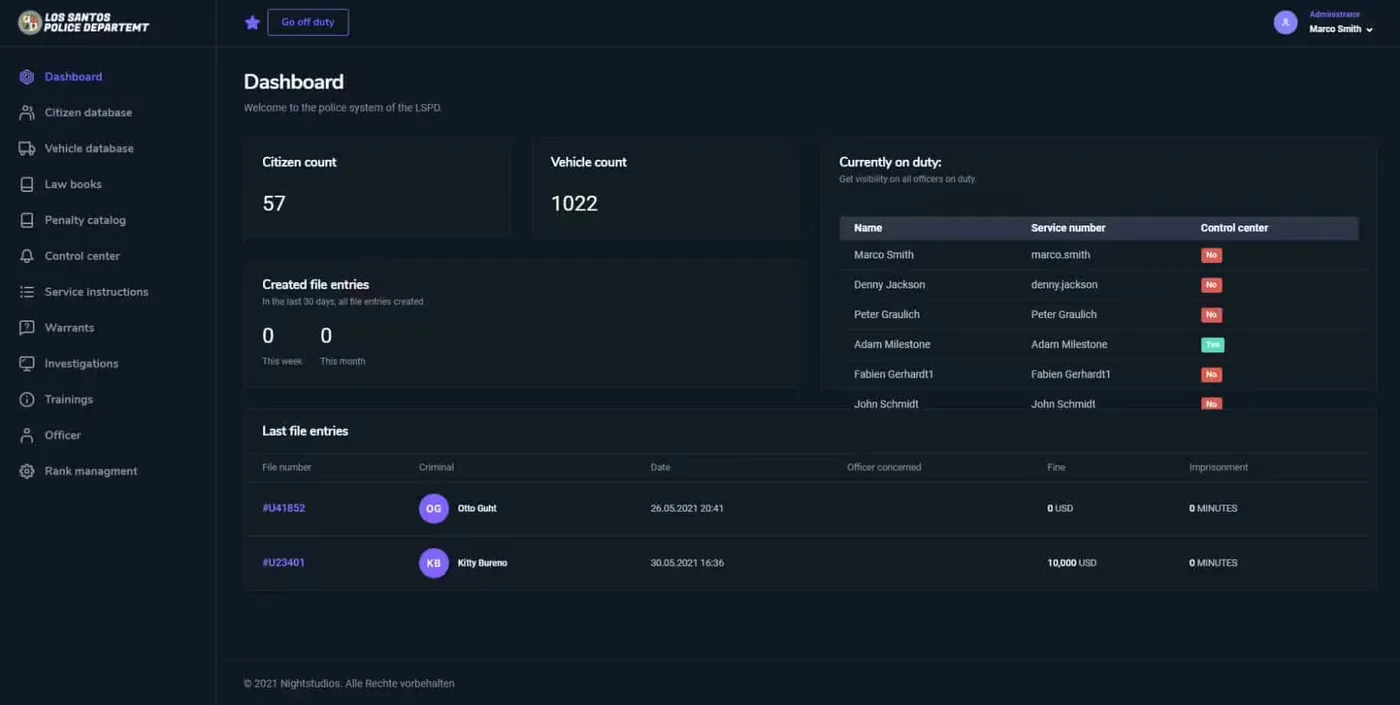
Transform your emergency services operations with FaxCAD, a comprehensive Computer-Aided Dispatch and Mobile Data Terminal system designed specifically for FiveM roleplay servers. This professional-grade CAD/MDT solution provides law enforcement, fire/EMS, and dispatch centers with the tools needed to coordinate responses, manage calls, track units, and maintain detailed records—all within an intuitive, modern interface that mirrors real-world public safety systems.
https://streamable.com/enbq2cWhat It Does
FaxCAD serves as the central nervous system for your server's emergency services. Dispatchers receive 911 calls, create incidents, and assign units in real-time. Officers access MDTs from their patrol vehicles to view call details, run license/vehicle/warrant checks, and file reports. Fire and EMS personnel coordinate medical responses and track patient information. All activity gets logged in a centralized database, creating accountability and enabling supervisors to review operations.
The system bridges the gap between civilian calls for help and emergency response, creating realistic workflows that mirror real public safety operations. Instead of players messaging each other out-of-character to coordinate responses, FaxCAD provides in-character tools that enhance roleplay while improving operational efficiency.
Core Features
- Active Call Management - Dispatchers create, update, and close incidents while tracking responding units, call priority levels, and incident status in real-time
- Unit Tracking System - See all available units with their current status (10-8, 10-6, out of service), location, and active assignments on an interactive map interface
- Records Database - Search and manage civilian profiles, vehicle registrations, criminal histories, warrants, citations, and arrest records with full audit trails
- MDT Access Levels - Role-based permissions for dispatch, patrol officers, supervisors, detectives, fire/EMS, with customizable access controls
- Vehicle/License Lookup - Run plates and driver's licenses instantly, returning owner information, vehicle details, flags, and associated warrants
- Warrant Management - Create, track, and serve warrants with automatic notifications when flagged individuals are encountered
- Report Filing System - Officers file incident reports, arrest reports, and citations directly in the MDT with supervisor review capabilities
- BOLO System - Broadcast be-on-lookout alerts for suspects, vehicles, or missing persons visible to all active units
- Panic Button Integration - Officers trigger emergency alerts that notify all units and dispatch of officer-in-distress situations
- Multi-Department Support - Separate panels and databases for police, sheriff, state police, fire, and EMS with cross-agency coordination
Perfect For
- Serious roleplay servers emphasizing realistic emergency services operations
- Police departments wanting professional-grade tools for patrol operations
- Dispatch centers coordinating multiple agencies and call types
- Fire/EMS services tracking medical calls and apparatus deployment
- Servers with active criminal elements requiring proper investigation tools
- Communities wanting to eliminate meta-gaming through proper IC channels
Technical Details
- Architecture: Web-based interface accessible in-game via browser or tablet items
- Database: MySQL backend with optimized queries for real-time performance
- API Integration: Connects with phone systems, garage scripts, character databases
- Performance: Lightweight resource usage, tested on 200+ player servers
- Customization: Configurable department names, codes, unit designations, form templates
- Mobile Responsive: Works on MDT tablets, police computer props, dispatch stations
- Update Frequency: Regular updates with bug fixes and new features
Installation
- Download FaxCAD from your FiveMX purchase
- Import the provided SQL database file to create necessary tables
- Configure database connection in the resource's config file
- Set up department permissions and user roles
- Add
ensure faxcadto your server.cfg - Configure integration with your framework's job system
- Train dispatch and patrol staff on system usage
- Access the CAD via configured command or item usage
Framework Compatibility
- ✅ ESX - Integrates with esx_policejob, esx_ambulancejob, society systems
- ✅ QBCore - Compatible with qb-policejob, qb-ambulancejob, qb-phone
- ✅ QBOX - Full support for QBOX emergency services and jobs
- ✅ Standalone - Can operate independently with custom framework integration
- ✅ Custom Frameworks - API available for custom job system integration
What Makes It Stand Out
Unlike simple dispatch boards that only track active calls, FaxCAD provides a complete public safety ecosystem. The records management system creates persistent data—arrest someone today, and that arrest shows up in background checks months later. Warrants don't disappear when players log off; they remain active until served. Vehicle registrations tie to character identities, creating investigative opportunities when plates get run.
The system eliminates common meta-gaming issues by providing proper in-character communication channels. Instead of officers asking each other in Discord if someone has warrants, they run the name through the MDT. Rather than dispatchers using admin tools to see who's online, they rely on units checking in and updating their status. This creates authentic police roleplay where information gathering becomes part of the investigation process.
FaxCAD's interface design mirrors real CAD systems used by actual public safety agencies, giving players with real-world emergency services experience a familiar environment while teaching others how these systems work. The learning curve is intentional—mastering the CAD becomes part of training new dispatchers and officers, creating mentorship opportunities and department hierarchy.
Operational Workflows
A typical incident flow: Civilian uses /911 command, creating a call in the dispatcher's queue. Dispatcher reviews location, caller information, and incident type, then creates a formal call and assigns nearby units. Officers receive MDT notification, respond via status codes, and access call details en route. On scene, they run IDs and plates, discovering an outstanding warrant. After arrest, they file a report directly in the MDT, updating the subject's criminal history. Supervisor reviews and approves the report, making it part of permanent records.
This workflow creates multiple roleplay touchpoints beyond simple crime happens, police respond. Dispatchers roleplay proper call-taking procedures, officers conduct thorough investigations using available tools, and supervisors maintain quality control through report review. Each role becomes essential to the overall operation rather than just logging in and waiting for calls.
Advanced Features
The analytics dashboard lets command staff review department statistics—response times, arrest rates, citation totals, and officer activity. This data drives promotion decisions, identifies training needs, and helps balance server gameplay. Department supervisors can spot patterns like certain areas generating more calls or specific officers excelling at investigations.
Multi-agency coordination features allow police, sheriff, and state police to share information while maintaining separate databases. Fire/EMS can view police calls to coordinate scene safety, while police see medical calls that might require security. The system creates realistic inter-agency cooperation without breaking departmental boundaries.
Customization Options
Server administrators can configure virtually every aspect of FaxCAD. Customize department codes (10-codes vs plain language), modify form templates to match server lore, add custom flags and alerts for vehicles/persons, adjust permission levels for different ranks, and even rebrand the interface with department logos and colors. The system adapts to your server's existing structure rather than forcing you to change operations around the software.
Requirements
- FiveM server with MySQL database access
- ESX, QBCore, QBOX, or custom framework with job system
- Basic server administration knowledge for initial setup
- Recommended: tablet/MDT prop item for in-vehicle access
- Optional: phone script integration for 911 calls
FaxCAD elevates emergency services roleplay from casual response scenarios to professional operations with accountability, training requirements, and realistic workflows. Players don't just respond to calls—they become part of a functioning public safety system where their actions have documented consequences and their investigations rely on proper tools rather than admin powers. For servers serious about law enforcement, fire, and EMS roleplay, FaxCAD provides the infrastructure needed to support complex, long-term storylines built on persistent data and realistic procedures.
Related ESX Scripts
Installation notes
Buy this when it saves setup time
Use this checklist to decide quickly whether the resource fits your current server build, framework, and support expectations.
Server-owner payoff
FaxCAD is positioned to reduce Police Scripts instead of making you rebuild the same system from scratch.
Compatibility
Works with esx, qbcore, qbox, standalone, vrp. Check the requirements block before adding it to a live stack.
Purchase confidence
Instant download, Stripe checkout, support access, and refund policy context are shown before payment.
Decision assets
Requirements, Preview video, Product Q&A
Product fit, setup, and proof at a glance
Use the published facts on this page to confirm whether FaxCAD matches your server before checkout.
Compatibility
- Frameworks
- ESX, QBCore, QBOX, Standalone, vRP
- Category
- Police Scripts
Setup & requirements
- Install flow
- Download → resources folder → ensure in server.cfg
- Requirements
- Published on this page
- File size
- 613.9 KB
Proof & buyer questions
- Reviews
- No reviews yet
- Answered Q&A
- Ask before buying
Only the facts published on this page should be treated as confirmed. If you need more detail, review the description, requirements, changelog, reviews, and product Q&A before checkout.