7 product images available.
Secure Checkout
Cards, Apple Pay, Google Pay, iDEAL/Wero, Bancontact, EPS, Przelewy24, and optional Crypto where available via Stripe.
Requires a FiveM server, ESX or QBCore, access to server resources, and permission to restart the resource after configuration.
Description
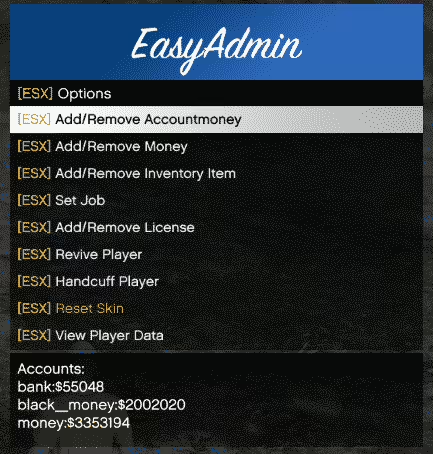
Izzy Admin Menu - Professional Server Management Interface for FiveM
The Izzy Admin Menu delivers a comprehensive server administration system designed for modern FiveM servers running ESX, QBCore, or QBOX frameworks. Built with performance and usability in mind, this admin panel provides server owners and staff with powerful moderation tools wrapped in an intuitive, professionally designed interface. Whether you're managing a 5-player development server or a 500+ player production environment, Izzy equips your team with the essential controls needed to maintain order, moderate gameplay, and handle administrative tasks efficiently.
What's Included
This admin menu system comes as a complete, ready-to-deploy resource with full framework integration. You receive the core admin menu script with customizable permission levels, a comprehensive UI built with modern web technologies, and pre-configured commands for all common administrative actions. The system integrates seamlessly with your existing server infrastructure without requiring modifications to your framework core, and includes documentation covering installation, configuration, and permission management.
Key Administrative Features
- Player Management Panel - View all connected players with real-time data including identifiers, ping, coordinates, job information, and current vehicle or activity status
- Moderation Tools - Kick, ban, warn, freeze, teleport, spectate, or revive players directly from the intuitive menu interface
- Resource Control - Start, stop, restart, and monitor server resources without console access, with real-time resource usage statistics
- Vehicle Spawning System - Spawn any vehicle with customizable plates, colors, and modifications, with support for custom vehicle packs
- Teleportation Suite - Quick teleport to players, coordinates, or saved locations; bring players to you or send them to specific positions
- Inventory Management - Add or remove items, weapons, and money from player inventories for testing or compensation purposes
- Weather & Time Control - Instantly change server weather conditions and time of day for events or testing scenarios
- Noclip Mode - Toggle noclip for staff members to navigate the map freely during investigations or map development
- Developer Tools - Access coordinate display, entity information, and other debugging utilities directly from the admin interface
- Permission System - Granular role-based permissions allowing you to control exactly which staff members can access which features
Perfect For
- Server owners seeking a professional all-in-one admin solution to replace multiple scattered admin resources
- Development teams needing powerful debugging and testing tools accessible without constant console switching
- Moderation staff requiring quick access to essential player management functions during active gameplay
- RP servers with structured staff hierarchies needing role-based permission controls for different admin levels
- Growing communities transitioning from basic admin commands to a full-featured management interface
- Multi-server networks wanting consistent admin tooling across all their server instances
Technical Details
- Performance Impact: Minimal server overhead (~0.01ms resmon when menu closed, ~0.05ms when active)
- Framework Support: ESX Legacy (1.9.x and 2.x), QBCore, QBOX, and standalone configurations available
- UI Technology: Modern HTML5/CSS3/JavaScript interface with responsive design
- Database: No database modifications required - uses existing framework permissions
- Dependencies: Framework-specific (es_extended for ESX, qb-core for QB, or standalone mode)
- Language Support: Multi-language system with English included, additional languages configurable
- Update Policy: Regular updates with new features and framework compatibility improvements
Installation & Configuration
- Extract the
izzy-adminresource folder to your server's resources directory - Add
ensure izzy-adminto your server.cfg file after your framework resource - Configure permission levels in
config.luato match your staff hierarchy (supports Ace permissions, framework groups, or Steam/Discord identifiers) - Customize menu appearance, keybinds, and feature availability in the configuration file
- Restart your server and open the menu using the configured keybind (default: F10 or configurable)
- Grant admin access to your staff team using your chosen permission method
Framework Compatibility
- ✅ ESX Legacy - Full support for ESX 1.9.x and ESX Legacy (2.x) with automatic framework detection and group-based permissions
- ✅ QBCore - Native QBCore integration with job-based permission system and QB-specific player data display
- ✅ QBOX - Fully compatible with QBOX framework using modern permission structure
- ✅ Standalone - Can operate independently using Steam IDs, Discord IDs, or license identifiers for permission control
Permission System Explained
Izzy's flexible permission architecture allows you to create custom admin tiers with precise feature access control. Define roles like Trial Moderator with limited kick/warn permissions, Moderator with full player management, Admin with vehicle and weather controls, and Head Admin with complete system access including resource management. The system supports multiple permission methods: Ace permissions for servers using txAdmin or similar, framework-based groups (ESX groups or QB permissions), or direct identifier whitelisting for simple setups.
What Makes It Stand Out
Unlike basic admin scripts that simply wrap console commands in a UI, Izzy Admin Menu is purpose-built for real-world server management scenarios. The interface prioritizes speed and clarity - you can identify and moderate a problematic player in seconds, not minutes. The real-time player data updates mean you always see current information without manual refreshes. The granular permission system prevents privilege escalation and allows you to confidently grant appropriate access to growing mod teams. Most importantly, the menu operates entirely client-side for the UI with server-side validation for all actions, ensuring both performance and security. Servers using Izzy report significantly faster incident response times and improved staff satisfaction compared to console-based or basic admin tools.
Post-Purchase Support
Your purchase includes access to comprehensive documentation with configuration examples, troubleshooting guides, and permission setup tutorials. Updates are delivered automatically through FiveMX, ensuring compatibility with new framework versions and FiveM updates. While direct support channels vary by your purchase tier, the active FiveMX community and detailed documentation typically resolve most configuration questions quickly.
https://www.youtube.com/watch?v=ar2d53hoJJQRelated vRP Scripts
Installation notes
Buy this when it saves setup time
Use this checklist to decide quickly whether the resource fits your current server build, framework, and support expectations.
Server-owner payoff
Izzy – Admin Menu is positioned to reduce Admin Tools instead of making you rebuild the same system from scratch.
Compatibility
Works with esx, qbcore, qbox, standalone, vrp. Check the requirements block before adding it to a live stack.
Purchase confidence
Instant download, Stripe checkout, support access, and refund policy context are shown before payment.
Decision assets
Requirements, Preview video, Product Q&A
Product fit, setup, and proof at a glance
Use the published facts on this page to confirm whether Izzy – Admin Menu matches your server before checkout.
Compatibility
- Frameworks
- ESX, QBCore, QBOX, Standalone, vRP
- Category
- Admin Tools
Setup & requirements
- Install flow
- Download → resources folder → ensure in server.cfg
- Requirements
- Published on this page
- File size
- 24.83 MB
Proof & buyer questions
- Reviews
- No reviews yet
- Answered Q&A
- Ask before buying
Only the facts published on this page should be treated as confirmed. If you need more detail, review the description, requirements, changelog, reviews, and product Q&A before checkout.