2 product images available.
(QB) LunnyDev Dispatch
Secure Checkout
Cards, Apple Pay, Google Pay, iDEAL/Wero, Bancontact, EPS, Przelewy24, and optional Crypto where available via Stripe.
Requires a FiveM server, qbcore or qbox, access to server resources, and permission to restart the resource after configuration.
Description
LunnyDev Dispatch - Professional Emergency Response CAD System for QBCore
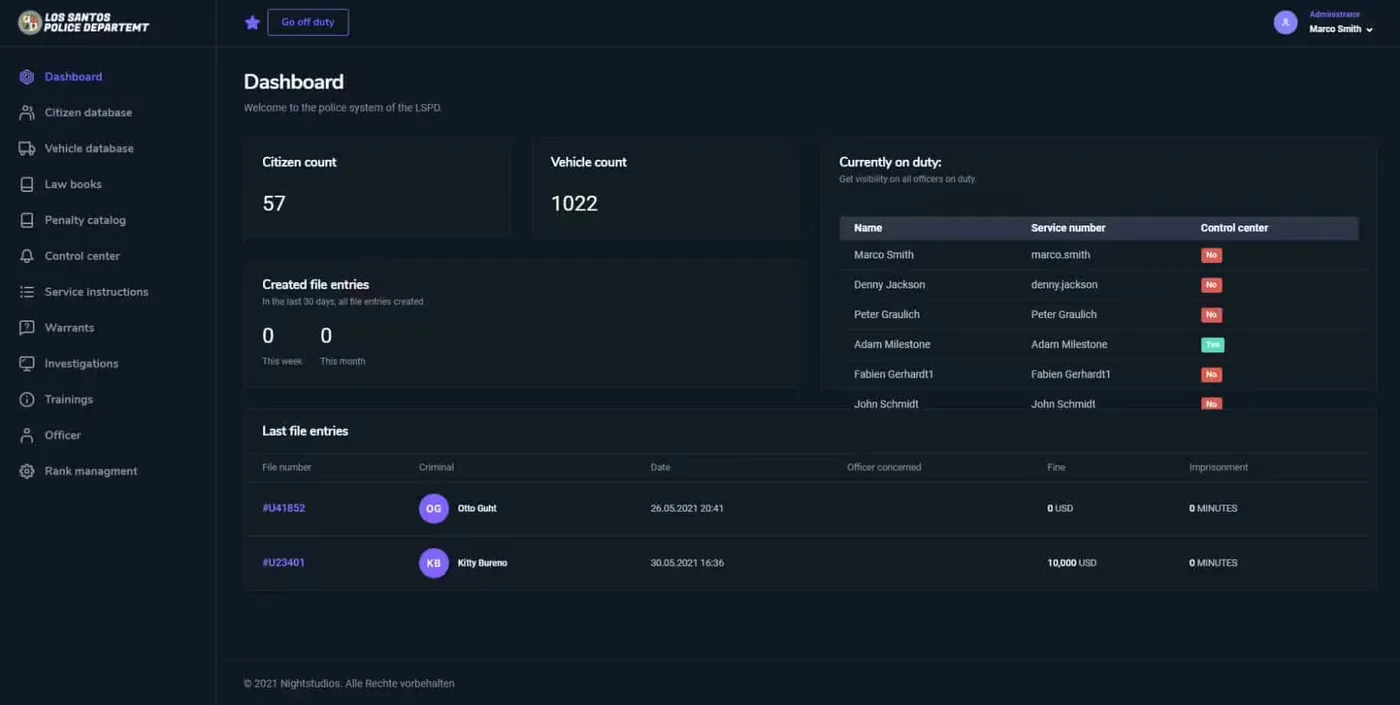
The LunnyDev Dispatch system is a comprehensive Computer-Aided Dispatch (CAD) solution built specifically for QBCore servers, providing law enforcement, EMS, and fire department players with professional-grade emergency call management and response coordination. This advanced dispatch system transforms how emergency services operate on your server by centralizing 911/112 calls, tracking unit availability, managing active incidents, and facilitating seamless communication between dispatchers and field units.
Modern roleplay servers require sophisticated emergency response coordination that goes beyond basic chat commands. LunnyDev Dispatch delivers a realistic dispatch experience with features you'd find in real-world public safety communications centers, including call prioritization, automatic unit assignment suggestions, GPS tracking, and multi-agency coordination. Whether you're running a casual roleplay server or a serious simulation community, this dispatch system elevates emergency service gameplay to professional standards.
What's Included
You receive a complete CAD system with dispatcher interface, caller information display, automated call logging, unit status management, incident tracking, GPS mapping integration, and cross-agency coordination tools. The package includes both the dispatch console for communications operators and field unit tablets for police, EMS, and fire personnel. All emergency calls are automatically logged to the database for record-keeping and after-action reviews.
The system integrates seamlessly with QBCore's job system, phone scripts, and existing emergency service resources. You'll get comprehensive configuration files to customize call types, priority levels, unit identifiers, and dispatch protocols to match your server's specific needs.
Key Features
- Centralized 911/112 Call Management - All emergency calls route through the dispatch center with caller information, location, and incident type automatically displayed
- Real-Time Unit Tracking - GPS integration shows all emergency units on a live map with status indicators (available, en route, on scene, busy)
- Automated Call Prioritization - Emergency calls are automatically categorized by priority level with color-coded alerts for critical incidents
- Smart Unit Assignment - System suggests nearest available units based on GPS location and current workload
- Multi-Agency Coordination - Coordinate between police, EMS, and fire departments with shared incident information and cross-agency dispatch
- Incident Management System - Create, update, and close incidents with detailed notes, timestamps, and unit assignments
- Field Unit Tablets - Officers and medics access their assigned calls, update status, and communicate with dispatch via integrated tablets
- Call History and Logs - Complete database logging of all calls with searchable history for investigations and reviews
- Custom Call Types - Configure unlimited call types with specific protocols, response requirements, and priority assignments
- Dispatch Audio Alerts - Customizable sound notifications for new calls, priority incidents, and unit status changes
- Caller ID Integration - Displays caller's phone number, name, and previous call history from phone script integration
- Active Scene Management - Track multiple simultaneous incidents with dedicated status boards for each active call
Perfect For
- Serious roleplay servers with dedicated dispatch personnel
- Servers requiring professional emergency service coordination
- Communities with separate police, EMS, and fire departments needing unified dispatch
- Whitelist servers where realistic emergency response is expected
- Large servers with high call volumes requiring organized call management
- Training servers teaching proper dispatch and emergency response procedures
- Servers wanting to add dedicated dispatcher roles for non-field players
Technical Details
- Framework: QBCore exclusive (requires qb-core)
- Performance Impact: Optimized - 0.01-0.02ms resmon for dispatch interface, negligible for field tablets
- Dependencies: qb-core, qb-phone (for call integration), qb-policejob (recommended)
- Database: MySQL tables for call logs, incident tracking, and unit status
- Map Integration: Compatible with most map/GPS resources for unit tracking
Installation
- Ensure you have qb-core and qb-phone installed and configured
- Extract LunnyDev Dispatch to your resources folder
- Import the provided SQL file to create dispatch database tables
- Configure job permissions in config.lua (set which jobs can access dispatch/tablets)
- Customize call types, priority levels, and unit identifiers to match your server
- Add ensure qb-lunnydev-dispatch to your server.cfg after qb-core
- Restart the server and assign dispatch permissions to authorized players
Framework Compatibility
- ✅ QBCore - Built specifically for QBCore framework with full integration
- ✅ QB-Phone Integration - Seamlessly connects with QBCore phone scripts for 911 calls
- ✅ QB-PoliceJob Compatible - Works with standard QB police, EMS, and fire job scripts
- ❌ Not ESX Compatible - This version is QBCore-specific (ESX version may be available separately)
What Makes It Stand Out
LunnyDev Dispatch goes far beyond basic emergency call notifications by providing a complete CAD system that mirrors real-world dispatch operations. The combination of centralized call management, GPS tracking, and multi-agency coordination creates an immersive dispatch experience that benefits both dispatchers and field units. Unlike simple call scripts that just relay messages, this system manages the entire incident lifecycle from initial 911 call through unit assignment, response, and incident closure.
The field unit tablets give police, EMS, and fire personnel independence while maintaining connection to dispatch - they can see their assigned calls, update their status, and access incident details without constant radio communication. This reduces radio clutter while improving response coordination.
Dispatch Operations
Dispatchers receive immediate notifications when citizens call 911/112, with the caller's location automatically pinned on the map. The system displays caller information from their phone, incident type, and suggested units based on proximity and availability. Dispatchers can assign multiple units to incidents, add notes visible to field personnel, update priority levels as situations develop, and coordinate cross-agency responses for complex incidents requiring police, EMS, and fire.
Field Unit Experience
Emergency service players access their assigned calls via the field tablet, which shows incident details, location waypoints, and dispatch notes. They can update their status (en route, on scene, code 4) which automatically notifies dispatch and updates the unit tracker. The tablet provides quick access to call history, allowing units to reference previous incidents at the same location or with the same individuals.
Customization Options
Server owners can fully customize call types to match their roleplay standards - from minor traffic stops to major incidents like bank robberies or multi-vehicle accidents. Priority levels determine alert severity, with critical incidents like active shooters or cardiac arrests triggering high-priority alerts with distinct sounds. Unit identifiers can be customized to match your department's naming conventions (LSPD-1, EMS-3, Fire-5, etc.).
https://www.youtube.com/watch?v=UTqvqso2ptI