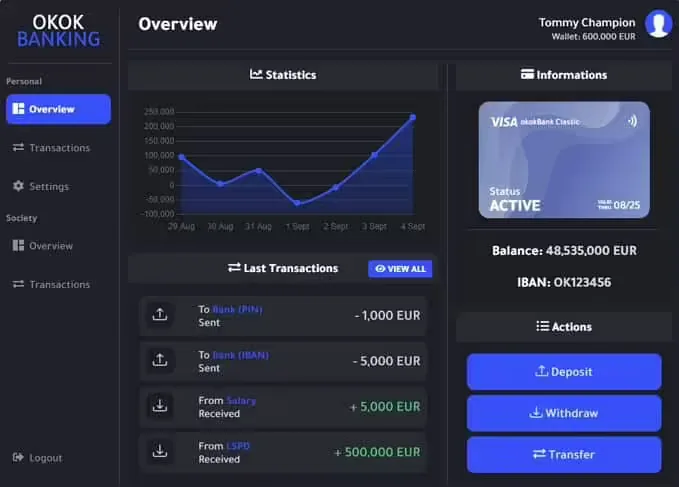
3 product images available.
Secure Checkout
Cards, Apple Pay, Google Pay, iDEAL/Wero, Bancontact, EPS, Przelewy24, and optional Crypto where available via Stripe.
Requires a FiveM server, qbcore or qbox, access to server resources, and permission to restart the resource after configuration.
Description
STG Market - Customizable Player Marketplace for QBCore Servers
Create a dynamic player-driven economy on your QBCore server with STG Market, a flexible marketplace system where players can buy and sell items using in-game currency. This script transforms static NPC shops into living economies where item prices fluctuate based on player trading, rare items find their true market value, and entrepreneurial players can profit from smart buying and selling.
Why Player Marketplaces Change Server Economies
Traditional FiveM servers rely on fixed-price NPC shops where items always cost the same amount regardless of supply, demand, or economic conditions. This static pricing creates stale economies where items never appreciate in value, scarcity doesn't matter, and entrepreneurial gameplay is impossible. STG Market introduces real market dynamics where players - not server admins - determine what items are worth.
Player-to-player trading enables economic complexity that NPC shops can't provide. Rare items become valuable because they're actually rare, not just because admins set high prices. Crafters can sell their products directly to consumers. Farmers can auction harvested goods to the highest bidder. Criminals can fence stolen merchandise at market rates. These player-driven transactions create emergent gameplay that keeps economies interesting long after players have completed traditional job progression.
Core Marketplace Functionality
Listing Items for Sale
Players access the market interface, select items from their inventory, set asking prices, and create listings. The system removes items from their inventory and holds them in the marketplace until sold or de-listed. This prevents duplication exploits while ensuring sellers can't back out of sales after buyers commit.
The listing process is intentionally simple - sellers don't need to fill out complicated forms or understand complex trading mechanics. Select item, enter price, confirm listing. This simplicity encourages participation from casual players who might avoid more complicated trading systems.
Browsing and Purchasing
Buyers browse available listings through categorized or searchable interfaces showing item names, quantities, prices, and seller information. When they find desired items at acceptable prices, they purchase directly using in-game currency. The money transfers to the seller, and items appear in the buyer's inventory immediately or at next login.
The marketplace shows real-time inventory - only actually-available items appear in listings. Players don't waste time pursuing items that already sold or listings that sellers removed. This real-time accuracy prevents frustration and keeps the marketplace feeling active and reliable.
Price Discovery and Market Dynamics
Unlike fixed NPC prices, player-set prices create natural market dynamics. When an item is abundant, sellers compete by lowering prices to move inventory. When items are scarce, sellers can command premium prices from desperate buyers. Over time, market prices settle around equilibrium values that reflect actual supply and demand.
These price movements create opportunities for savvy players. Buy low during oversupply, hold inventory, sell high during shortages. This speculation becomes viable gameplay for characters focused on commerce rather than production or crime.
Customization and Configuration
Item Whitelist/Blacklist Control
Server owners can configure which items are tradeable through the marketplace. Block certain items entirely (weapons, police equipment, admin items) or create separate market categories for different item types. This granular control prevents economy-breaking trades while allowing legitimate commerce.
Common configurations include allowing all consumables and materials while blocking weapons, permitting vehicle parts but not vehicles themselves, or creating tier systems where common items trade freely but rare items require additional restrictions.
Price Limits and Safeguards
Set minimum and maximum prices for items or entire categories to prevent obvious scams and exploits. For example, prevent players from listing worthless items for millions of dollars (scam attempts) or listing valuable items for $1 (money laundering). These guardrails keep the marketplace functional without requiring constant admin monitoring.
Price limits can be broad (no item over $100k) or specific (weapon prices between $500-$10k, food prices between $5-$50). The flexibility lets you create appropriate limits for your server's economy without stifling legitimate price variation.
Market Locations and Access
Configure marketplace access points throughout your map. Place market terminals in town centers, shopping districts, business hubs, or player-owned stores. Multiple access points ensure players can reach markets conveniently without making dedicated trips to one centralized location.
You can also configure remote market access if desired, allowing players to browse and purchase from anywhere while restricting listing creation to physical locations. This hybrid approach balances convenience with encouraging player interaction at market hubs.
Commission and Taxation
Implement marketplace fees to create money sinks and fund server economies. Charge listing fees (paid upfront when creating listings), sales commissions (percentage taken from successful sales), or both. These fees remove currency from circulation, combating inflation while creating passive revenue for governments or market operators.
A typical configuration might charge a 5-10% commission on sales, ensuring markets generate economic value beyond just facilitating trades. The fees should be meaningful enough to matter but not so high that they discourage marketplace use.
Economic Applications
Crafting and Production Economies
Servers with crafting systems benefit enormously from player marketplaces. Crafters produce goods, list them for sale, and earn money from their labor without needing to find individual buyers manually. This enables specialization - some players focus on crafting, others on gathering materials, others on retail - creating interconnected economic roles.
The marketplace effectively becomes the distribution channel for your server's production economy. Without it, crafters must spam chat advertising wares or set up time-consuming direct trades. With it, they list inventory and let demand come to them.
Resource Gathering and Materials Trading
Farmers, miners, loggers, and other resource gatherers can sell raw materials to crafters through the marketplace rather than grinding materials to NPC shops. This creates player-to-player supply chains where gatherers supply crafters who supply retailers who supply end consumers.
Material prices fluctuate based on crafting demand and gathering effort. When a popular crafting recipe requires specific materials, those material prices spike as crafters compete for supply. When gathering is easy or popular, material prices drop due to oversupply. These price movements guide player behavior naturally.
Vehicle and Property Trading
If configured to allow it, STG Market can facilitate vehicle sales, property transfers, or other high-value transactions. Players sell customized vehicles they've upgraded, flip properties they purchased at low prices, or trade limited-edition items they obtained during events.
High-value items create exciting marketplace moments. When someone lists a rare supercar for $500k, it becomes server news. Players pool money to purchase together, criminals plot heists to steal marketplace money, and the marketplace becomes a social hub around major listings.
Arbitrage and Merchant Gameplay
Dedicated traders can make careers buying underpriced items and reselling at market rates. This arbitrage gameplay creates a legitimate merchant profession beyond just running businesses or crafting. Successful merchants develop reputations, players seek them out for hard-to-find items, and commerce becomes active gameplay rather than passive NPC interaction.
QBCore Integration
STG Market is built specifically for QBCore framework, integrating seamlessly with QBCore's inventory system, money handling, and notification systems. The script uses QBCore's shared object, making it compatible with most QBCore-based servers without additional bridge configuration.
Inventory System Compatibility
Works with qb-inventory and most QBCore-compatible inventory systems. When players list items, they're removed from inventory using standard QBCore methods. When purchases complete, items are added to buyer inventories through proper QBCore item creation. This integration prevents duplication bugs and ensures marketplace transactions interact correctly with the rest of your server's item systems.
Money and Banking
Transactions use QBCore's money system (cash and/or bank balance depending on configuration). You can configure whether marketplace purchases deduct from cash, bank, or player choice. Sales proceeds can be paid to sellers' cash or deposited into their bank accounts automatically.
Job and Gang Integration Options
If desired, restrict certain marketplace features to specific jobs or gangs. For example, allow only merchant job players to create listings, or let gang members access special black market categories. This integration adds roleplay depth by connecting economic systems with character professions.
User Interface and Experience
The marketplace UI needs to be intuitive because it's the primary tool for economic interaction. STG Market provides clean interfaces for browsing listings (with filtering and search), creating new listings (with price validation), and managing active listings (view, edit, or cancel).
Players can view their own listing history to track what sold at what prices, helping them price future listings appropriately. Buyers can filter by item type, price range, or seller to find exactly what they need quickly.
Real-time updates ensure players see accurate information. When items sell, they disappear from listings immediately. When new items are listed, they appear for all users without requiring refreshes. This responsiveness makes the marketplace feel alive and trustworthy.
Anti-Exploit Features
Marketplace systems are prime targets for exploits - item duplication, money laundering, price manipulation scams. STG Market includes protections against common exploits:
- Item Validation - Verifies items exist in seller inventory before allowing listings
- Atomic Transactions - Removes items and adds money in single database operations to prevent partial failures
- Price Sanity Checks - Enforces minimum/maximum price limits to prevent obvious exploits
- Cooldown Systems - Optional cooldowns between listing creation prevent spam and manipulation
- Audit Logging - Tracks all marketplace transactions for admin review if needed
These protections run transparently - legitimate users never notice them, but they prevent the common exploits that ruin marketplace economies on less-protected systems.
Installation and Setup
- Download STG Market and extract to your QBCore server's resources folder
- Import the SQL file to create marketplace database tables
- Configure allowed items, price limits, and commission rates in config.lua
- Set up marketplace access locations (coordinates for market terminals or NPCs)
- Add marketplace access commands or integrate with existing job/location systems
- Add ensure stg-market to server.cfg
- Restart server and test listing/purchasing flows
- Monitor initial marketplace activity and adjust price limits based on server economy
Balancing Marketplace Economics
Introducing player marketplaces changes server economies fundamentally. Some considerations for maintaining balance:
Competition with NPC Shops - If NPC shops buy items for high prices, players will never use the marketplace to sell. If NPC shops sell items cheaply, players won't buy from the marketplace. Configure NPC shop prices to be less favorable than player trading to encourage marketplace use.
Preventing Inflation - Marketplace fees (commissions) remove money from the economy, but marketplace activity also generates wealth through efficient trading. Monitor your economy's money supply and adjust commission rates if inflation becomes problematic.
Scarcity Management - If every item is readily available, nothing has value in the marketplace. Ensure your server has genuine scarcity for some items through limited drops, challenging acquisition methods, or restricted crafting recipes. Scarcity drives marketplace activity.
Starting the Marketplace - New marketplaces start empty, which discourages use. Seed your marketplace with admin-listed items at reasonable prices to demonstrate functionality and give early adopters something to buy. Once player listings reach critical mass, remove admin listings.
Why Servers Choose STG Market
Player-driven economies are significantly more engaging than admin-dictated fixed prices. They create ongoing economic gameplay, enable emergent player interactions, and add depth to your server beyond just jobs and crime. STG Market provides the infrastructure for these player-to-player transactions in a QBCore-optimized package.
At only $13.99, this script offers exceptional value for servers looking to enhance their economic systems without investing in complex custom development. The configuration flexibility means you can start with basic functionality and expand marketplace features as your server economy matures.
For QBCore servers specifically, STG Market's native integration eliminates compatibility headaches and ensures marketplace transactions interact correctly with your existing inventory, money, and job systems from day one.
https://www.youtube.com/watch?v=PrJriXgICGYRelated FiveM Economy System
Installation notes
Buy this when it saves setup time
Use this checklist to decide quickly whether the resource fits your current server build, framework, and support expectations.
Server-owner payoff
STG Market is positioned to reduce Economy & Banking instead of making you rebuild the same system from scratch.
Compatibility
Works with qbcore, qbox. Check the requirements block before adding it to a live stack.
Purchase confidence
Instant download, Stripe checkout, support access, and refund policy context are shown before payment.
Decision assets
Requirements, Preview video, Product Q&A
Product fit, setup, and proof at a glance
Use the published facts on this page to confirm whether STG Market matches your server before checkout.
Compatibility
- Frameworks
- QBCore, QBOX
- Category
- Economy & Banking
Setup & requirements
- Install flow
- Download → resources folder → ensure in server.cfg
- Requirements
- Published on this page
- File size
- 10.49 MB
Proof & buyer questions
- Reviews
- No reviews yet
- Answered Q&A
- Ask before buying
Only the facts published on this page should be treated as confirmed. If you need more detail, review the description, requirements, changelog, reviews, and product Q&A before checkout.