8 product images available.
Secure Checkout
Cards, Apple Pay, Google Pay, iDEAL/Wero, Bancontact, EPS, Przelewy24, and optional Crypto where available via Stripe.
Requires a FiveM server, esx or qbcore or qbox or standalone, access to server resources, and permission to restart the resource after configuration.
Description
Wasabi MDT & Dispatch - Complete Law Enforcement Management System
Running law enforcement on a FiveM server without proper tools is chaos. Officers can't share information, dispatchers are juggling voice chat, and nobody has access to criminal records when they actually need them. Wasabi MDT & Dispatch solves all of that with a professional-grade system that combines records management, live dispatch, unit tracking, and department communications in one cohesive package.
https://www.youtube.com/watch?v=yBEcHtWxtvQWhat You're Getting
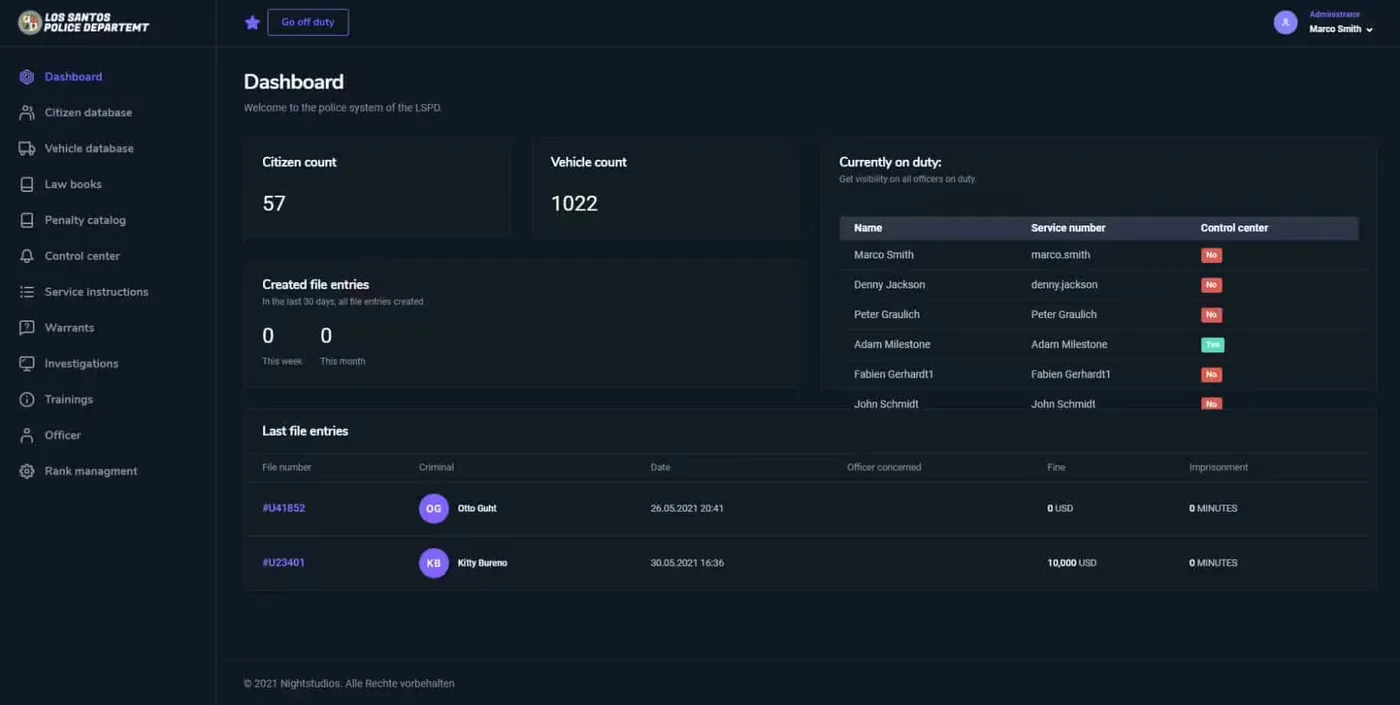
This is the complete law enforcement infrastructure for serious roleplay servers. Officers get a full MDT (Mobile Data Terminal) with searchable databases for persons, vehicles, incidents, and warrants. Dispatchers see real-time unit locations, active calls, and can assign officers to situations with live updates. Departments can manage rosters, case files, and evidence logs all from one interface.
The UI is clean and professional - looks like actual police CAD systems, not a video game menu. Everything is accessible via hotkeys while on duty, with responsive design that works on all screen sizes. And it integrates with your existing framework (ESX, QBCore, or custom) without replacing core systems you've already got working.
Key Features
- Complete MDT Interface - Search and manage criminal records, vehicle registrations, active warrants, and incident reports from a professional in-vehicle terminal
- Live Dispatch System - Real-time 911 call management with unit assignment, location tracking, and priority tagging for active situations
- Person & Vehicle Database - Comprehensive records with mugshots, criminal history, known associates, vehicle registrations, and stolen vehicle flags
- Warrant Management - Create, assign, and track arrest warrants with offense details, officer notes, and automatic MDT flagging
- Incident Reporting - Document arrests, traffic stops, use of force, and investigations with timestamped logs and evidence attachments
- Unit Tracking - See all active units on the map with callsigns, status updates (10-8, 10-6, etc.), and current assignments
- Department Roster - Manage officer ranks, certifications, disciplinary records, and duty schedules within the MDT
- Evidence Locker Integration - Track seized items, case evidence, and chain of custody documentation
- BOLO System - Broadcast Be On the Lookout alerts for suspects, vehicles, or situations to all active units
- Call History & Logs - Complete audit trail of all 911 calls, dispatch actions, and officer responses for review and training
- Multi-Department Support - Separate databases and access levels for police, sheriff, state police, and other agencies
- API & Webhook Integration - Connect to external systems, Discord logging, or custom department websites
Perfect For
- Serious RP servers looking for professional-grade law enforcement tools
- Departments that require advanced records, dispatch, and communication systems
- Communities with multiple law enforcement agencies needing separate but interconnected systems
- Servers transitioning from basic police scripts to comprehensive CAD/MDT infrastructure
Technical Details
- Framework Support: ESX, QBCore, and custom frameworks - modular integration points
- Database: MySQL/MariaDB with optimized queries for fast record lookups even with thousands of entries
- Performance: Lightweight client-side, heavy lifting done server-side with caching for frequently accessed data
- UI Framework: Modern web-based interface (HTML/CSS/JS) using NUI for responsive in-game display
- Permissions System: Role-based access control - officers, supervisors, dispatchers, command staff each see appropriate features
- API Access: RESTful endpoints for external tools, department websites, or custom integrations
Installation
- Import the SQL database structure (tables for persons, vehicles, warrants, incidents, units)
- Configure framework integration (ESX or QBCore job checks, inventory hooks)
- Set up department permissions and access levels in the config
- Customize UI branding (department logos, color schemes) if desired
- Configure Discord webhooks for external logging (optional)
- Start the resource and assign MDT access keybind to officers
MDT Interface Explained
Officers open the MDT (default keybind while in a vehicle or at a computer) and get a dashboard showing active calls, unit status, and recent alerts. From there they can search persons by name or ID, pull up vehicle plates, check for active warrants, or file new incident reports.
Example: Officer stops a vehicle. They run the plate in the MDT, it returns the registered owner plus any flags (stolen, linked to warrants, BOLO match). They run the driver's name, see two prior arrests for drug possession and an active warrant for failure to appear. All this happens in seconds without radioing dispatch or asking admins for info.
Dispatch System
Dispatchers see a live map with all unit locations and status. When a 911 call comes in, it appears on their screen with location, caller info, and call type (robbery, medical, traffic). They can assign the nearest available unit, who receives the call details on their MDT automatically.
Units can update their status (10-8 available, 10-6 busy, 10-23 arrived on scene) from the MDT or via radio commands. Dispatch sees these updates in real-time and can coordinate multi-unit responses or reallocate resources as situations develop.
Person & Vehicle Records
Every interaction can be documented. Officer arrests someone? They create a person record (if new) or update existing with mugshot, charges, and arrest report. Vehicle stops get logged with plate, VIN, make/model, and any violations or warnings issued.
Over time, this builds a comprehensive database that makes investigations possible. Looking for a serial robber? Search incident reports for modus operandi. Trying to link suspects? Check known associates. Need to find a frequently stolen vehicle type? Query the vehicle database. It's CSI-level functionality for roleplay.
Warrant System
Supervisors can issue warrants from the MDT with offense details, bail amount, and special instructions. Once active, that person is flagged in every MDT search. Officer runs their name at a traffic stop? Instant notification of the active warrant. Automatic integration means fewer criminals slip through cracks.
Warrants can be marked served when executed, with arrest details and booking officer logged automatically. This creates accountability and a complete paper trail for the judicial system if your server has court RP.
Why Choose Wasabi Advanced MDT
- All-in-one system - combines every major law enforcement feature in one package.
- Optimized for performance - built to run smoothly on any modern FiveM setup.
- Regular updates - continuous feature additions and improvements.
- Trusted by professionals - created by Wasabi Scripts, one of the most respected FiveM developers.
Ideal For
- Serious RP servers looking for a professional-grade MDT system
- Departments that require advanced records, dispatch, and communication tools
- Developers who want a modular and API-ready framework
Framework Compatibility
- ✅ ESX - Full integration with job system, player data, and inventory
- ✅ QBCore - Native support for QB jobs, metadata, and police systems
- ✅ Custom Frameworks - API endpoints allow integration with any framework using standard HTTP requests
Multi-Department Configuration
Running multiple agencies? Each department can have separate databases with controlled sharing. LSPD sees their cases, BCSO sees theirs, but both can access shared regional records like vehicle registrations and active warrants. Command staff can have cross-department access for oversight.
This mirrors real law enforcement data sharing and prevents meta-gaming while enabling cooperation when storylines require it.
Evidence & Case Management
Officers can attach evidence items to incident reports - seized drugs, weapons, documents, photos. The evidence locker tracks chain of custody, so you know who collected it, when, and where it's stored. For servers with court RP, this provides the documentation defense attorneys and prosecutors need.
Case files can link multiple incidents to track ongoing investigations. Follow a drug trafficking ring through multiple stops, seizures, and arrests - all connected in one case file with a primary investigator and supporting officers documented.
BOLO & Alert System
Dispatcher or supervisor issues a BOLO for a suspect vehicle (say, red sports car last seen fleeing a robbery). Every officer gets that alert on their MDT. If any unit runs a plate matching the description, the MDT highlights it automatically. Collaborative policing through information sharing.
BOLOs can include photos, last known locations, armed/dangerous flags, and vehicle descriptions. They stay active until manually cleared, ensuring all shifts are aware of ongoing situations.
What Makes It Stand Out
Wasabi MDT isn't just a script - it's the future of FiveM roleplay infrastructure. Most MDT systems give you basic record keeping. This gives you a complete CAD system rivaling what real departments use. The difference is night and day for immersion and operational capability.
The polish is evident everywhere. Smooth animations, intuitive UI, fast database queries, zero lag during high-traffic situations. It's production-ready out of the box but flexible enough to customize for your specific department structure and roleplay style.
Real-World Usage Scenario
911 call comes in - armed robbery at a jewelry store. Dispatcher sees the call, checks unit availability on the map, and assigns three units. Officers receive the call on their MDT with location marker and description. They arrive, apprehend suspects, run their names - one has an active warrant, two have prior robbery arrests on file.
Lead officer creates an incident report, attaches seized weapons as evidence, links it to the active warrant, and books all three. The case file automatically includes victim statements from the 911 call, officer reports, evidence logs, and suspect histories. Prosecutor has everything needed without asking anyone for paperwork. That's the power of integrated systems.
Related FiveM Police Scripts
Installation notes
Buy this when it saves setup time
Use this checklist to decide quickly whether the resource fits your current server build, framework, and support expectations.
Server-owner payoff
Wasabi MDT & Dispatch is positioned to reduce Police Scripts instead of making you rebuild the same system from scratch.
Compatibility
Works with esx, qbcore, qbox, standalone. Check the requirements block before adding it to a live stack.
Purchase confidence
Instant download, Stripe checkout, support access, and refund policy context are shown before payment.
Decision assets
Requirements, Preview video, Product Q&A
Product fit, setup, and proof at a glance
Use the published facts on this page to confirm whether Wasabi MDT & Dispatch matches your server before checkout.
Compatibility
- Frameworks
- ESX, QBCore, QBOX, Standalone
- Category
- Police Scripts
Setup & requirements
- Install flow
- Download → resources folder → ensure in server.cfg
- Requirements
- Published on this page
- File size
- 972.76 KB
Proof & buyer questions
- Reviews
- No reviews yet
- Answered Q&A
- Ask before buying
Only the facts published on this page should be treated as confirmed. If you need more detail, review the description, requirements, changelog, reviews, and product Q&A before checkout.