$ USD

Advanced Chess System Multiplayer Chess
Testing a free script?
Free scripts are fine for quick checks. For production servers, compare maintained paid scripts by framework and use case.
Advanced Chess System is a complete multiplayer chess resource for FiveM. Players can sit at physical chess tables, play fully synchronized matches against other players, challenge AI opponents, and let nearby spectat…
Preview
Advanced Chess System
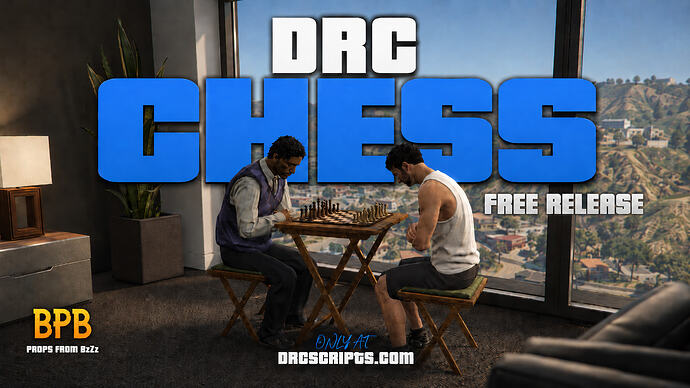
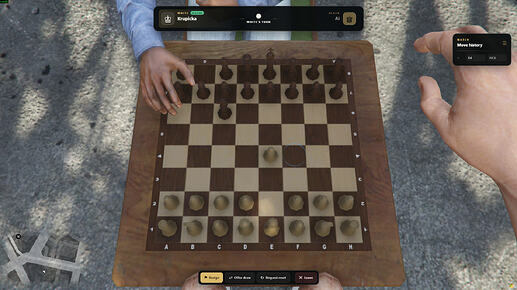
Advanced Chess System is a complete multiplayer chess resource for FiveM. Players can sit at physical chess tables, play fully synchronized matches against other players, challenge AI opponents, and let nearby spectators watch the current game state through an in-world display.
The system is designed to create an immersive chess experience with real 3D pieces, animations, sounds, AI gameplay, and proper chess rules instead of a simple UI-only minigame.
Multiplayer Chess
Players can join a chess table and play a full match against another player.
Includes:
-
Fully synchronized board state
-
Physical 3D chess pieces
-
Smooth piece movement
-
Legal move validation
-
Turn-based gameplay
-
Move history
-
Check, checkmate, and stalemate detection
-
Resign option
-
Draw offers
-
Reset requests requiring both players to accept
AI Opponent
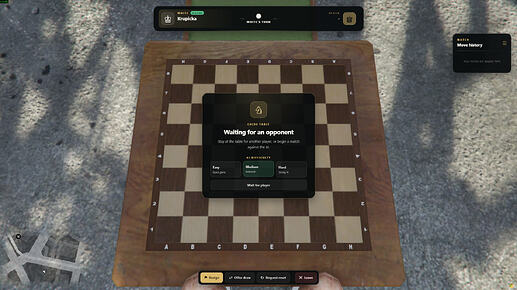
Players can start a match against an AI opponent directly from the chess table.
Includes:
-
Easy, Medium, and Hard difficulty options
-
Configurable AI NPC models
-
AI seated at the table
-
Synchronized AI moves
-
Same move timing across all difficulties
-
Difficulty changes AI strength, not move speed
Spectator System
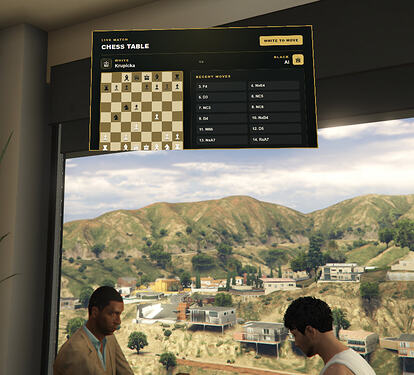
Nearby players can watch active games without joining the match.
Includes:
-
Floating in-world DUI display above the table
-
Live board state
-
Player names
-
Current turn display
-
Recent move history
-
Distance-based loading for performance
-
Display automatically faces spectators
Animations & Sounds
The script includes immersive visual and audio feedback.
Includes:
-
Sitting animations
-
Move animation when a player or AI makes a move
-
Automatic return to idle animation
-
Spatial chess move sound using xsound
-
Configurable sound volume and distance
Chess Rules
The system supports standard chess rules.
Includes:
-
Legal move checking
-
Captures
-
Castling
-
En passant
-
Pawn promotion
-
Check detection
-
Checkmate detection
-
Stalemate detection
Configuration
Everything can be configured:
-
Chess table locations using simple vec4 entries
-
Table object offsets
-
Seat positions
-
Camera settings
-
AI difficulty depth
-
AI NPC models
-
Interaction type
-
Spectator display settings
-
Sound settings
-
Debug and placement tools
Example:
Config.Tables = {
    vec4(338.5125, -1630.5292, 97.9960, 142.53),
}
Additional Features
Standalone, ESX, and QB-Core support
Target, TextUI, and 3D Text interaction modes
ox_target, qb-target, and qtarget support
Physical chess table, board, chairs, and pieces
Dedicated chess camera
Mouse wheel camera zoom
Legal move highlights
Captured piece tracking
Player reconnect state sync
AI NPC synchronization for nearby players
Advanced debug placement tools
Simple table creation with vec4
Preview
Download:
Download via Linkvertise
More script resources
Resource summary
Advanced Chess System Multiplayer Chess is listed as a free FiveM resource. Treat it as a candidate resource: review the source, test it on a staging server, and confirm framework compatibility before using it on a live roleplay server.
Compatibility
Check the original source page and the files inside the resource for ESX, QBCore, QBOX, standalone, dependency, and version notes. If the resource touches jobs, vehicles, inventory, maps, clothing, HUDs, or server events, test it with your existing scripts before publishing it to players.
Install notes
- Download the resource from the verified source or trusted listing.
- Scan the archive and review configuration files before upload.
- Place the folder in your server resources directory and add the correct
ensureline toserver.cfg. - Restart on staging first and check console errors, missing dependencies, and client performance.
Source / download