



Advanced Garages – Complete Vehicle Management System for FiveM
Transform your FiveM server’s vehicle management experience with Advanced Garages, the ultimate garage, impound, and vehicle storage solution designed for modern roleplay servers. This comprehensive system goes far beyond basic vehicle parking—it delivers a feature-rich, immersive interface that gives players complete control over their vehicle collections while providing server administrators with powerful management tools. Whether you’re running public garages, private storage facilities, job-specific vehicle pools, or gang headquarters, Advanced Garages provides the flexibility and functionality your community needs.
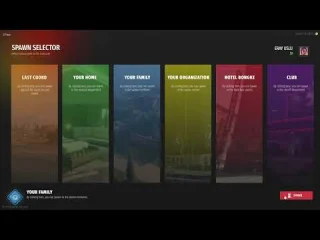
Built with performance and user experience in mind, this system integrates seamlessly with ESX, QBCore, and QBox frameworks while maintaining compatibility with dozens of popular third-party scripts. Players can access their vehicles through an elegant, modern UI that displays real-time vehicle status including fuel levels, engine health, body condition, and more—all while maintaining smooth server performance even with hundreds of stored vehicles.
Comprehensive Garage Types
Advanced Garages supports multiple garage configurations to match any server’s roleplay structure. Create public garages accessible to all players for general vehicle storage, establish private garages for property owners and VIP members, configure job-specific garages for police departments, EMS stations, and mechanic shops, or set up gang garages with restricted access for organized crime groups. Each garage type can be independently configured with custom spawn points, storage limits, pricing structures, and access permissions.
The system also includes a fully-featured impound management system that allows law enforcement to tow and store vehicles, set impound fees, and track vehicle ownership. Server owners can configure automatic impound timers, retrieval costs based on vehicle class, and even permanent confiscation for specific violations.
Key Features
- Multi-Framework Support – Works flawlessly with ESX Legacy, QBCore, and QBox with zero compatibility issues
- Modern Tablet UI – Sleek, responsive interface with real-time vehicle status display and intuitive navigation
- Vehicle Status Tracking – Shows fuel levels, engine health, body damage, mileage, and last location for every stored vehicle
- Public & Private Garages – Configure unlimited garage locations with individual permissions and pricing
- Job & Gang Garages – Dedicated vehicle storage for emergency services, businesses, and criminal organizations
- Advanced Impound System – Complete towing, storage, and retrieval system with configurable fees and timers
- House Garage Integration – Seamless connection with housing scripts for personal vehicle storage at properties
- Vehicle Spawner System – Create custom vehicle spawners for jobs, rentals, or test drive locations
- Shared Garage Options – Allow multiple players to access the same garage with customizable permissions
- Out-of-Garage Vehicle Tracking – See where your vehicles are parked even when not stored in garages
- Customizable Spawn Points – Set precise vehicle spawn locations and headings for each garage
- Vehicle Transfer System – Move vehicles between garages without driving them across the map
- Extensive Integration Support – Compatible with popular fuel, keys, racing, and vehicle customization scripts
- Optimized Performance – Minimal resource usage even with 1000+ stored vehicles across your server
- Configurable Access Control – Set job requirements, gang affiliations, or custom permissions for any garage
Perfect For
- Roleplay servers needing realistic vehicle storage and management systems
- Communities with extensive vehicle collections requiring organized storage solutions
- Servers running job systems with dedicated vehicle fleets for police, EMS, mechanics, and businesses
- Gang roleplay servers requiring secure, faction-specific vehicle storage
- Property-based servers with housing scripts that need integrated garage systems
- Economy-focused servers where impound fees and garage rentals generate revenue
- Realistic city roleplay servers looking to replace basic spawner systems
Advanced Management Features
Server administrators gain access to powerful management tools that make configuring and maintaining garage systems effortless. The config file allows you to set storage limits per garage, define vehicle class restrictions (prevent storing helicopters in street garages), configure pricing tiers based on vehicle value, and establish automatic cleanup routines for abandoned vehicles. You can also set impound rules that automatically tow vehicles parked in restricted zones or left unattended for extended periods.
The system includes detailed logging for vehicle storage, retrieval, and transfers, making it easy to track player activity and investigate potential abuse. Administrators can manually move vehicles between garages, force-retrieve impounded vehicles, or permanently remove abandoned cars from the database.
Installation & Setup
- Download and extract the Advanced Garages resource to your server’s resources folder
- Import the included SQL file to create necessary database tables for vehicle storage
- Configure your garage locations, spawn points, and permissions in the config.lua file
- Add garage markers to your map and configure access points for each location
- Restart your server and configure framework-specific settings (ESX/QBCore/QBox)
- Test vehicle storage, retrieval, and impound functions to ensure proper operation
- Customize UI colors, language strings, and garage types to match your server theme
Framework Compatibility
- ✅ ESX Legacy – Full support for ESX 1.9.x and ESX Legacy (1.10.x+) with shared vehicle access
- ✅ QBCore – Complete integration with QB-Core framework including job and gang garages
- ✅ QBox – Optimized for QBox with enhanced performance and modern features
- ✅ Standalone Mode – Can be configured to work without any framework using basic permissions
Popular Integrations
Advanced Garages works seamlessly with the most popular FiveM scripts including fuel systems (LegacyFuel, ox_fuel, cdn-fuel), vehicle key systems (wasabi_carlock, qb-vehiclekeys, esx_advancedgarage), housing scripts (qb-houses, esx_property, loaf_housing), and vehicle damage scripts (AdvancedVehicleDamage, vehicleFailure). The system also integrates with racing scripts to allow easy vehicle access for race events, and connects with car dealership scripts for new vehicle deliveries directly to garages.
What Makes It Stand Out
Unlike basic garage scripts that only store and spawn vehicles, Advanced Garages provides a complete vehicle lifecycle management system. The real-time vehicle status display means players can see their car’s fuel and damage before retrieving it, preventing frustrating surprises. The multi-garage architecture allows realistic roleplay where players store work vehicles at the police station, personal cars at home, and racing vehicles at the track. The impound system adds consequences for poor parking and creates revenue opportunities for towing companies and law enforcement. With extensive customization options, every server can configure the system to match their unique roleplay style—from strict realism with limited storage to arcade-style convenience with unlimited capacity.
Performance & Optimization
Built with optimization as a core priority, Advanced Garages maintains minimal server load even with thousands of vehicles in storage. The system uses efficient database queries, smart caching mechanisms, and optimized UI rendering to ensure smooth performance. Vehicle spawning is instant with no lag, and the garage UI opens immediately without delays. Resource usage typically stays below 0.01ms during idle and peaks at 0.03ms during active vehicle operations, making it one of the most efficient garage systems available for FiveM.
Requirements
- FiveM server running artifact 5181 or newer
- MySQL database with proper permissions for table creation
- ESX Legacy, QBCore, or QBox framework (or standalone configuration)
- Basic understanding of FiveM resource configuration and server management
Support & Updates
Advanced Garages includes lifetime updates with new features, compatibility patches, and performance improvements. The resource comes with comprehensive documentation, configuration examples, and video tutorials to help you get started quickly. Priority support is available for troubleshooting, custom configurations, and integration assistance with other scripts on your server.




Sydney (verified owner) –
Good performance, clean interface, and helpful support. Nothing to complain about.
Lacy (verified owner) –
The quality is noticeably better than many alternatives I have tried.
Jessika (verified owner) –
Not the best thing, but worth the money
Lenny (verified owner) –
Performance is excellent. We have not noticed any significant increase in resource usage since installing it.
Kaleb (verified owner) –
Support was friendly, fast, and knowledgeable. My issue was resolved within a short time.
Romaine (verified owner) –
The support alone makes this worth purchasing. Fast answers and practical solutions.
Nyasia (verified owner) –
Very beginner-friendly setup. The instructions made the installation process simple.
Candido (verified owner) –
Wished I had found this sooner, it took me a lot of money and time until I found my dream product here!