How To Add Patreon Key to FiveM Server
Welcome to FiveMX's tutorial on how to add your custom license key (Patreon benefits included) to your FiveM server. Follow these step-by-step...

Welcome to FiveMX's tutorial on how to add your custom license key (Patreon benefits included) to your FiveM server. Follow these step-by-step instructions to make full use of your Patreon benefits, such as Onesync, colored server names, and more!
Why You Need a Patreon
A custom license key is essential if:
- You want to utilize your FiveM Patreon benefits (like custom clothings or a colored server name).
- You need to change the listed server owner.
- The automatically generated key from your server provider is invalid.
Preparation
Before you start, ensure you have a Cfx.re Forum account.
If you don't, create one. Then, log in to the Cfx.re Keymaster website.
1. Login to Cfx.re Keymaster
Navigate to the Cfx.re Keymaster website and log in using your Cfx.re Forum account credentials. If you don't have an account, create one first. This is necessary.
2. Create a New Key
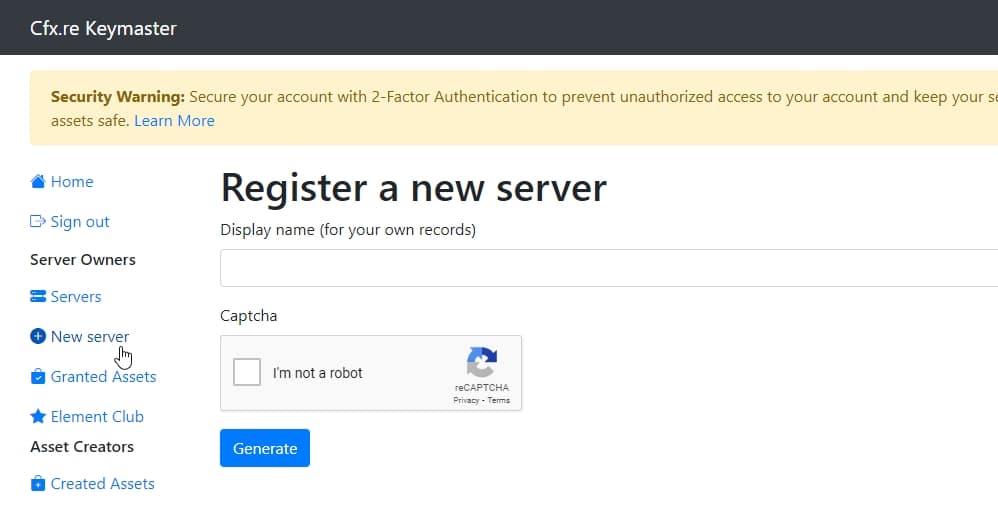
After logging in, click on the New Server button in the left navigation bar. This will take you to the key creation page.
3. Specify your Server Data
Fill out the requested information as follows:
- Label: A descriptive label for your key, e.g., 'My FiveM Server.
- Server IP Address: The IP address of your server without the port.
- Server Type: Select 'Server Provider (rented server).'
4. Enter IP Address
You can find your server's IP address on your server provider’s web interface panel or in the FTP-Browser section on the web interface. Ensure you enter the IP address without the port number.
5. Generate License Key
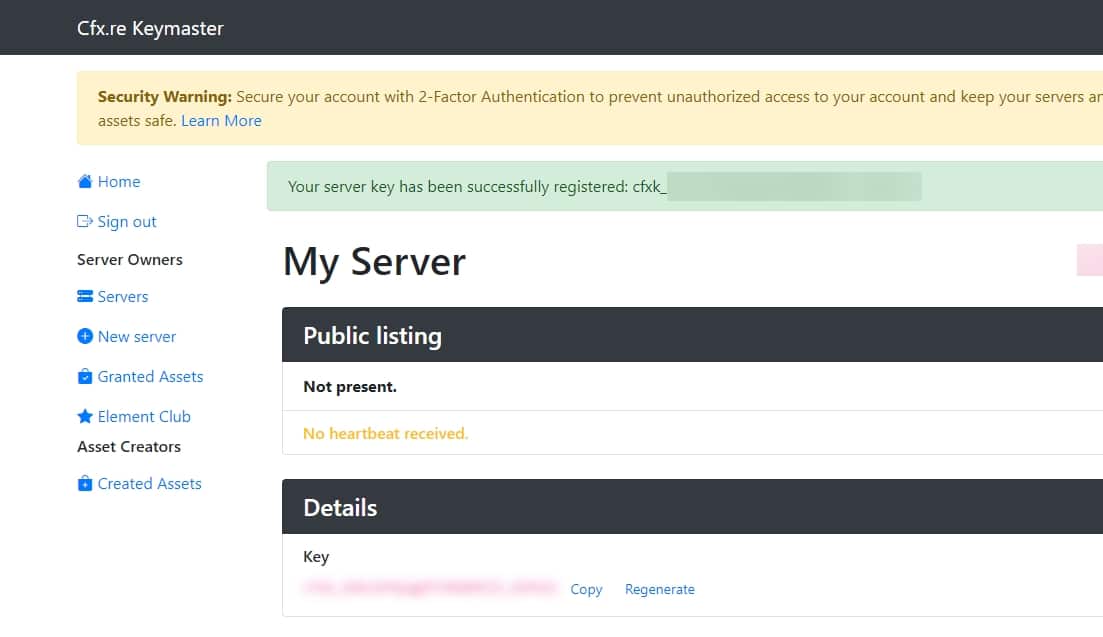
Once all fields are filled, click Generate. Your new license key will be displayed on the home page under your registered servers. And you're done!
Adding the License Key to Your Server
You've generated the server key and now you have to add it to your server. Here is how:
For Zaphosting
1. Access Server Settings
Log in to your game server's web interface and navigate to the Settings section.
2. Paste the License Key
In the Custom License Key field, paste the key you generated.
Note for txAdmin Users
If you're using txAdmin, define the key under the sv_licensekey parameter. Access your server.cfg file via the txAdmin interface panel, the Configs section, or directly through FTP.
Adding the License Key to Your Self-Hosted Server
1. Access server.cfg File
Navigate to the directory where your FiveM server files are located and find the server.cfg file. Open this file using a text editor of your choice.
2. Add Your License Key
Locate the section within the server.cfg file where server configuration settings are listed. Add the following line to this file, substituting "YOUR_LICENSE_KEY" with the key you generated:
sv_licensekey "YOUR_LICENSE_KEY"
Example Configuration
Your server.cfg file should now contain a line similar to this:
sv_licensekey "abcdef1234567890abcdef1234567890"
3. Save and Exit
After adding your license key, save the changes to the server.cfg file and exit the text editor.
Restart Your Server
To activate your custom license key, restart your FiveM server. This can be done through your server management interface or by restarting the server application directly.
Final Steps
After pasting your custom license key, restart your FiveM server. Congratulations, your custom license key is now set up and activated. Sometimes it takse up to 15 minutes to be active.
Related setup resources
- Create a FiveM server template if you are still preparing the project basics.
- Set up txAdmin before changing production server configuration.
- Check server costs when choosing between rented hosting and self-hosting.
- Browse server bundles if you want a faster launch path after the key is active.
- Open the FiveMX shop for scripts and resources to test after the license key works.
FAQ - Common Issues
Why do I need a Patreon for my FiveM server?
A Patreon account is essential for utilizing the exclusive benefits offered to FiveM patrons, such as custom clothing, colored server names, and Onesync features. Additionally, a custom license key linked to your Patreon can be used to change the listed server owner or replace an invalid key generated by your server provider.
What should I do before adding a custom license key?
Before you begin, ensure you have a Cfx.re Forum account. If you don’t have one, create it and then log in to the Cfx.re Keymaster website.
How do I create a new license key on the Cfx.re Keymaster website?
1. Log in to the Cfx.re Keymaster website using your Cfx.re Forum account credentials.
2. Click on the “New Server” button in the left navigation bar.
3. Fill out the information:Label: Provide a descriptive name for your key (e.g., 'My FiveM Server').
Server IP Address: Enter your server's IP address without the port number.
Server Type: Select 'Server Provider (rented server).'
4. Click on Generate to create your new license key. The key will appear under your registered servers on the homepage.
Where can I find my server's IP address?
You can find your server's IP address on your server provider’s web interface panel or in the FTP-Browser section of the web interface. Make sure to use the IP address without the port number.
How can I confirm that my custom license key is working correctly?
After restarting your server, check if the benefits associated with your Patreon tier (such as Onesync, custom clothing, or a colored server name) are active. If they are, your license key is successfully set up and functioning.
![Mercedes G63 Philippe Plein [Mansory] [ADD-ON/REPLACE]](https://cdn.fivemx.com/wp-content/uploads/2022/09/chrome_udQ6d0RFiQ.jpg)