
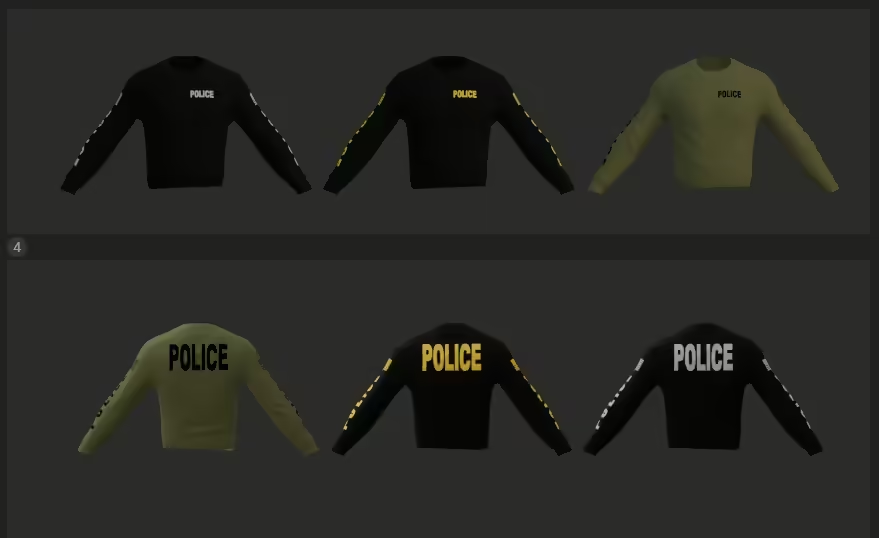
- download the File: First, you’ll need to download the mod file. You can do this by clicking the link below: Download
- Extract the Files: After downloading the file (sweatermultiple.7z), you will need to extract it. Use a file extraction tool such as WinRAR or 7-Zip to unpack the contents.
- Locate Your Game Directory: Navigate to the directory where your game is installed. This is typically found in “C:Program FilesYourGame” or within your Steam library if you’re using Steam.
- Insert Mod Files: Move the extracted files into the appropriate folder within your game directory. This could be a ‘Mods’ folder or a designated directory for custom content. Ensure you place it in the correct folder to avoid any issues.
- Verify Installation: Launch your game to see if the Male Long Sleeve Shirt mod has appeared in your wardrobe options. If installed correctly, you should be able to wear this stylish sweatshirt during your gameplay.
- Enjoy Your New Look: Now that the mod is installed, customize your character’s look and enjoy a more fashionable gaming experience!
Review before live use
Before adding this resource to a live server, test the main workflow on staging, check the current source package, and keep a rollback copy of changed files. For comparison, also review FiveM clothes, free FiveM clothes.