Eventi e callback sicuri (niente modder fastidiosi)
Compatibile con gli inventari: inventario_di_bue, qb-inventario, qs-inventario, mf-inventario, inventario esx, formaggio, ed è possibile aggiungere elementi personalizzati (facoltativo)
Menu skin compatibili: esx_skin, qb-abbigliamento, fivem-aspetto, ed è possibile aggiungere elementi personalizzati (facoltativo)
Sistemi di chiusura auto compatibili: wasabi_carlock, qb-chiavi-veicolo, Jacksam e può essere aggiunto personalizzato (facoltativo)
Sistemi di alimentazione compatibili: legacyfuel, carburante per buoi o qualsiasi altro sistema (facoltativo)
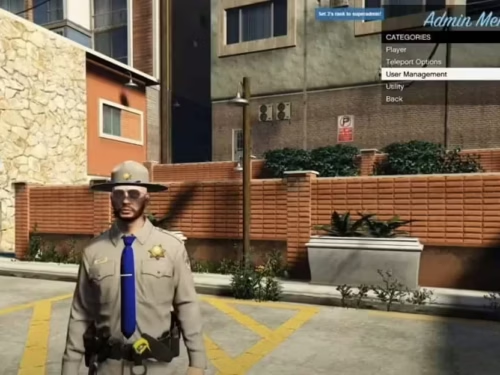
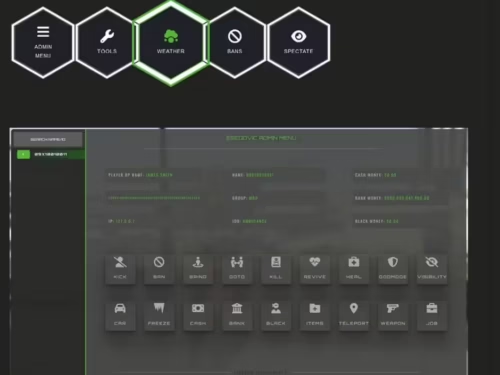
Invia un annuncio amministrativo specifico per il lavoro
Sistema di divieto integrato:
Banna i giocatori tramite menu o comando per un tempo impostato (configurabile)
Visualizza, modifica ed elimina i divieti attivi in Gestione del server sezione del menu
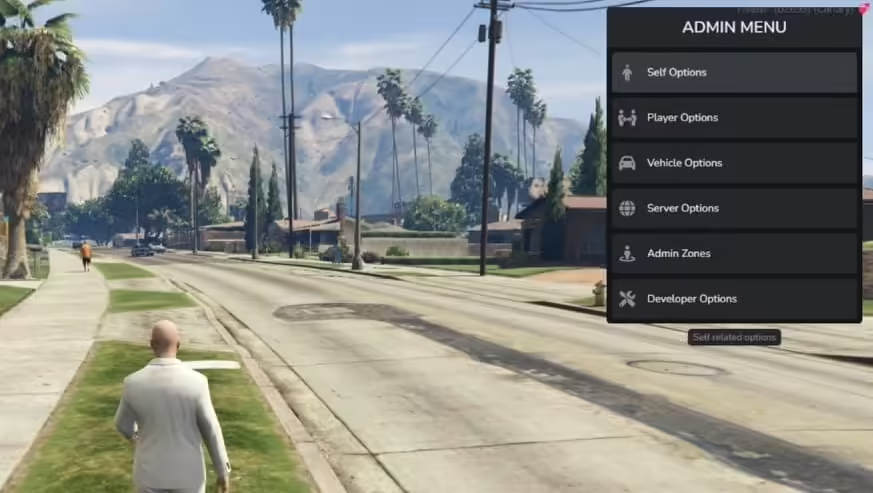
Opzioni del veicolo:
Genera un veicolo con colori personalizzati, targa e possibilità di modifiche massime
Riparare il veicolo
Cambiare la targa del veicolo
Elimina il veicolo più vicino
Rifornire il veicolo
Attiva/disattiva lo stato di blocco della porta del veicolo più vicino
Cambia colore del veicolo
Imposta il veicolo sul carburante massimo (script di carburante compatibili sopra)
Modificare la coppia del veicolo
Opzioni sviluppatore:
Attiva/disattiva la modalità debug (un raycast per ottenere informazioni su entità/oggetti come coordinate e hash. Offre anche l'opzione per eliminare l'entità)
Copia le coordinate del vettore 3 negli appunti
Copia le coordinate del vettore 4 negli appunti
Comandi:
Comandi del menu ban, kick, no clip, cerca inventario, cancella inventario e skin (configurabili)
Zone amministrative:
Crea, modifica e gestisci zone amministrative definite
Possibilità di impostare nome, segnale, colore e dimensione della zona al momento della creazione
Possibilità di impostare se le persone vengono rianimate automaticamente all'interno della zona
Possibilità di impostare se le persone vengono automaticamente disarmate all'interno della zona
Possibilità di impostare se le persone sono invincibili all'interno della zona
Possibilità di impostare limiti di velocità all'interno della zona per i veicoli
Visualizza le zone amministrative attive, modificale, eliminale o teletrasportati in esse
Molti aggiornamenti pianificati e suggerimenti attivamente implementati!
Config = {}

Config.MenuPosition = 'top-right' -- Menu position when open (Options: 'top-left' or 'top-right' or 'bottom-left' or 'bottom-right')
Config.OpenKey = 'F9' -- Default key for opening admin menu
Config.UsingVehicleKeys = 'qb' -- Supported options: 'wasabi' for wasabi_carlock / 'qb' for qb-vehiclekeys / 'jaksam' for jacksam_carlock / 'custom' for custom in modifyme.lua -- Set to false if not needed
Config.SkinMenu = 'qb' -- 'esx_skin' = ESX Skin / 'qb' = qb-clothing / 'fivem-appearance' = FiveM appearance / 'custom' = custom in modifyme.lua
Config.FuelSystem = 'legacyfuel' -- Supported options: 'ox' - ox_fuel/ 'legacyfuel' - LegacyFuel / false - anything else
Config.Inventory = 'qb' -- Current options: 'ox' (For ox_inventory) / 'qb' (For qb-inventory) 'mf' (For mf inventory) / 'qs' (For qs_inventory) / 'cheeza' (for chezza inventory) -- false for none (Can be edited in modifyme.lua)
Config.SpeedMeasurement = 'mph' -- Options: 'mph' or 'kmh'

Config.AdminPerms = { -- Different ways of defining who has permission to access and utilize the admin menu
    UserGroups = {
        enabled = true, -- Enable usergroups from framework (Esx/QBCore), example/common groups below by default.
        Groups = {
            'admin',
            'god',
        --  'mod',
        }
    },

    ----------------------------------------------------------------------------
    -- If ace perms are desired, an example of ace perms to set in server.cfg:--
    -- add_ace group.admin 'wasabi.adminmenu.allow' allow                     --
    ----------------------------------------------------------------------------
    AcePerms = { enabled = true, AcePerm = 'wasabi.adminmenu.allow' }
}

--- Commands
Config.Commands = {
    Ban = {
        enabled = true, -- Enable ban command?
        command = 'ban' -- Command (Default: 'ban')
        -- Example: /ban ID_HERE OPTIONAL_REASON_HERE
        -- Indefinite ban. Use menu for temporary ban
    },
    Kick = {
        enabled = true, -- Enable kick command?
        command = 'kick' -- Command (Default: 'kick')
        -- Example: /kick ID_HERE OPTIONAL_REASON_HERE
    },
    NoClip = {
        enabled = true, -- Enable noclip command?
        command = 'noclip' -- Command (Default: 'noclip')
        -- Example: /noclip
    },
    SearchInv = {
        enabled = true, -- Enable searchinv command?
        command = 'searchinv' -- Command (Default: 'searchinv')
        -- MUST HAVE Config.Inventory CONFIGURED TO PROPER INVENTORY!
        -- Example: /searchinv ID_HERE (Opens target inventory)
    },
    ClearInv = {
        enabled = true, -- Enable clearinv command?
        command = 'clearinv' -- Command (Default: 'clearinv')
        -- MUST HAVE Config.Inventory CONFIGURED TO PROPER INVENTORY!
        -- Example: /clearinv ID_HERE (Clears target inventory)
    },
    SkinMenu = {
        enabled = true, -- Enable skinmenu command?
        command = 'skinmenu' -- Command (Default: 'skinmenu')
        -- MUST HAVE Config.SkinMenu CONFIGURED TO PROPER SKIN / CLOTHING SCRIPT
        -- Example: /skinmenu ID_HERE (Opens skin menu on target's screen)
    }
}

--- WEATHER SETTING OPTIONS
Config.Weathers = {
    {label = 'Clear Skies', value = 'CLEAR'},
    {label = 'Extra Sunny', value = 'EXTRASUNNY'},
    {label = 'Cloudy', value = 'CLOUDS'},
    {label = 'Foggy', value = 'FOGGY'},
    {label = 'Thunder', value = 'THUNDER'},
    {label = 'Rainy', value = 'RAIN'},
    {label = 'Halloween', value = 'HALLOWEEN'},
    {label = 'Snow Light', value = 'SNOWLIGHT'},
    {label = 'XMAS', value = 'XMAS'}
}

--- BAN SETTING OPTIONS
Config.Ban = { --- value = ban time in hours
    {label = '2 Hours', value = 2},
    {label = '24 Hours', value = 24},
    {label = '1 Week', value = 168},
    {label = 'Permanent', value = 'perm'}
}

--- JOB ANNOUNCEMENT OPTIONS
Config.Jobs = { -- label value is for how it is displayed in the menu. name must be exact as in your jobs database/table
    { label = 'Police', name = 'police' },
    { label = 'EMS', name = 'ambulance' },
    { label = 'Mechanic', name = 'mechanic' },
    { label = 'Car Dealer', name = 'cardealer' }
}

--- NO CLIP OPTIONS
Config.Noclip = {
     FirstPersonWhileNoclip = true,
     DefaultSpeed = 1.0,
     MaxSpeed = 12.0,
     Controls = {
         DecreaseSpeed = 14, -- Mouse wheel down
         IncreaseSpeed = 15, -- Mouse wheel up
         MoveFoward = 32, -- W
         MoveBackward = 33, -- S
         MoveLeft = 34, -- A
         MoveRight = 35, -- D
         MoveUp = 44, -- Q
         MoveDown = 46, -- E
     },
     Particle = {
         Fxname = 'core',
         Effectname = 'ent_dst_elec_fire_sp'
     }
}

---- VEHICLE RELATED OPTIONS
Config.VehicleColors = { --- https://pastebin.com/pwHci0xK
    { label = 'Red', value = 27 },
    { label = 'Black', value = 0 },
    { label = 'Sunset Red', value = 33 },
    { label = 'Hot Pink', value = 135 },
    { label = 'Salmon Pink', value = 136 },
    { label = 'Dark Green', value = 49 },
    { label = 'Surf Blue', value = 68 },
    { label = 'Woodbeech Brown', value = 102 },
    { label = 'Cast Iron Silver', value = 10 },
    { label = 'Ice White', value = 111 },
    { label = 'Cream', value = 107 },
    { label = 'Frost White', value = 112 }
}

Config.TorqueMultiplier = { --- https://docs.fivem.net/natives/?_0xB59E4BD37AE292DB
    { label = 'Off', value = 1.0 },
    { label = '25%', value = 4.0 },
    { label = '50%', value = 8.0 },
    { label = '75%', value = 10.0 },
    { label = '100%', value = 100.0 }
}
Setup guide
The delivered README supplies the authoritative SQL, dependency and start-order baseline.
Requirements and preparation
ESX or QBCore, ox_lib E oxmysql.
Choose compatible inventory, clothing, vehicle-key and fuel integrations.
Installazione
Importa install_me.sql.
Configure permissions and integrations in configs/config.lua.
Start the menu after its framework, ox_lib E oxmysql.
Configuration checkpoints
Use least-privilege groups or ACE permissions.
Test inventory actions, bans, noclip, vehicle actions and staff-only commands with separate staff and player accounts.
Safety: Back up the affected resource and database tables, use credentials owned by your server, and complete a staging test before replacing a live resource. The full configuration remains in the download package.
7 recensioni per Wasabi Admin Menu
Valutato 5 su 5
Dayana (proprietario verificato)–
Support was friendly, fast, and knowledgeable. My issue was resolved within a short time.
Valutato 5 su 5
GreenCobra (proprietario verificato)–
I think this is amazing. Lots of features and customizable from every point of view. The few times I asked for help in support they were competent, fast and above all very patient. Really recommend
Valutato 5 su 5
Chase (proprietario verificato)–
I appreciate how customizable this resource is. We were able to make it match our server branding perfectly.
Valutato 5 su 5
Scotty (proprietario verificato)–
Easy to install and easy to customize.
Valutato 5 su 5
Everardo (proprietario verificato)–
Molto soddisfatto di questo acquisto.
Valutato 5 su 5
NinjaEva980 (proprietario verificato)–
One of the few resources I purchased that worked correctly without extensive troubleshooting.
Valutato 5 su 5
Kraig (proprietario verificato)–
The quality is noticeably better than many alternatives I have tried.
Solamente clienti che hanno effettuato l'accesso ed hanno acquistato questo prodotto possono lasciare una recensione.















Dayana (proprietario verificato) –
Support was friendly, fast, and knowledgeable. My issue was resolved within a short time.
GreenCobra (proprietario verificato) –
I think this is amazing. Lots of features and customizable from every point of view. The few times I asked for help in support they were competent, fast and above all very patient. Really recommend
Chase (proprietario verificato) –
I appreciate how customizable this resource is. We were able to make it match our server branding perfectly.
Scotty (proprietario verificato) –
Easy to install and easy to customize.
Everardo (proprietario verificato) –
Molto soddisfatto di questo acquisto.
NinjaEva980 (proprietario verificato) –
One of the few resources I purchased that worked correctly without extensive troubleshooting.
Kraig (proprietario verificato) –
The quality is noticeably better than many alternatives I have tried.