
FiveMX
Shop
Scripts
MLOs
Full Servers
Free Mods
Tools
Guides
All Products
FiveMX

Start building your server today.

Curated FiveM resources, instant delivery, free starter mods, and practical guides in one calm marketplace.

Browse the shopsupport@fivemx.com

Shop

  • Shop
  • All Products
  • Free Mods
  • Best Scripts & Mods
  • FiveM Scripts

Frameworks

  • QBCore Scripts
  • ESX Scripts
  • QBox
  • Standalone

Community

  • Blog
  • Support
  • Creators
  • Affiliate

Legal

  • Privacy Policy
  • Terms of Service
  • Refund Policy
  • Digital Delivery
  • Cookie Policy
  • GDPR Compliance
  • DMCA
  • Imprint
  • Editorial Policy
© 2026 FiveMX. All rights reserved.·FiveMX is not affiliated with Rockstar Games, Take-Two Interactive, or CFX.re. All trademarks are property of their respective owners.
GitHubDiscordDocs

2 product images available.

Compatibility:

KQ OutfitBag

KQ OutfitBag - Great script performance running at 0. Compatible with ESX framework for FiveM servers.

Instant Access
14-day refund policy
Secure Checkout

Product fit, setup, and proof at a glance

Use the published facts on this page to confirm whether KQ OutfitBag matches your server before checkout.

Compatibility

Frameworks
ESX, QBCore, QBOX
Category
Clothing Packs

Setup & requirements

Install flow
Download → resources folder → ensure in server.cfg
Requirements
Published on this page
File size
1.54 MB

Proof & buyer questions

Reviews
No reviews yet
Answered Q&A
Ask before buying

Only the facts published on this page should be treated as confirmed. If you need more detail, review the description, requirements, changelog, reviews, and product Q&A before checkout.

$6.99
Instant file access after payment
Support and refund policy shown before checkout
Works with esx, qbcore, qbox
  • Instant Access
  • SSL Encrypted
  • Card, Klarna, wallets
Frameworks

esx, qbcore, qbox

Requirements

Published on this page

Preview

Available

Card, Klarna and supported wallets via Stripe. More local methods may appear when available for your region.

Ask support before buyingRead refund policy

Support expectation

Support covers download access, missing delivered files, and questions based on the published setup notes.

Custom installation, framework conversion, live server setup, and custom feature work are not included unless stated on the product page.

Ask before buying if your server uses heavily modified framework, inventory, or database resources.

Building a larger server?Compare curated bundles before checkout if you need multiple compatible scripts.View FiveM bundles

Buy this when it saves setup time

Use this checklist to decide quickly whether the resource fits your current server build, framework, and support expectations.

Server-owner payoff

KQ OutfitBag is positioned to reduce Clothing Packs instead of making you rebuild the same system from scratch.

Compatibility

Works with esx, qbcore, qbox. Check the requirements block before adding it to a live stack.

Purchase confidence

Instant download, Stripe checkout, support access, and refund policy context are shown before payment.

Decision assets

Requirements, installation details, Preview video, Product Q&A

Description

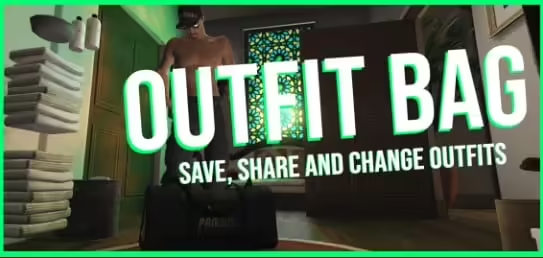
KQ OutfitBag - Portable Wardrobe System for Quick Outfit Changes

Give your players the flexibility to change outfits anywhere, anytime with KQ OutfitBag - a portable wardrobe system that works as an inventory item. Perfect for criminals who need disguises, civilians attending events, gang members with territory colors, or anyone who wants quick access to saved outfits without visiting a clothing store. This isn't just a wardrobe script; it's a portable fashion system that fits in your pocket.

What's Included

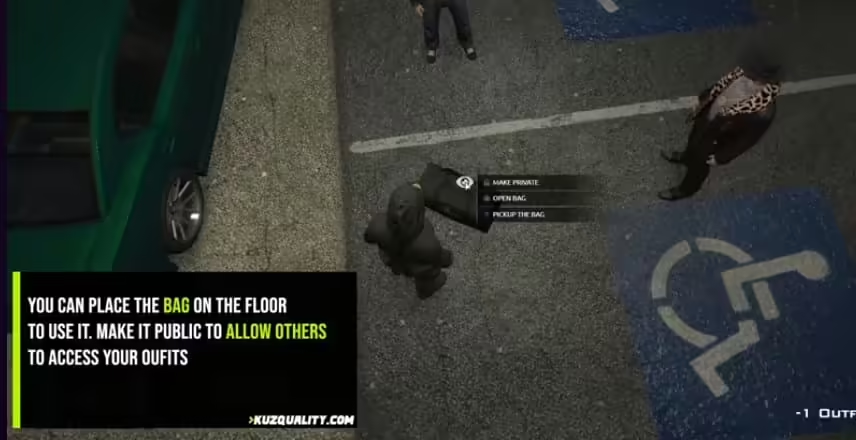
You're getting a complete portable outfit management system that functions as an ESX/QBCore inventory item. Players carry outfit bags in inventory, use them to open a wardrobe interface, save unlimited outfit presets with custom names, and switch between outfits instantly from anywhere on the map. The system includes full clothing compatibility with all GTA V clothing items, accessories, and customization options. Everything needed for flexible outfit management is built in.

Key Features

  • Portable Wardrobe Item - Functions as a usable inventory item, carry wardrobe access anywhere without visiting stores
  • Unlimited Outfit Presets - Save as many outfit combinations as needed with custom naming for easy identification
  • Instant Outfit Changes - Switch between saved outfits immediately, no loading screens or delays
  • Full Clothing Support - Compatible with all GTA V clothing, accessories, masks, hats, glasses, and body modifications
  • Custom Outfit Names - Label outfits clearly (Work Uniform, Gang Colors, Formal Attire, Disguise, etc.)
  • Save Current Outfit - Capture your current clothing configuration as a new preset instantly
  • Delete/Edit Presets - Remove outdated outfits or update existing presets with new clothing
  • Framework Integration - Works seamlessly with ESX and QBCore inventory systems
  • Clean UI Interface - Intuitive menu showing all saved outfits with preview and management options
  • Performance Optimized - Minimal resource usage, even with many saved outfits

Perfect For

  • Criminal Roleplay - Quick disguise changes during or after crimes to evade police identification
  • Gang Territory - Members switch to gang colors when entering territory or attending gang events
  • Job Systems - Employees change into uniforms for work and back to civilian clothes after shifts
  • Event Attendance - Players bring formal wear for weddings, parties, or business meetings
  • Law Enforcement - Undercover cops carry civilian outfits and switch to uniform when needed
  • Casual Convenience - Fashion-conscious players who like outfit variety without constant store visits

How It Works

Players acquire an outfit bag item through shops, crafting, or administrative grants. The bag sits in their inventory like any other item. When they want to change outfits, they use the outfit bag item, which opens the wardrobe interface. From there, they can view all saved outfit presets, select one to wear immediately, save their current clothing as a new preset with a custom name, or delete/edit existing presets. The entire process takes seconds, making it perfect for on-the-fly outfit changes during active roleplay scenarios.

Installation

  1. Extract kq_outfitbag to your resources folder
  2. Add ensure kq_outfitbag to your server.cfg
  3. Import the SQL file to add the outfit bag item to your database
  4. Configure item settings in config.lua (item name, weight, price, etc.)
  5. Add outfit bag to shops, crafting recipes, or admin commands
  6. Optionally configure restrictions (can't use in vehicles, during combat, etc.)
  7. Test outfit saving and changing functionality

Framework Compatibility

  • ✅ ESX Legacy - Full integration with ESX inventory and clothing systems
  • ✅ ESX 1.9.x - Compatible with older ESX versions
  • ✅ QBCore - QB-compatible version available with qb-inventory integration
  • ✅ QBOX - Works with QBOX framework and inventory systems

Technical Details

  • Performance Impact: Negligible (~0.00ms idle, ~0.01ms during outfit changes)
  • Storage Method: Outfits stored in database per-player with unlimited capacity
  • Item Type: Usable inventory item (consumable-reusable)
  • Clothing System: Uses native GTA V clothing components and drawables
  • Dependencies: ESX or QBCore framework required
  • Database: SQL file included for item and outfit storage tables

Configuration Options

The config file offers extensive customization. Set the outfit bag item weight and inventory stack limits, configure whether bags are reusable or consumable, define usage restrictions (can't use while cuffed, in vehicles, or during combat), set outfit name character limits, enable or disable outfit sharing between players, configure cooldowns between outfit changes to prevent spam, and customize UI colors and button layouts. You can also set whether outfit bags require specific permissions or job roles.

What Makes It Stand Out

Unlike traditional wardrobe scripts tied to specific locations (homes, clothing stores), the KQ OutfitBag brings wardrobe functionality anywhere through a portable item. This creates genuine gameplay value - criminals can ditch recognizable clothing after heists, gang members can respect territory dress codes, and professionals can maintain work-life outfit separation without constant store visits. The unlimited outfit preset system means players aren't restricted to 3-5 saved outfits; fashion enthusiasts can save dozens of combinations. With 45+ servers already using it, the OutfitBag has proven essential for dynamic roleplay where appearance changes matter.

Gameplay Applications

  • Crime Disguises: Criminals wear distinctive outfits during robberies, then switch to clean clothes to avoid police profiling
  • Gang Identification: Members carry gang colors in bags and change when entering contested territory
  • Undercover Operations: Police carry civilian outfits for undercover work, switching to uniform when needed
  • Job Uniforms: Employees keep work uniforms in bags, changing at job sites instead of homes
  • Event Preparation: Players bring formal wear to weddings or business attire to meetings
  • Fashion Variety: Style-focused players maintain large wardrobes accessible anywhere

Criminal Use Cases

For crime-focused servers, the OutfitBag is invaluable. Criminals can wear masks and distinctive clothing during heists for intimidation, then immediately switch to casual civilian wear when escaping. Police looking for suspect in red hoodie and mask won't find them in the now-equipped blue jacket and baseball cap. This adds strategic depth to crime and pursuit - witnesses describe one outfit, but the suspect now wears something completely different.

Gang Territory Roleplay

Gang servers benefit enormously from portable outfit changes. Members can wear neutral civilian clothes when traveling through rival territory to avoid conflict, then switch to gang colors when reaching home turf. This creates realistic territorial behavior - wearing colors is a statement of presence and control, but smart members don't advertise affiliation in dangerous areas.

Professional Roleplay

For serious roleplay servers, the OutfitBag enables proper work-life separation. Lawyers wear suits to court but carry casual clothes for after-work activities. Doctors change into scrubs at the hospital but don't wear medical attire off-duty. Mechanics switch to work overalls at the shop but dress normally elsewhere. This attention to outfit appropriateness enhances immersion.

Economy Integration

Integrate outfit bags into your server economy by selling them at clothing stores ($500-$2,000 typical pricing), offering them as job benefits (mechanics, police, EMS get free uniform bags), including them in starter packs for new players, or making them craftable through tailoring or manufacturing jobs. You can also create premium versions with faster change times or additional preset slots at higher prices.

Customization Examples

  • Job-Restricted Bags: Special police outfit bags that only store law enforcement uniforms
  • Gang-Specific Bags: Bags that automatically include gang clothing presets for new members
  • VIP Premium Bags: Donator bags with larger preset capacity or instant change times
  • Branded Bags: Different bag items for different clothing store brands (luxury vs budget)
  • Tiered Systems: Basic bags hold 10 outfits, premium bags hold unlimited

Usage Restrictions

Configure sensible restrictions to prevent exploitation. Recommended settings include preventing outfit changes while handcuffed, blocking changes during active combat, disabling use while in vehicles (or while driving), and adding brief cooldowns between changes (3-5 seconds) to prevent rapid-fire outfit cycling. These restrictions maintain realism while preserving the convenience factor.

Support & Updates

Includes lifetime updates and ongoing support for framework compatibility. The resource is maintained for ESX, QBCore, and QBOX updates. Bug fixes and new features are added based on community feedback.

https://www.youtube.com/watch?v=4hl32OpVhC4

Related Products You Might Like

  • Premium Inventory Script - Advanced inventory system with drag-and-drop UI trusted by 225+ servers
  • Chezza Inventory - Complete inventory system with weapon customization support
  • FiveM EUP Pack V5 - Premium clothing pack with 166+ satisfied customers
  • Super ESX Server - Complete server package with jobs and MLOs included

Installation notes

Requires a FiveM server, ESX or QBCore, access to server resources, and permission to restart the resource after configuration.
DescriptionRequirementsPreview video
Home
Shop
Clothing Packs
Clothing Packs
ESX
QBCore
QBOX
Review process
Review process

Key Features

  • Portable Wardrobe Item

    Functions as a usable inventory item, allowing players to carry wardrobe access anywhere without visiting clothing stores

  • Unlimited Outfit Presets

    Save as many outfit combinations as needed with custom naming for easy identification

  • Instant Outfit Changes

    Switch between saved outfits immediately with no loading screens or delays

  • Full Clothing Support

    Compatible with all GTA V clothing, accessories, masks, hats, glasses, and body modifications

  • Framework Integration

    Works seamlessly with ESX Legacy, ESX 1.9.x, QBCore, and QBOX inventory systems

Frequently Asked Questions

Community Q&A

0 questions

No Questions

Be the first to ask a question!

0/500 characters (minimum 10)

Your question will be reviewed before appearing publicly.

Related Products

$28.99
$6.99
$24.99
$14.99

Related Tutorials & Guides

Learn more about setting up, configuring, and using this type of resource.

ESX vs QBCore vs QBOX: Technical Framework Comparison 2026

ESX vs QBCore vs QBOX: Technical Framework Comparison 2026

Choosing a framework is the single most consequential decision when building a FiveM server. It determines which scripts you can use, how your developers write code, the…

FiveM Frameworks Explained: Complete Guide to ESX, QBCore & QBOX

FiveM Frameworks Explained: Complete Guide to ESX, QBCore & QBOX

FiveM frameworks form the backbone of roleplay servers. They're not just code libraries—they're complete systems that manage player identity, jobs, inventory, permissions,…

QBox Framework Guide: Migrate from QBCore and Boost Performance (2026)

QBox Framework Guide: Migrate from QBCore and Boost Performance (2026)

QBox has firmly established itself as the natural successor to QBCore in the FiveM roleplay ecosystem.

Continue Building Your FiveM Server

Use this product as part of a larger setup. Explore related categories, alternative frameworks, premium bundles, and free companion downloads.

Explore Gang & CrimeBrowse all scriptsClothing Packs scriptsesx scriptsTry QBCore insteadTry QBox insteadFree FiveM modsCompare bundles
Knocks Clothing Pack V3 (10 GB)

Knocks Clothing Pack V3 (10 GB)

Duty Belts and Safariland 2 Holster Pack (FiveM EUP)

Duty Belts and Safariland 2 Holster Pack (FiveM EUP)

Clothing Pack NonBranded

Clothing Pack NonBranded

Vipex Illenium Appearance

Vipex Illenium Appearance