







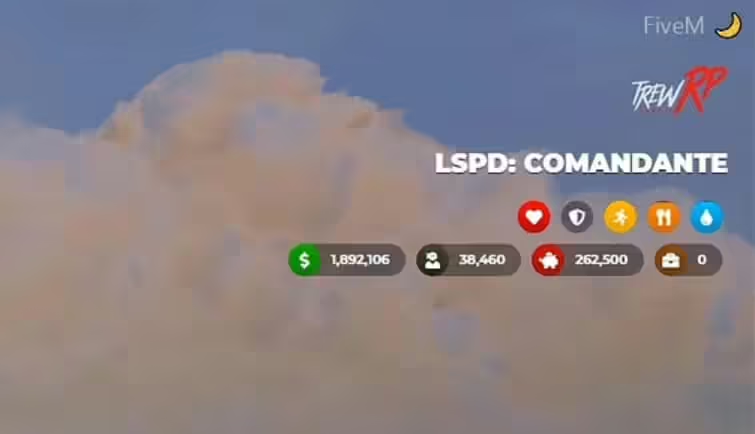
Het was een geweldige ervaring om GTA5 RP te spelen en LUA te leren om de Trew HUD UI te coderen. Echter, na talloze uitdagingen met de FiveM-community en het project zelf, heb ik besloten om verdere ontwikkeling te stoppen. Het is al 6 maanden geleden dat ik voor het laatst GTA5 RP heb gespeeld, en het voortzetten van dit project heeft geen zin meer.
Video Voorbeeld

Download Mirror
Functies
- Serverlogo;
- Functie en functieniveau;
- Geld, vuil geld, bank en samenleving (deze laatste is alleen voor ESX);
- Status zoals gezondheid, pantser, uithoudingsvermogen, honger en dorst;
- Snelheidsmeter met veiligheidsgordel ondersteuning, brandstofdetectie, lichten, versnellingswisseling, waarschuwingen en sirenes (voor noodvoertuigen);
- Locatie en tijd;
- Spraakcontroller (OneSync klaar);
- Gebruikersinterface voor wapens;
- Aangepaste statusopname.
Installatie-instructies
- Pak de bestanden uit:
- Pak de
.zipbestand of open het direct. - Plaats
trew_hud_uiin je resources directory.
- Pak de
- Update
server.cfg:- Voeg de volgende regel toe aan uw
server.cfgfile:sqlCode kopiërenstart trew_hud_ui
- Voeg de volgende regel toe aan uw
Speciale instructies voor de ESX-versie
Vereisten:
es_extendedesx_societyesx_addonaccount
Optioneel:
esx_basicneedsesx_statusLegacyFuel(het moet worden gestart voordattrew_hud_ui)
Standaard HUD uitschakelen:
- Ga naar
es_extended/config.luaen stel inConfig.EnableHudnaarfalse.
Code vervangen in esx_basicneeds/main.lua:
- Vervang de bestaande code:
TriggerEvent('esx_status:registerStatus', 'hunger', 1000000, '#CFAD0F', function(status) return true end, function(status) status.remove(1000) end) TriggerEvent('esx_status:registerStatus', 'thirst', 1000000, '#0C98F1', function(status) return true end, function(status) status.remove(750) end)met:TriggerEvent('esx_status:registerStatus', 'hunger', 1000000, '#CFAD0F', function(status) return false end, function(status) status.remove(1000) end) TriggerEvent('esx_status:registerStatus', 'thirst', 1000000, '#0C98F1', function(status) return false end, function(status) status.remove(750) end)
Speciale instructies voor de VRP\/VRPEX versies
Config.vRP instellingen:
- Stel benodigde items zoals zwart geld in door het item-ID op te geven in
config.lua.
Config.vRP voorbeeld:
Config.vRP = {
 blackMoney = "dirty_money" -- Change this to your black money item ID
}
Algemene configuraties:
- Config.Locale: Stel taal in (standaard is
en). - Config.serverLogo: Stel de URL van je serverlogo in.
- Config.font: Pas het UI-lettertype aan (standaard is Montserrat).
- Config.date: Stel datumformaat in voor de GPS-locatie.
- Config.voice: Configureer spraakinstellingen (OneSync compatibel).
- Config.vehicle: Configureer voertuig- en snelheidsmeterinstellingen.
- Config.ui: Schakel weergave-elementen van de HUD in/uit.
Aangepaste Status Toevoegen
U kunt aangepaste indicatoren maken voor bestaande statussen zoals stress of dronkenschap.
Voorbeeld:
nexports.trew_hud_ui.createStatus({
 status = 'stress',
 color = '#FF0090',
 icon = '<i class="fas fa-brain"></i>'
});
Aanpassen van Status:
Citizen.CreateThread(function()
 while true do
 Citizen.Wait(1000)

 local STRESS_STATUS

 TriggerEvent('esx_status:getStatus', 'stress', function(status)
 STRESS_STATUS = status.getPercent()
 end)

 exports.trew_hud_ui:setStatus({
 name = 'stress',
 value = STRESS_STATUS
 });
 end
end)
Chat Commando's:
- /toggleui: Schakelt HUD informatie-elementen in/uit, nuttig voor streamers.
Gebruiksvoorbeeld:
/toggleui
FAQ
V: De HUD datum is verkeerd! Kun je het repareren?
- A: De HUD datum gebruikt de game server's tijd en standaardfuncties voor FiveM, dus het is niet fout. Als je de echte datum wilt weergeven, kun je bewerken
app.jsmet behulp van JavaScript'sDate()function. Google het voor meer info.
V: Hoe kan ik het /toggleui commando bewerken om de elementen te verbergen?
- A: Om te bewerken
/toggleuicommando, ga naar deui.htmlbestanden en zoek naar deidattribuut van de elementen die u wilt verbergen. Bewerk vervolgens detoggleuicommand inclient.luaom aan uw behoeften te voldoen.
V: Bent u van plan een versie uit te brengen die dit of dat script ondersteunt?
- A: Momenteel niet. LegacyFuel wordt getoond als een optionele functie omdat het het brandstofgedrag verandert, maar geen speciale functies vereist om te werken.
V: Ik wil de posities van de elementen wijzigen. Hoe kan ik dat doen?
- A: Om de posities van de elementen te wijzigen, controleer de
main.cssbestand en wijzig hettop,left,right, ofbottomeigenschappen van de elementen die je wilt. Wees voorzichtig en lees over absolute positionering in CSS. Gebruik bijvoorbeeld, om een element onderaan te positioneren,BOTTOMeigenschap in plaats vanTOP.