







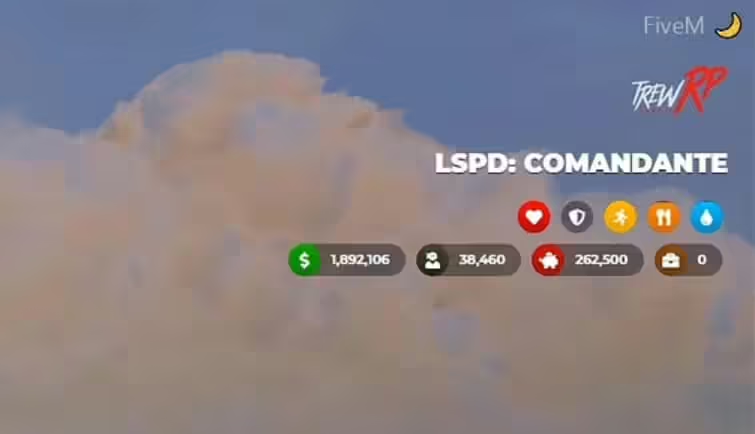
To było wspaniałe doświadczenie grać w GTA5 RP i uczyć się LUA, aby kodować Trew HUD UI. Jednak po licznych wyzwaniach związanych ze społecznością FiveM i samym projektem, zdecydowałem się zaprzestać dalszego rozwoju. Minęło 6 miesięcy od ostatniej gry w GTA5 RP, a kontynuowanie tego projektu nie ma już sensu.
Podgląd wideo

Mirror do pobrania
Cechy
- Logo serwera;
- Praca i ranga w pracy;
- Pieniądze, brudne pieniądze, bank i społeczeństwo (to ostatnie dotyczy tylko ESX);
- Statusy takie jak zdrowie, pancerz, wytrzymałość, głód i pragnienie;
- Prędkościomierz z pasami bezpieczeństwa wsparcie, wykrywanie paliwa, światła, zmiana biegów, alerty i syreny (dla pojazdów uprzywilejowanych);
- Lokalizacja i czas;
- Kontroler głosu (gotowy na OneSync);
- Interfejs użytkownika dla broni;
- Dodawanie niestandardowych statusów.
Instrukcje Instalacji
- Wypakuj pliki:
- Wypakuj
.zipplik lub otwórz go bezpośrednio. - Umieść
trew_hud_uiw katalogu resources.
- Wypakuj
- Aktualizacja
server.cfg:- Dodaj następującą linię do swojego
server.cfgplik:sqlCode kopierenstart trew_hud_ui
- Dodaj następującą linię do swojego
Specjalne instrukcje dla wersji ESX
Wymagania:
es_extendedesx_societyesx_addonaccount
Opcjonalnie:
esx_basicneedsesx_statusLegacyFuel(powinien być uruchomiony przedtrew_hud_ui)
Wyłączanie domyślnego HUD:
- Przejdź do
es_extended/config.luai ustawConfig.EnableHuddofalse.
Zastępowanie kodu w esx_basicneeds/main.lua:
- Zastąp istniejący kod:
TriggerEvent('esx_status:registerStatus', 'hunger', 1000000, '#CFAD0F', function(status) return true end, function(status) status.remove(1000) end) TriggerEvent('esx_status:registerStatus', 'thirst', 1000000, '#0C98F1', function(status) return true end, function(status) status.remove(750) end)za pomocą:TriggerEvent('esx_status:registerStatus', 'hunger', 1000000, '#CFAD0F', function(status) return false end, function(status) status.remove(1000) end) TriggerEvent('esx_status:registerStatus', 'thirst', 1000000, '#0C98F1', function(status) return false end, function(status) status.remove(750) end)
Specjalne instrukcje dla wersji VRP/VRPEX
Ustawienia Config.vRP:
- Skonfiguruj niezbędne przedmioty, takie jak czarne pieniądze, określając ID przedmiotu w
config.lua.
Przykład Config.vRP:
Config.vRP = {
 blackMoney = "dirty_money" -- Change this to your black money item ID
}
Ogólne konfiguracje:
- Config.Locale: Ustaw język (domyślnie
en). - Config.serverLogo: Ustaw URL logo swojego serwera.
- Config.font: Dostosuj czcionkę UI (domyślnie Montserrat).
- Config.date: Ustaw format daty dla lokalizacji GPS.
- Config.voice: Skonfiguruj ustawienia głosu (kompatybilne z OneSync).
- Config.vehicle: Skonfiguruj ustawienia pojazdu i prędkościomierza.
- Config.ui: Przełącz elementy wyświetlania HUD.
Dodawanie niestandardowego statusu
Możesz tworzyć niestandardowe wskaźniki dla istniejących statusów, takich jak stres czy upojenie alkoholowe.
Przykład:
nexports.trew_hud_ui.createStatus({
 status = 'stress',
 color = '#FF0090',
 icon = '<i class="fas fa-brain"></i>'
});
Aktualizowanie niestandardowego statusu:
Citizen.CreateThread(function()
 while true do
 Citizen.Wait(1000)

 local STRESS_STATUS

 TriggerEvent('esx_status:getStatus', 'stress', function(status)
 STRESS_STATUS = status.getPercent()
 end)

 exports.trew_hud_ui:setStatus({
 name = 'stress',
 value = STRESS_STATUS
 });
 end
end)
Komendy czatu:
- /toggleui: Włącza/Wyłącza elementy informacyjne HUD, przydatne dla streamerów.
Przykład użycia:
/toggleui
Często zadawane pytania
P: Data HUD jest nieprawidłowa! Czy możesz to naprawić?
- A: Data HUD korzysta z czasu serwera gry i domyślnych funkcji dla FiveM, więc nie jest błędna. Jeśli chcesz wyświetlić rzeczywistą datę, możesz edytować
app.jsza pomocą funkcji JavaScriptDate(). Wyszukaj w Google więcej informacji.
P: Jak mogę edytować komendę /toggleui, aby ukryć elementy?
- A: Aby edytować
/toggleuikomendę, przejdź doui.htmli poszukajidatrybutu elementów, które chcesz ukryć. Następnie edytujtoggleuiwclient.luaaby dostosować do swoich potrzeb.
P: Czy planujesz wydać wersję obsługującą TEN lub TAMTEN skrypt?
- A: Obecnie nie. LegacyFuel jest pokazane jako opcjonalna funkcja, ponieważ zmienia zachowanie paliwa, ale nie wymaga specjalnych funkcji do działania.
P: Chcę zmienić pozycje elementów. Jak mogę to zrobić?
- A: Aby zmienić pozycje elementów, sprawdź
main.cssplik i zmodyfikujtop,left,right, lubbottomwłaściwości elementów, które chcesz. Bądź ostrożny i przeczytaj o pozycjonowaniu absolutnym w CSS. Na przykład, aby umieścić element na dole, użyjBOTTOMwłaściwości zamiastTOP.