








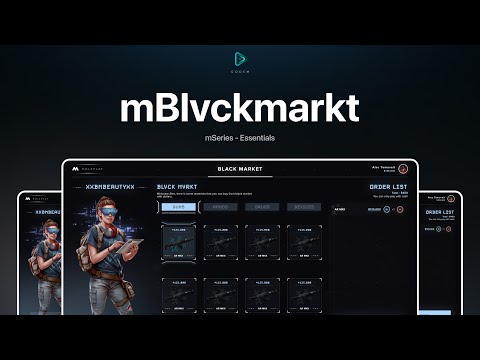





CodeM mBlackmarket — Illegal Underground Shop for FiveM
Bring the criminal underworld to life on your FiveM server with CodeM mBlackmarket, a premium black market script from the renowned CodeM M-Series. Players can access a hidden illegal shop through a configurable NPC interaction point, browsing and purchasing restricted items that would never appear in a legal store — weapons, drugs, bomb materials, and more.
Designed with the same polished UI and robust configuration system that defines the entire CodeM M-Series, mBlackmarket integrates seamlessly into any ESX or QBCore server economy.
Functies
- Illegal Item Shop — Fully configurable list of black market items including weapons, drugs, materials, and contraband
- Categorized Item Browser — Items organized into categories for easy browsing and filtering
- NPC Interactie — A configurable PED NPC spawns at the black market location; approach to open the shop interface
- Map Blip Support — Optional map blip to mark the location (toggle on/off per server style)
- ESX & QBCore Support — Works with both major FiveM frameworks out of the box
- Inventariscompatibiliteit — Compatible with ox_inventory, qb-inventory, ESX default inventory
- oxmysql / mysql-async Support — Works with all major MySQL wrappers
- Volledig Configureerbaar — Items, prices, coordinates, PED models, blip settings all in one clean config file
- CodeM TextUI Support — Optional integration with CodeM mTextUI for interaction prompts
- Full Source Code — Shipped as readable Lua source — no obfuscation, easy to extend
Wat is inbegrepen
m-blackmarket/FiveM bron
– fxmanifest.lua — Bronnenmanifest
– config.lua — All configurable options
– client/ — Client-side scripts
– server/ — Server-side scripts
– html/ — NUI interface files
Compatibiliteit
| Requirement | Details | |—|—| | Framework | ESX (legacy and new) / QBCore | | Inventory | ox_inventory, qb-inventory, ESX default | | SQL | oxmysql, mysql-async, ghmattimysql | | FiveM Build | cfx-server artifact 4000+ |
Installatie
1. Extract the m-blackmarket folder into your server resources directory 2. Configure config.lua — set framework, SQL wrapper, items, and location coordinates 3. Add ensure m-blackmarket naar uw server.cfg 4. Restart your server
No SQL import required for basic functionality. Full documentation available at the CodeM Gitbook.



Juanita (geverifieerde eigenaar) –
Everybody skips this, but it’s actually a good item, I’ll remove 1 star for the customer support
Jason (geverifieerde eigenaar) –
Updates zijn frequent en de ontwikkelaar blijft het product duidelijk verbeteren.
Shany (geverifieerde eigenaar) –
Reliable, customizable, and well supported. I would purchase from this developer again.
Raphaelle (geverifieerde eigenaar) –
The resource matched the description and screenshots perfectly. No unpleasant surprises.
Dee (geverifieerde eigenaar) –
**** great:)
PaulMagic (geverifieerde eigenaar) –
Good performance, clean interface, and helpful support. Nothing to complain about.
Eudora (geverifieerde eigenaar) –
Fantastic resource for roleplay servers. Our staff and players both enjoy using it.
Jillian (geverifieerde eigenaar) –
Been using it for a while, I usually don’t write a review but this time I am truly convinced to write.