







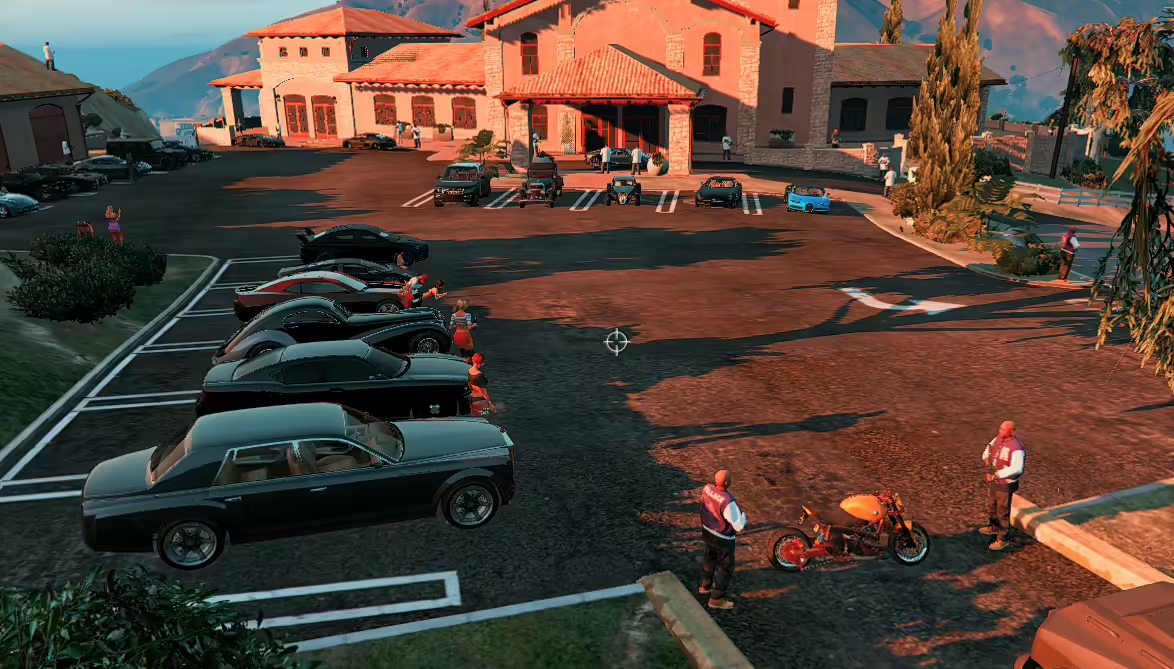
Ontdek een spannende toevoeging aan je GTA V-ervaring met de Mafia Boss High Security Mansion-mod. Deze zeer gedetailleerde mod transformeert je game door een weelderig landhuis te introduceren met stijlvolle functies, waaronder een privé-helikopterplatform en een levendige sfeer met strippers.
Kenmerken van de Mod
- 45 unieke NPC's: Geniet van de levendige activiteit rond het landhuis met 45 unieke personages, waaronder vijf levendige strippers.
- Mafia's baasauto's: Stap achter het stuur van 23 exclusieve maffia-themavoertuigen die een vleugje elegantie en kracht aan je collectie toevoegen.
Installatiehandleiding
Om de Mafia Boss High Security in te stellen Mansion mod, volg deze eenvoudige stappen:
- Vereiste mods downloaden: Zorg ervoor dat je de volgende mods hebt geïnstalleerd:
- Download de Mansion-mod: Download het mod-bestand.
- Het XML-bestand toevoegen:
- Open je GTA V-hoofdmap.
- Sleep het gedownloade XML-bestand naar deze map.
- Laad de mod in het spel:
- Start GTA V.
- Druk op F7 om de kaarteditor te openen.
- Typ de naam “mafia” in om het landhuis te laden.
Waar vind je het landhuis
De locatie van het landhuis is te vinden in de meegeleverde screenshots. Geniet van het verkennen van deze weelderige nieuwe ruimte en neem deel aan de maffialevenstijl!
Maak je klaar om te beoordelen in een unieke game-ervaring met deze fantastische mod.