Wideo
Config.lua
Config = {}

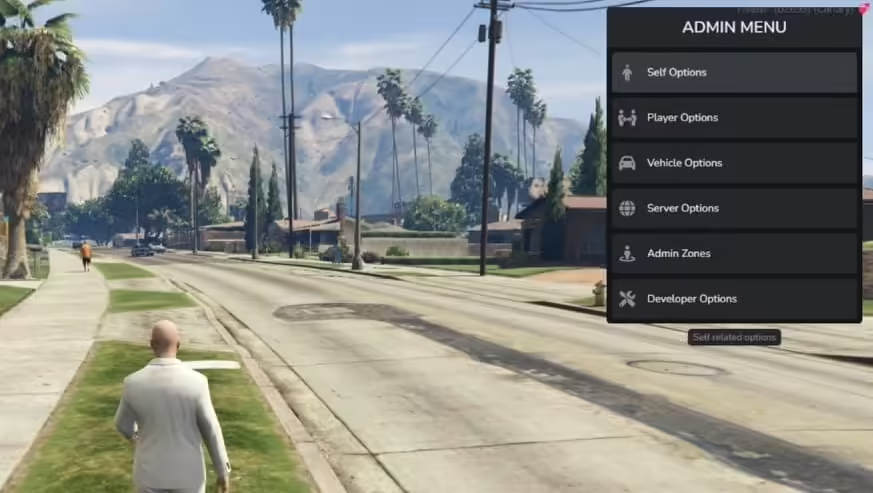
Config.MenuPosition = 'top-right' -- Menu position when open (Options: 'top-left' or 'top-right' or 'bottom-left' or 'bottom-right')
Config.OpenKey = 'F9' -- Default key for opening admin menu
Config.UsingVehicleKeys = 'qb' -- Supported options: 'wasabi' for wasabi_carlock / 'qb' for qb-vehiclekeys / 'jaksam' for jacksam_carlock / 'custom' for custom in modifyme.lua -- Set to false if not needed
Config.SkinMenu = 'qb' -- 'esx_skin' = ESX Skin / 'qb' = qb-clothing / 'fivem-appearance' = FiveM appearance / 'custom' = custom in modifyme.lua
Config.FuelSystem = 'legacyfuel' -- Supported options: 'ox' - ox_fuel/ 'legacyfuel' - LegacyFuel / false - anything else
Config.Inventory = 'qb' -- Current options: 'ox' (For ox_inventory) / 'qb' (For qb-inventory) 'mf' (For mf inventory) / 'qs' (For qs_inventory) / 'cheeza' (for chezza inventory) -- false for none (Can be edited in modifyme.lua)
Config.SpeedMeasurement = 'mph' -- Options: 'mph' or 'kmh'

Config.AdminPerms = { -- Different ways of defining who has permission to access and utilize the admin menu
    UserGroups = {
        enabled = true, -- Enable usergroups from framework (Esx/QBCore), example/common groups below by default.
        Groups = {
            'admin',
            'god',
        --  'mod',
        }
    },

    ----------------------------------------------------------------------------
    -- If ace perms are desired, an example of ace perms to set in server.cfg:--
    -- add_ace group.admin 'wasabi.adminmenu.allow' allow                     --
    ----------------------------------------------------------------------------
    AcePerms = { enabled = true, AcePerm = 'wasabi.adminmenu.allow' }
}

--- Commands
Config.Commands = {
    Ban = {
        enabled = true, -- Enable ban command?
        command = 'ban' -- Command (Default: 'ban')
        -- Example: /ban ID_HERE OPTIONAL_REASON_HERE
        -- Indefinite ban. Use menu for temporary ban
    },
    Kick = {
        enabled = true, -- Enable kick command?
        command = 'kick' -- Command (Default: 'kick')
        -- Example: /kick ID_HERE OPTIONAL_REASON_HERE
    },
    NoClip = {
        enabled = true, -- Enable noclip command?
        command = 'noclip' -- Command (Default: 'noclip')
        -- Example: /noclip
    },
    SearchInv = {
        enabled = true, -- Enable searchinv command?
        command = 'searchinv' -- Command (Default: 'searchinv')
        -- MUST HAVE Config.Inventory CONFIGURED TO PROPER INVENTORY!
        -- Example: /searchinv ID_HERE (Opens target inventory)
    },
    ClearInv = {
        enabled = true, -- Enable clearinv command?
        command = 'clearinv' -- Command (Default: 'clearinv')
        -- MUST HAVE Config.Inventory CONFIGURED TO PROPER INVENTORY!
        -- Example: /clearinv ID_HERE (Clears target inventory)
    },
    SkinMenu = {
        enabled = true, -- Enable skinmenu command?
        command = 'skinmenu' -- Command (Default: 'skinmenu')
        -- MUST HAVE Config.SkinMenu CONFIGURED TO PROPER SKIN / CLOTHING SCRIPT
        -- Example: /skinmenu ID_HERE (Opens skin menu on target's screen)
    }
}

--- WEATHER SETTING OPTIONS
Config.Weathers = {
    {label = 'Clear Skies', value = 'CLEAR'},
    {label = 'Extra Sunny', value = 'EXTRASUNNY'},
    {label = 'Cloudy', value = 'CLOUDS'},
    {label = 'Foggy', value = 'FOGGY'},
    {label = 'Thunder', value = 'THUNDER'},
    {label = 'Rainy', value = 'RAIN'},
    {label = 'Halloween', value = 'HALLOWEEN'},
    {label = 'Snow Light', value = 'SNOWLIGHT'},
    {label = 'XMAS', value = 'XMAS'}
}

--- BAN SETTING OPTIONS
Config.Ban = { --- value = ban time in hours
    {label = '2 Hours', value = 2},
    {label = '24 Hours', value = 24},
    {label = '1 Week', value = 168},
    {label = 'Permanent', value = 'perm'}
}

--- JOB ANNOUNCEMENT OPTIONS
Config.Jobs = { -- label value is for how it is displayed in the menu. name must be exact as in your jobs database/table
    { label = 'Police', name = 'police' },
    { label = 'EMS', name = 'ambulance' },
    { label = 'Mechanic', name = 'mechanic' },
    { label = 'Car Dealer', name = 'cardealer' }
}

--- NO CLIP OPTIONS
Config.Noclip = {
     FirstPersonWhileNoclip = true,
     DefaultSpeed = 1.0,
     MaxSpeed = 12.0,
     Controls = {
         DecreaseSpeed = 14, -- Mouse wheel down
         IncreaseSpeed = 15, -- Mouse wheel up
         MoveFoward = 32, -- W
         MoveBackward = 33, -- S
         MoveLeft = 34, -- A
         MoveRight = 35, -- D
         MoveUp = 44, -- Q
         MoveDown = 46, -- E
     },
     Particle = {
         Fxname = 'core',
         Effectname = 'ent_dst_elec_fire_sp'
     }
}

---- VEHICLE RELATED OPTIONS
Config.VehicleColors = { --- https://pastebin.com/pwHci0xK
    { label = 'Red', value = 27 },
    { label = 'Black', value = 0 },
    { label = 'Sunset Red', value = 33 },
    { label = 'Hot Pink', value = 135 },
    { label = 'Salmon Pink', value = 136 },
    { label = 'Dark Green', value = 49 },
    { label = 'Surf Blue', value = 68 },
    { label = 'Woodbeech Brown', value = 102 },
    { label = 'Cast Iron Silver', value = 10 },
    { label = 'Ice White', value = 111 },
    { label = 'Cream', value = 107 },
    { label = 'Frost White', value = 112 }
}

Config.TorqueMultiplier = { --- https://docs.fivem.net/natives/?_0xB59E4BD37AE292DB
    { label = 'Off', value = 1.0 },
    { label = '25%', value = 4.0 },
    { label = '50%', value = 8.0 },
    { label = '75%', value = 10.0 },
    { label = '100%', value = 100.0 }
}
Tylko zalogowani klienci, którzy kupili ten produkt mogą napisać opinię.











![Wasabi's FiveM Admin Menu [ ESX / QBCORE ]](https://i.ytimg.com/vi/kT4KMSlW_o4/hqdefault.jpg)

Dayana (zweryfikowany) –
Support was friendly, fast, and knowledgeable. My issue was resolved within a short time.
GreenCobra (zweryfikowany) –
I think this is amazing. Lots of features and customizable from every point of view. The few times I asked for help in support they were competent, fast and above all very patient. Really recommend
Chase (zweryfikowany) –
I appreciate how customizable this resource is. We were able to make it match our server branding perfectly.
Scotty (zweryfikowany) –
Easy to install and easy to customize.
Everardo (zweryfikowany) –
Very satisfied with this purchase.
NinjaEva980 (zweryfikowany) –
One of the few resources I purchased that worked correctly without extensive troubleshooting.
Kraig (zweryfikowany) –
The quality is noticeably better than many alternatives I have tried.