Ostrzeżenie o zawieszeniu wątku FiveM – jak to naprawić
Co to jest ostrzeżenie o zawieszeniu wątku FiveM?
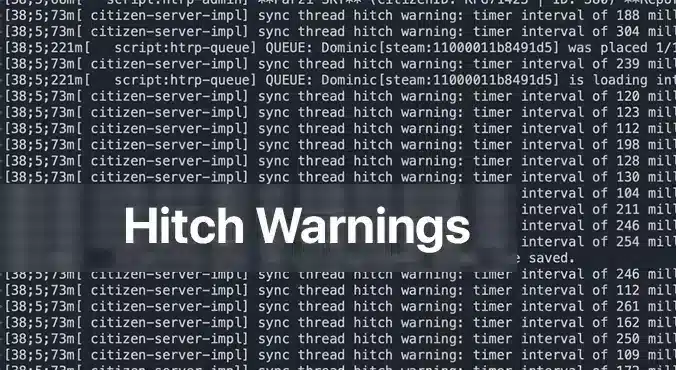
A ostrzeżenie o zawieszeniu wątku FiveM pojawia się jako lepka wiadomość w konsoli serwera, ostrzegając, że jeden lub więcej skryptów zużywa zbyt dużo czasu procesora. To sposób serwera na powiedzenie: “Hej, coś trwa dłużej niż powinno, a twoi gracze odczują to jako opóźnienie”. Dla każdego, kto prowadzi serwer FiveM, te ostrzeżenia są natychmiastowym sygnałem, że wrażenia z gry mogą ucierpieć. Zrozumienie przyczyny i naprawa nie tylko wygładza rozgrywkę, ale także utrzymuje zadowolenie społeczności.
Dlaczego pojawiają się ostrzeżenia o zawieszeniu wątku?
Najczęstszym winowajcą jest niezoptymalizowany skrypt. W FiveM skrypty działają na procesorze serwera, obsługując wszystko, od zachowania NPC po niestandardową logikę pojazdów. Gdy skrypt zawiera nieefektywne pętle, ciężkie wywołania bazy danych lub wielokrotnie sprawdza warunki, które nigdy się nie zmieniają, może zablokować wątek serwera. Kolejka serwera zostaje wtedy zablokowana, co prowadzi do groźnego ostrzeżenia o zawieszeniu. Innym, rzadszym powodem jest niewystarczający sprzęt: słaby procesor lub niewystarczająca ilość pamięci RAM nie nadążają za obciążonym serwerem, zmuszając każdy skrypt do rywalizacji o ograniczone zasoby.
Krok po kroku: naprawa ostrzeżeń o zawieszeniu wątku
1. Sprawdź swój sprzęt serwerowy
Even the best‑optimized script can choke if your hardware is underpowered. Below is a quick hardware checklist rated by player count.
| Player Count | CPU | RAM | Storage | Bandwidth | OS |
|————–|—–|—–|——–|———–|—-|
| 64 | 8‑Core 4.0 GHz | 32 GB DDR4 | 1 TB NVMe | 100 Mbps+ | Ubuntu 22.04 |
– CPU: FiveM is CPU‑bound; higher clock speeds improve single‑thread performance, which is more critical than extra cores.
– RAM: More memory means the server can cache more assets and handle more connections without swapping to disk.
– Pamięć masowa: SSD or NVMe drives cut loading times dramatically; HDDs become a bottleneck.
– Przepustowość: Higher upload speeds ensure packets reach the server fast, especially with larger player counts.
– OS: Linux distributions offer lower overhead and better stability for game servers.
If you’re running on a shared host or a virtual private server, confirm these specs with your provider. Upgrade when you hit consistent hitch warnings and notice performance lag.
2. Zidentyfikuj wadliwy skrypt Scripts za pomocą profilowania serwera
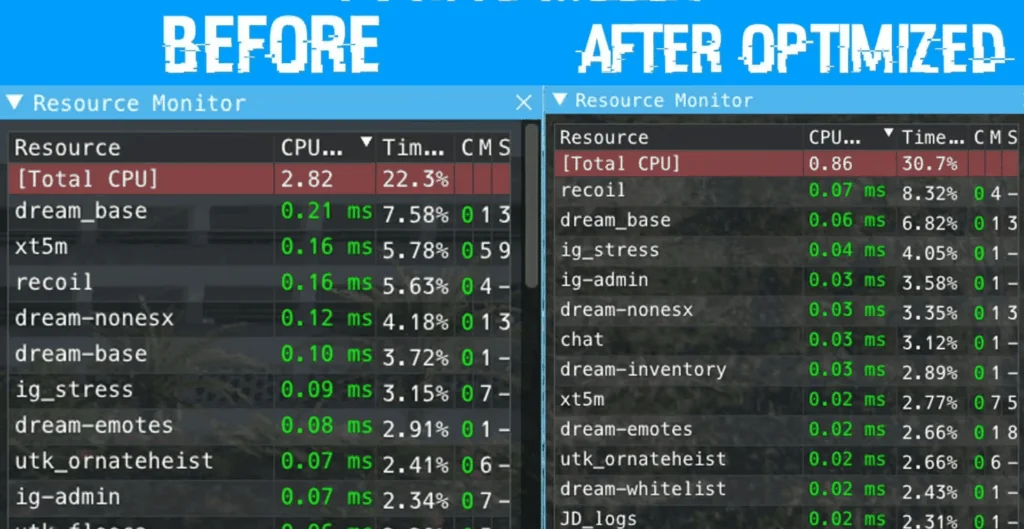
Compare the same resources before and after optimization.
The built‑in profiling tools in txAdmin or the FiveM server console let you pinpoint which script is causing the hitch.
1. Open a console or txAdmin in Administrator mode.
2. Type: `profiler record 500`
(This records 500 milliseconds of execution data.)
3. Wait for the recording to finish, then run: `profiler save myprofile`.
A file will be generated.
4. Finally, `profiler view myprofile` will open a link in your browser.
If you’re not on the same machine, you may need to use `export profilers` to send the file elsewhere.
In the profiler report, look for functions or scripts that consistently consume a large portion of the measured time. Pay attention to:
– Long loops that run every tick
– Database queries or file reads that
– External API calls or network requests that block the thread
Once you’ve located the problematic parts, you have two options: optimize or remove.
3. Optymalizuj lub Wyłącz problematyczne Scripts
Optymalizuj
If the script is essential to your server’s unique gameplay, try the following:
– Przebuduj pętle: Replace `for {}` loops that run per tick with event‑driven logic or reduce the frequency.
– Zapamiętuj wyniki: Store expensive calculations or database results in memory, updating only when necessary.
– Używaj natywnych funkcji: Where possible, replace custom code with FiveM’s built‑in natives, which are usually more efficient.
– Asynchroniczne wywołania: Switch blocking operations to asynchronous patterns if the API supports them.
After modifications, run the profiler again to verify the improvement.
Wyłącz
If optimization isn’t feasible or the script is cosmetic, disable it safely:
1. Edit `server.cfg`.
2. Comment out or delete any lines that load the script, e.g. `ensure faulty_script`.
3. Restart the server to confirm the hitch warning disappears.
You can always re‑enable it later if you find a workaround or external optimization support.
4. Utrzymuj serwer aktualny
Starsze wersje FiveM lub jego zależności mogą zawierać regresje wydajności regressions. Ensure you’re running the latest stable server files:
“`
cd /root/fivem
git pull
sh ctl restart
“`
Also keep the operating system updated with the latest patches; this can prevent unknown bottlenecks.
Gdy opóźnienia utrzymują się po naprawieniu ostrzeżeń
If a hitch warning has been addressed but lag continues, consider:
– Zwiększenie częstotliwości taktowania (tick rate): Lowering TPS (ticks per second) reduces CPU demand but can feel less responsive. Balance it by only adjusting if other solutions fail.
– Wyłączanie niepotrzebnych zasobów: Many servers enable mods that provide little value but consume resources. Remove or replace them.
– Monitorowanie metryk systemu: Use tools like `htop`, `nvme-cli`, or `iftop` to watch CPU, RAM, disk, and network usage in real time.
A persistent lag can also stem from network issues outside the server’s control. Ask your players to test latency with `ping` or `traceroute` and confirm they’re in the same region as your server.
Ostatnie myśli
A FiveM ostrzeżenie o zacięciu wątku jest jasnym sygnałem, że coś w środowisku twojego serwera – czy to nieprawidłowy skrypt, czy niewystarczający sprzęt – wymaga uwagi. Systematycznie sprawdzając sprzęt, profilując skrypty oraz optymalizując lub wyłączając problematyczny kod, możesz wyeliminować te ostrzeżenia i zapewnić swojej społeczności płynniejsze i przyjemniejsze doświadczenie. Pamiętaj, że kluczem do stabilnego serwera FiveM jest proaktywne monitorowanie i regularne aktualizacje. Jeśli nadal napotykasz przeszkody, fora FiveM, Discord i zasoby txAdmin to doskonałe miejsca, aby uzyskać dopasowane porady. Miłego hostowania!
Potrzebuję pomocy z tym problemem wątku synchronizacji. Wszystkie moje skrypty wydają się być zoptymalizowane, a mimo to otrzymuję to ostrzeżenie nawet na świeżej instalacji qb-core, co powoduje desynchronizację graczy.








Potrzebuję pomocy z tym problemem wątku synchronizacji. Wszystkie moje skrypty wydają się być zoptymalizowane, a mimo to otrzymuję to ostrzeżenie nawet na świeżej instalacji qb-core, co powoduje desynchronizację graczy.