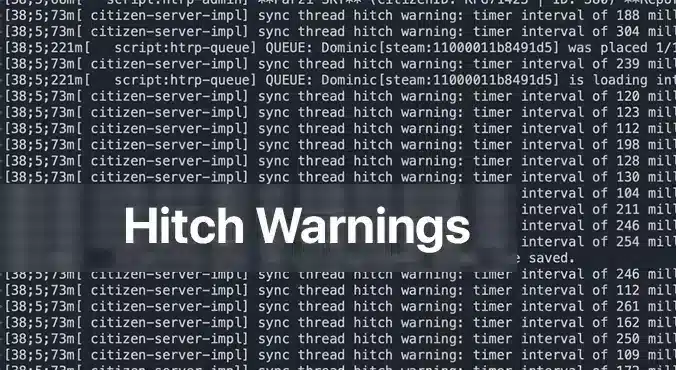
A FiveM-Thread-Hitch-Warnung erscheint als eine klebrige Nachricht in deiner Serverkonsole und warnt dich, dass ein oder mehrere Skripte zu viel Verarbeitungszeit verwenden. Es ist die Art des Servers, dir zu sagen: “Hey, etwas dauert länger als es sollte, und es wird sich wie ein Lag-Spike für deine Spieler anfühlen.” Für jeden, der einen FiveM-Server betreibt, sind diese Warnungen ein sofortiges Zeichen dafür, dass das Erlebnis leiden könnte. Das Verständnis der Ursache und die Behebung des Problems verbessert nicht nur das Gameplay, sondern hält auch deine Community glücklich.
Warum werden Thread-Hitch-Warnungen angezeigt?
Der häufigste Übeltäter ist ein nicht optimiertes SkriptIn FiveM werden Skripte auf der CPU des Servers ausgeführt, um alles zu verarbeiten, vom Verhalten der NPCs bis hin zur benutzerdefinierten Fahrzeuglogik. Enthält ein Skript ineffiziente Schleifen, umfangreiche Datenbankaufrufe oder prüft wiederholt Bedingungen, die sich nie ändern, kann dies den Server-Thread blockieren. Die Server-Warteschlange bleibt dann hängen, was zu der gefürchteten Rucklerwarnung führt. Ein weiterer, seltenerer Grund ist unzureichende Hardware: Eine Low-End-CPU oder unzureichender RAM können mit einem ausgelasteten Server nicht Schritt halten, sodass jedes Skript um die begrenzten Ressourcen konkurrieren muss.
Schritt-für-Schritt-Lösungen für Thread-Hitch-Warnungen
1. Überprüfe die Hardware deines Servers
Even the best‑optimized script can choke if your hardware is underpowered. Below is a quick hardware checklist rated by player count.
| Player Count | CPU | RAM | Storage | Bandwidth | OS |
|————–|—–|—–|——–|———–|—-|
| 64 | 8‑Core 4.0 GHz | 32 GB DDR4 | 1 TB NVMe | 100 Mbps+ | Ubuntu 22.04 |
– CPU: FiveM is CPU‑bound; higher clock speeds improve single‑thread performance, which is more critical than extra cores.
– RAM: More memory means the server can cache more assets and handle more connections without swapping to disk.
– Lagerung: SSD or NVMe drives cut loading times dramatically; HDDs become a bottleneck.
– Bandbreite: Higher upload speeds ensure packets reach the server fast, especially with larger player counts.
– Betriebssystem: Linux distributions offer lower overhead and better stability for game servers.
If you’re running on a shared host or a virtual private server, confirm these specs with your provider. Upgrade when you hit consistent hitch warnings and notice performance lag.
2. Identifiziere fehlerhafte Scripts mit Server-Profiling
Compare the same resources before and after optimization.
The built‑in profiling tools in txAdmin or the FiveM server console let you pinpoint which script is causing the hitch.
1. Open a console or txAdmin in Administrator mode.
2. Type: `profiler record 500`
(This records 500 milliseconds of execution data.)
3. Wait for the recording to finish, then run: `profiler save myprofile`.
A file will be generated.
4. Finally, `profiler view myprofile` will open a link in your browser.
If you’re not on the same machine, you may need to use `export profilers` to send the file elsewhere.
In the profiler report, look for functions or scripts that consistently consume a large portion of the measured time. Pay attention to:
– Long loops that run every tick
– Database queries or file reads that
– External API calls or network requests that block the thread
Once you’ve located the problematic parts, you have two options: optimize or remove.
3. Optimieren oder Deaktivieren problematischer Scripts
Optimieren
If the script is essential to your server’s unique gameplay, try the following:
– Refactoring-Schleifen: Replace `for {}` loops that run per tick with event‑driven logic or reduce the frequency.
– Cache-Ergebnisse: Store expensive calculations or database results in memory, updating only when necessary.
– Verwenden nativer Funktionen: Where possible, replace custom code with FiveM’s built‑in natives, which are usually more efficient.
– Asynchrone Aufrufe: Switch blocking operations to asynchronous patterns if the API supports them.
After modifications, run the profiler again to verify the improvement.
Deaktivieren
If optimization isn’t feasible or the script is cosmetic, disable it safely:
1. Edit `server.cfg`.
2. Comment out or delete any lines that load the script, e.g. `ensure faulty_script`.
3. Restart the server to confirm the hitch warning disappears.
You can always re‑enable it later if you find a workaround or external optimization support.
4. Halte den Server auf dem neuesten Stand
Ältere Versionen von FiveM oder seine Abhängigkeiten können Leistungsprobleme enthalten regressions. Ensure you’re running the latest stable server files:
“`
cd /root/fivem
git pull
sh ctl restart
“`
Also keep the operating system updated with the latest patches; this can prevent unknown bottlenecks.
Wenn Verzögerungen nach der Behebung von Warnungen bestehen bleiben
If a hitch warning has been addressed but lag continues, consider:
– Steigende Tickrate: Lowering TPS (ticks per second) reduces CPU demand but can feel less responsive. Balance it by only adjusting if other solutions fail.
– Deaktivieren unnötiger Ressourcen: Many servers enable mods that provide little value but consume resources. Remove or replace them.
– Überwachungssystemmetriken: Use tools like `htop`, `nvme-cli`, or `iftop` to watch CPU, RAM, disk, and network usage in real time.
A persistent lag can also stem from network issues outside the server’s control. Ask your players to test latency with `ping` or `traceroute` and confirm they’re in the same region as your server.
Abschließende Gedanken
A FiveM Fadenblockierungswarnung ist ein klares Signal dafür, dass etwas in deiner Serverumgebung – sei es ein fehlerhaftes Skript oder unzureichende Hardware – Aufmerksamkeit erfordert. Durch systematische Überprüfung der Hardware, Profilierung von Skripten und Optimierung oder Deaktivierung problematischen Codes kannst du diese Warnungen beseitigen und deiner Community ein reibungsloseres und angenehmeres Erlebnis bieten. Denk daran: Der Schlüssel zu einem stabilen FiveM-Server ist proaktive Überwachung und regelmäßige Updates. Solltest du dennoch auf Probleme stoßen, findest du in den FiveM-Foren, Discord und den txAdmin-Ressourcen hervorragende Beratung. Viel Spaß beim Hosten!
ich brauche Hilfe bei diesem Synchronisierungsthread-Problem. Alle meine Skripte scheinen optimiert zu sein, und ich erhalte diese Warnung immer noch, sogar bei einer Neuinstallation von qb-core, was dazu führt, dass die Spieler desynchronisiert werden.




ich brauche Hilfe bei diesem Synchronisierungsthread-Problem. Alle meine Skripte scheinen optimiert zu sein, und ich erhalte diese Warnung immer noch, sogar bei einer Neuinstallation von qb-core, was dazu führt, dass die Spieler desynchronisiert werden.