







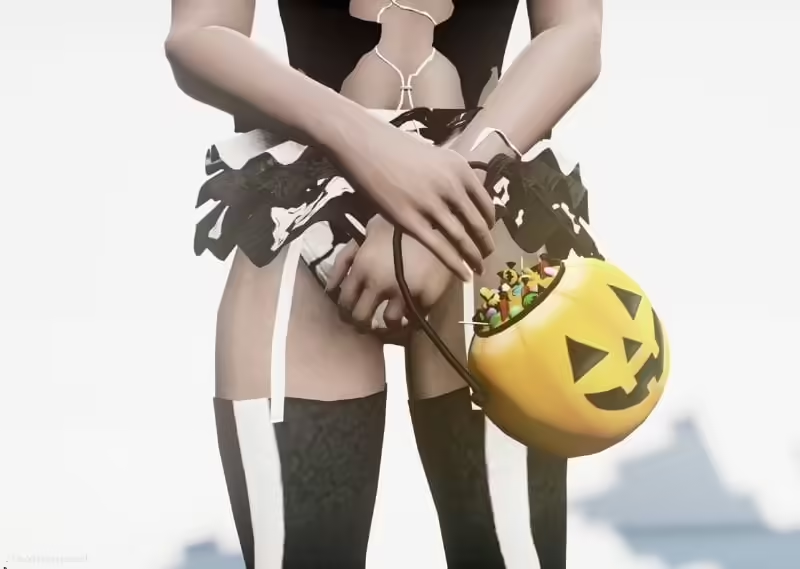
Odkryj Wiaderko na Cukierek albo Psikus na Halloween dla Twojego Serwera :)
Get into the spirit of Halloween in your FiveM experience with this fun and festive Trick or Treating Bucket! This low-poly model is designed to bring a unique charm to your virtual server, adding a seasonal touch that’s works for your in-game gatherings.
Funkcje, które pokochasz:
- Niska liczba wielokątów zapewnia płynną wydajność bez utraty jakości.
- Zawiera poziomy szczegółowości (LOD) dla zoptymalizowanego wyglądu w różnych ustawieniach.
Jak zainstalować moda
Instalacja halloweenowego wiaderka na słodycze jest prosta, jeśli używasz Single Player (SP) czy FiveM:
Dla trybu jednoosobowego (SP):
- Pobierz pliki modyfikacji.
- Otwórz OpenIV.
- Włącz “Tryb edycji” w OpenIV.
- Przeciągnij i upuść pobrane pliki do następującego katalogu:
x64v.rpf/models/cdimages/streamedpeds_mp.rpf/mp_f_freemode_01
Dla FiveM:
- Pobierz pliki modyfikacji.
- Przeciągnij i upuść pliki do swojego “Folderu Stream”, który znajduje się w zasobach Twojego serwera FiveM.
Postępując zgodnie z tymi prostymi krokami, możesz łatwo dodać Wiaderko na Cukierek albo Psikus do swojego serwera i ulepszyć swoją rozgrywkę podczas sezonu Halloween!
Gotowy, aby dodać trochę halloweenowego ducha?
Przekonaj się sam! Kliknij przycisk poniżej, aby pobrać modyfikację i przekształcić swoje środowisko FiveM w upiorną, świąteczną scenerię.