







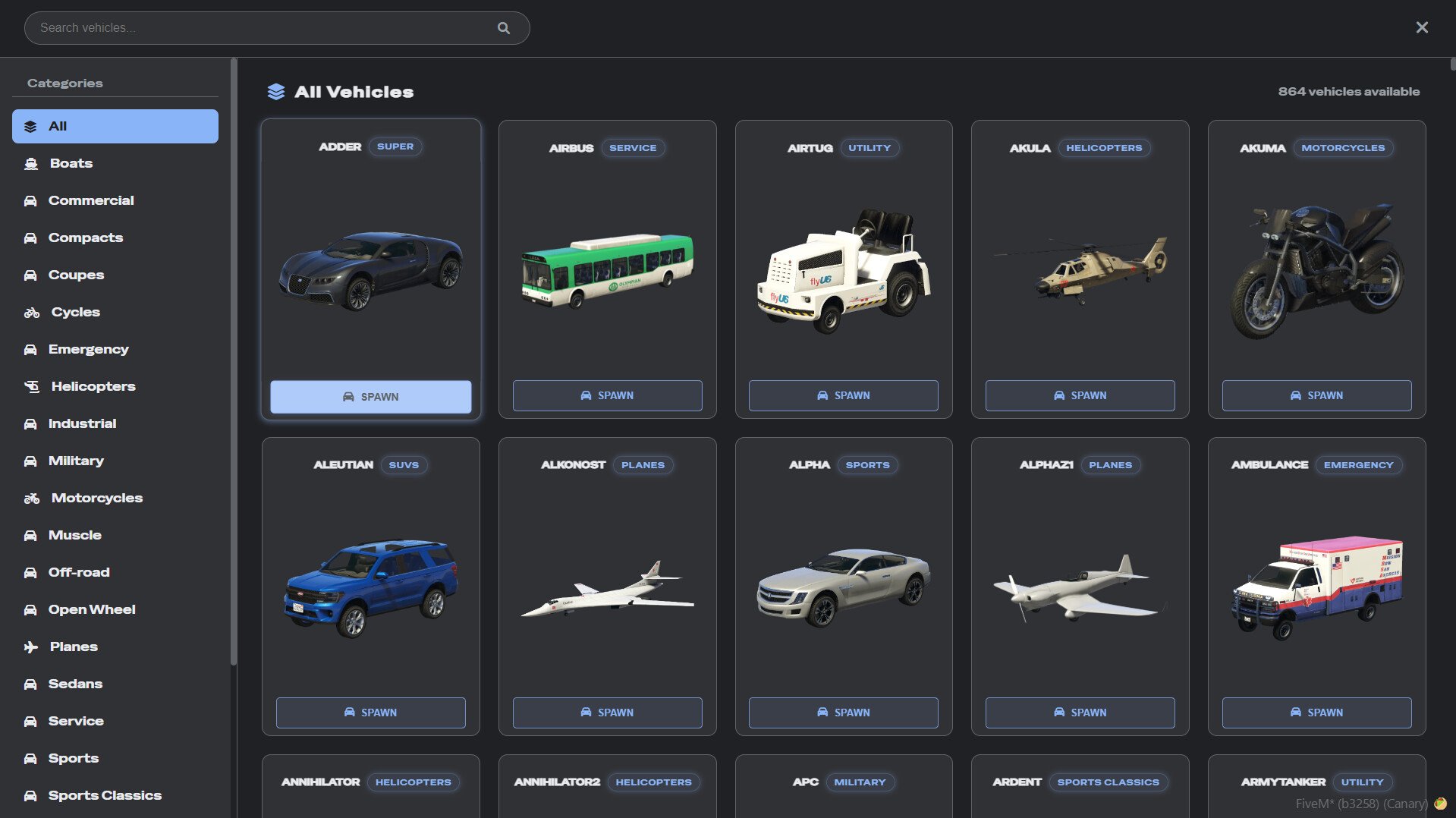
Rup Vehicle Spawner – Free Vehicle Spawner Menu for FiveM
Need a reliable, easy-to-use vehicle spawner for your FiveM server? The Rup Vehicle Spawner is a modern admin tool that makes spawning vehicles quick and painless. Whether you’re testing new cars, helping stuck players, or managing your server’s vehicle fleet, this lightweight menu gives you everything you need without the complexity of bloated alternatives.
What sets Rup Vehicle Spawner apart is its clean, intuitive interface that doesn’t require a manual to figure out. Category management keeps vehicles organized, add-on support means your custom cars work seamlessly, and framework flexibility ensures it works with QBCore, QBX, or standalone setups. It’s the kind of tool that just works – no headaches, no confusion.
Co zawiera
Kluczowe Funkcje
- Clean User-Friendly Menu – Modern interface that’s easy to navigate. No cluttered menus or confusing options – just simple, effective vehicle spawning that gets the job done.
- Category Management System – Organize vehicles by type (cars, motorcycles, boats, aircraft, emergency, etc.). Find what you need fast instead of scrolling through endless lists.
- Add-On Vehicle Support – Works seamlessly with custom vehicle packs. Add your favorite car mods and they’ll appear in the spawner automatically with proper categorization.
- Elastyczność frameworka – Compatible with QBCore, QBX, and standalone setups. No framework? No problem. Using QBCore? Works great. Maximum compatibility for any server type.
- Kontrola uprawnień – Configure who can access the spawner based on jobs, permissions, or ace perms. Keep it admin-only or give trusted players access.
- Funkcja wyszukiwania – Looking for a specific vehicle? Use the built-in search to filter by name instead of browsing categories. Saves time when you know what you want.
- Spawn Options – Spawn vehicles directly in front of you or at specific coordinates. Choose spawned or personal ownership. Configure default spawn behavior.
- Zoptymalizowana Wydajność – Lightweight code that doesn’t bog down your server. Runs efficiently even with hundreds of vehicles in the database.
- Łatwa konfiguracja – Simple config.lua file for adjusting spawn distance, permissions, categories, and more. No complex setup required.
Idealne dla
- Server administrators who need quick vehicle spawning tools
- Development/testing servers where you spawn vehicles frequently
- Roleplay servers needing admin tools for event management
- Car show/showcase servers displaying vehicle collections
- Servers running QBCore, QBX, or standalone frameworks
- Communities with large custom vehicle collections
Zgodność z frameworkami
- ✅ QBCore – Full native integration with QB permission system
- ✅ QBX (QBOX) – Compatible with QBX framework and its features
- ✅ Standalone – Działa niezależnie bez wymagań frameworka
- ⚠️ ESX – Not officially supported but could be adapted with modifications
Instrukcja instalacji
- Pobierz zasób – Get Rup Vehicle Spawner from GitHub using the link below
- Rozpakuj pliki – Unzip and place the “rup-vehiclespawner” folder in your server’s resources directory
- Konfiguracja Frameworka – Open config.lua and set your framework type:
Config.Framework = "qbcore" -- options: "qbcore", "qbx", "standalone"
- Ustaw uprawnienia – Configure who can access the spawner:
Config.AllowedJobs = {"admin", "moderator"} -- for QBCore/QBX Config.UseAcePermissions = true -- for standalone with ace perms - Add Vehicle Categories (Optional) – Customize categories in config.lua to match your vehicle collection
- Dodaj do server.cfg – Ensure the resource in your server config:
ensure rup-vehiclespawner
- Configure Keybind (Optional) – Set a keybind to open the menu or use a command
- Zrestartuj serwer – Restart or use “refresh” then “start rup-vehiclespawner”
- Przetestuj w grze – Join with an authorized account and open the spawner menu
Jak używać
Opening the Menu
The spawner can be accessed via:
- Command (default: /vehspawn or configured in config.lua)
- Keybind (configurable hotkey)
- Admin menu integration (if you have an admin panel)
Spawning a Vehicle
- Open the menu using your configured method
- Browse categories or use search to find your vehicle
- Click the vehicle you want to spawn
- Vehicle appears directly in front of you
- Get in and drive – it’s that simple
Managing Categories
Categories help organize large vehicle collections:
- Samochody – Standard civilian vehicles
- Sport – High-performance sports cars
- Emergency – Police, ambulance, fire vehicles
- Motocykle – Bikes and motorcycles
- Samolot – Planes and helicopters
- Boats – Water vehicles
- Niestandardowy – Your add-on vehicles
Opcje konfiguracji
Permission Settings
Config.Framework = "qbcore"  -- Framework type
Config.AllowedJobs = {"admin", "god"}  -- Jobs that can spawn
Config.UseAcePermissions = false  -- Enable ace perms for standalone
Config.AcePermission = "vehiclespawner.use"  -- Ace perm string
Spawn Settings
Config.SpawnDistance = 3.0  -- How far in front to spawn
Config.SpawnInVehicle = true  -- Auto-enter spawned vehicle
Config.DeleteOldVehicle = true  -- Delete previous spawn
Config.SetAsOwned = false  -- Give ownership (QB/QBX only)
UI Dostosowywanie
Config.MenuTitle = "Vehicle Spawner"  -- Menu header text
Config.SearchPlaceholder = "Search vehicles..."  -- Search box text
Config.ShowVehicleClass = true  -- Display vehicle class
Config.EnablePreview = false  -- 3D vehicle preview (experimental)
Category Configuration
Add or modify categories in config.lua:
Config.Categories = {
    {name = "Super Cars", class = "super"},
    {name = "Off-Road", class = "offroad"},
    {name = "Military", class = "military"}
}
Adding Custom Vehicles
Method 1: Automatic Detection
If your add-on vehicles are properly installed with manifests, Rup Vehicle Spawner will detect them automatically and add them to appropriate categories based on vehicle class.
Method 2: Manual Addition
For custom categorization, add vehicles manually in config.lua:
Config.CustomVehicles = {
    {spawn = "custom_lambo", name = "Custom Lamborghini", category = "Super Cars"},
    {spawn = "custom_truck", name = "Monster Truck", category = "Off-Road"}
}
Common Issues & Solutions
Issue: Menu Won’t Open
Rozwiązanie: Check that you have the required permissions. Verify Config.AllowedJobs includes your job or Config.UseAcePermissions is configured correctly. Test with console command /vehspawn.
Issue: No Vehicles Showing in List
Rozwiązanie: Make sure your vehicles.meta files are properly loaded. For add-ons, verify they’re in your server.cfg. Check F8 console for errors about missing vehicle data.
Issue: Custom Add-Ons Not Appearing
Rozwiązanie: Confirm add-on vehicles are installed correctly and loading before rup-vehiclespawner. Check vehicle manifest files and ensure spawn names match exactly.
Issue: Vehicle Spawns Inside Objects
Rozwiązanie: Increase Config.SpawnDistance to spawn further ahead. Make sure you’re facing away from walls/objects when spawning. Adjust spawn offset in advanced config.
Issue: Permission Errors
Rozwiązanie: For QBCore: verify your job is in Config.AllowedJobs. For standalone: ensure ace permissions are granted in server.cfg like “add_ace group.admin vehiclespawner.use allow”.
Issue: Menu UI Broken or Glitchy
Rozwiązanie: Clear your FiveM cache and reconnect. Make sure you’re running a recent FiveM build. Check for conflicts with other UI scripts.
Advanced Features
Integration with Admin Menus
Rup Vehicle Spawner can integrate with popular admin menus:
- Add a button in your admin panel that calls the spawner
- Use exports to trigger spawner from other scripts
- Embed spawn functionality in custom UIs
Funkcje eksportu
For developers wanting to integrate spawner functionality:
-- Spawn specific vehicle
exports['rup-vehiclespawner']:SpawnVehicle("adder")

-- Open menu programmatically
exports['rup-vehiclespawner']:OpenMenu()

-- Get vehicle list
local vehicles = exports['rup-vehiclespawner']:GetVehicleList()
Event Hooks
Listen for spawn events in other scripts:
AddEventHandler('rup-vehiclespawner:vehicleSpawned', function(vehicle, model)
    -- Your custom logic here
end)
Uwagi dotyczące wydajności
- Rozmiar pliku: Under 500KB (minimal download time)
- Database Calls: None (all data is config-based)
- Network Impact: Minimal (only during spawn events)
Często zadawane pytania
Q: Does this work with ESX?
A: Not officially, but the standalone mode could work on ESX servers. You’d need to configure permissions using ace perms instead of job-based access.
Q: Can players use this to spawn personal vehicles?
A: That depends on your configuration. If Config.SetAsOwned is true and you grant players access, they could spawn owned vehicles. For admin-only use, restrict permissions properly.
Q: How do I add my custom car pack?
A: If your pack is properly installed with correct manifests, vehicles appear automatically. For custom categories, add them manually in Config.CustomVehicles.
Q: Can I restrict certain vehicles to certain admins?
A: Not built-in, but you could modify the code to add permission tiers. The open-source nature makes this customization possible.
Q: Does this conflict with other spawner scripts?
A: Unlikely, unless they use the same commands or keybinds. Most spawners can coexist peacefully – just ensure commands don’t overlap.
Q: Can I use this for a public vehicle shop?
A: It’s designed as an admin tool, but could be adapted. You’d need to add payment processing, ownership transfer, and remove admin restrictions.
Q: Is this better than vMenu or other spawners?
A: “Better” is subjective. Rup is lightweight and simple. vMenu has more features. Choose based on needs – if you just want vehicle spawning, Rup is perfect.
Q: Can I spawn boats and aircraft?
A: Yes! All vehicle types are supported – cars, bikes, boats, planes, helicopters, etc. Categories help organize different types.
Q: Does this support saved vehicle spawns/garages?
A: No, it’s a spawner, not a garage system. For persistent vehicle storage, use a dedicated garage script alongside this.
Q: Can I modify the UI design?
A: Absolutely! The UI files are open and editable. Change colors, layout, fonts, whatever you want. CSS and HTML are standard web technologies.
Pobierz
Ready to add a professional vehicle spawner to your FiveM server? Download Rup Vehicle Spawner for free from GitHub:
Development & Support
Rup Vehicle Spawner is actively maintained on GitHub by ruptz. The repository is open for issues, feature requests, and pull requests. If you encounter bugs or have suggestions, open an issue on the GitHub page.
Comparison with Other Spawners
| Funkcja | Rup Vehicle Spawner | vMenu | Simple Trainer |
|---|---|---|---|
| Natywny QBCore | ✅ Tak | ❌ Nie | ❌ Nie |
| System kategorii | ✅ Tak | ✅ Tak | ❌ Basic |
| Add-On Support | ✅ Automatic | ✅ Manual | ⚠️ Ograniczony |
| Wydajność | ✅ Doskonały | ✅ Dobry | ⚠️ Moderate |
| Krzywa uczenia się | ✅ Easy | ⚠️ Moderate | ✅ Easy |
Related Resources
- Darmowe samochody FiveM – Download custom vehicles to use with this spawner
- Darmowe mody FiveM – More free server tools and resources
- Skrypty QBCore – Additional QBCore-compatible resources
- Admin Tools – Other administrative utilities for your server