

![[ESX] Advanced Ambulance Job FiveM resource preview](https://cdn.fivemx.com/wp-content/uploads/2023/10/chrome_r89t4g1UUb-jpg-500x375.avif)

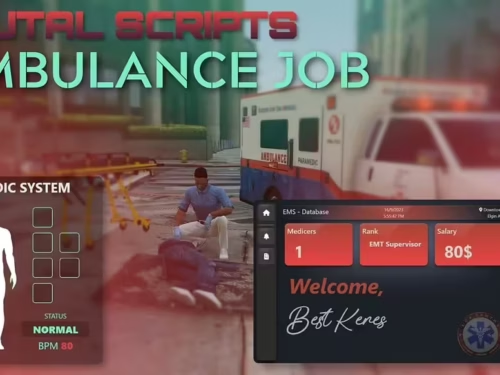
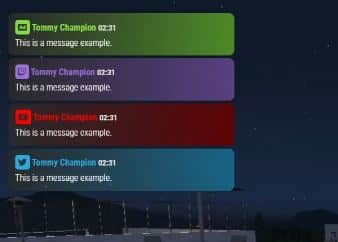
Chat script / resource for FiveM ESX, QBUS. esx_rp_chat like
<strong>[/fusion_builder_column][fusion_builder_column type="1_1" background_position="left top" background_color="" border_size="" border_color="" border_style="solid" spacing="yes" background_image="" background_repeat="no-repeat" padding="" margin_top="0px" margin_bottom="0px" class="" id="" animation_type="" animation_speed="0.3" animation_direction="left" hide_on_mobile="no" center_content="no" min_height="none"][Funcionality & Interfaces]</strong>
<blockquote><strong>Chat Input</strong></blockquote>
<blockquote><strong>Advertisement – Allows your players to make an advertisement</strong></blockquote>
On the config file you are able to:
<ul>
<li>Enable/disable the command</li>
<li>Set the command name</li>
<li>Set the <strong>advertisement price</strong></li>
<li>Set the <strong>advertisement cooldown</strong></li>
</ul>
<blockquote><strong>STAFF ONLY – Allows your server admins to talk with each other without the players seeing it</strong></blockquote>
On the config file you are able to:
<ul>
<li>Enable/disable the command</li>
<li>Set the command name</li>
<li>Set the <strong>allowed groups to do it</strong></li>
</ul>
<blockquote><strong>STAFF Announcement – Allows your server admins to make an announcement to all the players</strong></blockquote>
On the config file you are able to:
<ul>
<li>Enable/disable the command</li>
<li>Set the command name</li>
<li>Set the <strong>allowed groups to do it</strong></li>
</ul>
<blockquote><strong>Twitch – Allows your server <a href="https://fivemx.com/tutorials/how-to-become-gta-rp-content-creator/" data-wpil-monitor-id="505">streamers to advertise their Twitch channel</a></strong></blockquote>
On the config file you are able to:
<ul>
<li>Enable/disable the command</li>
<li>Set the command name</li>
<li>Set the <strong>allowed users to do it</strong></li>
</ul>
<blockquote><strong>Youtube – Allows your server youtubers to advertise their Youtube channel</strong></blockquote>
On the config file you are able to:
<ul>
<li>Enable/disable the command</li>
<li>Set the command name</li>
<li>Set the <strong>allowed users to do it</strong></li>
</ul>
<blockquote><strong>Twitter – The usual /twitter command</strong></blockquote>
On the config file you are able to:
<ul>
<li>Enable/disable the command</li>
<li>Set the command name</li>
</ul>
<blockquote><strong>Police Announcement – Allows the Police to make an announcement to all the players</strong></blockquote>
On the config file you are able to:
<ul>
<li>Enable/disable the command</li>
<li>Set the command name</li>
<li>Set the <strong>job that is allowed to do it</strong></li>
</ul>
<blockquote><strong>Ambulance Announcement – Allows the EMS to make an announcement to all the players</strong></blockquote>
On the config file you are able to:
<ul>
<li>Enable/disable the command</li>
<li>Set the command name</li>
<li>Set the <strong>job that is allowed to do it</strong></li>
</ul>
<blockquote><strong>OOC – Allows you to talk out of character to the near players</strong></blockquote>
On the config file you are able to:
<ul>
<li>Enable/disable the command</li>
<li>Set the command name</li>
<li>Set the <strong>distance that the message will be displayed</strong></li>
</ul>
<blockquote><strong>System Messages (that are only shown to the user itself)</strong></blockquote>
<strong>With this you can change all your default system messages.</strong>
<blockquote><strong>Clear chat</strong></blockquote>
On the config file you are able to:
<ul>
<li>Enable/disable the command</li>
<li>Set the command name</li>
<li>Allow the players to clear their chat by using the <strong>/clear</strong> command</li>
<li>Allow the admins to clear EVERYONEâS chat by using the <strong>/clearall</strong> command</li>
</ul>
<blockquote><strong>Long messages</strong></blockquote>
<ul>
<li><strong>Just to show that it supports very long messages</strong></li>
</ul>
<blockquote><strong>ADDITIONAL INFORMATIONS</strong></blockquote>
<ul>
<li>You can easily change the chat to the right side (<strong>explained in the README file</strong>).</li>
</ul>
<div class="lightbox-wrapper">
<div class="meta"><span class="filename">right</span><span class="informations">1920Ã1080 137 KB</span></div>
</div>
<ul>
<li><strong>It comes with a complete tutorial on how to use it.</strong></li>
<li></li>
</ul>
https://www.youtube.com/watch?v=H6xee_Dr2H4
Related Products You Might Like
- CrewPhone – Best gcPhone alternative trusted by 231+ servers for communication
- GKSPhone (ESX) – Advanced phone system with modern UI for ESX servers
- Super ESX Server – Complete server package with chat and jobs included
- Premium Inventory Script – UI-consistent inventory system for enhanced roleplay
Chat script / resource for FiveM ESX, QBUS. esx_rp_chat like
[/fusion_builder_column][fusion_builder_column type=”1_1″ background_position=”left top” background_color=”” border_size=”” border_color=”” border_style=”solid” spacing=”yes” background_image=”” background_repeat=”no-repeat” padding=”” margin_top=”0px” margin_bottom=”0px” class=”” id=”” animation_type=”” animation_speed=”0.3″ animation_direction=”left” hide_on_mobile=”no” center_content=”no” min_height=”none”][Funcionality & Interfaces]
Chat Input
Advertisement – Allows your players to make an advertisement
On the config file you are able to:
- Enable/disable the command
- Set the command name
- Set the advertisement price
- Set the advertisement cooldown
STAFF ONLY – Allows your server admins to talk with each other without the players seeing it
On the config file you are able to:
- Enable/disable the command
- Set the command name
- Set the allowed groups to do it
STAFF Announcement – Allows your server admins to make an announcement to all the players
On the config file you are able to:
- Enable/disable the command
- Set the command name
- Set the allowed groups to do it
Twitch – Allows your server streamers to advertise their Twitch channel
On the config file you are able to:
- Enable/disable the command
- Set the command name
- Set the allowed users to do it
Youtube – Allows your server youtubers to advertise their Youtube channel
On the config file you are able to:
- Enable/disable the command
- Set the command name
- Set the allowed users to do it
Twitter – The usual /twitter command
On the config file you are able to:
- Enable/disable the command
- Set the command name
Police Announcement – Allows the Police to make an announcement to all the players
On the config file you are able to:
- Enable/disable the command
- Set the command name
- Set the job that is allowed to do it
Ambulance Announcement – Allows the EMS to make an announcement to all the players
On the config file you are able to:
- Enable/disable the command
- Set the command name
- Set the job that is allowed to do it
OOC – Allows you to talk out of character to the near players
On the config file you are able to:
- Enable/disable the command
- Set the command name
- Set the distance that the message will be displayed
System Messages (that are only shown to the user itself)
With this you can change all your default system messages.
Clear chat
On the config file you are able to:
- Enable/disable the command
- Set the command name
- Allow the players to clear their chat by using the /clear command
- Allow the admins to clear EVERYONE’S chat by using the /clearall command
Long messages
- Just to show that it supports very long messages
ADDITIONAL INFORMATIONS
- You can easily change the chat to the right side (explained in the README file).
- It comes with a complete tutorial on how to use it.