2 product images available.
Compatibility:
izzy HUD v5
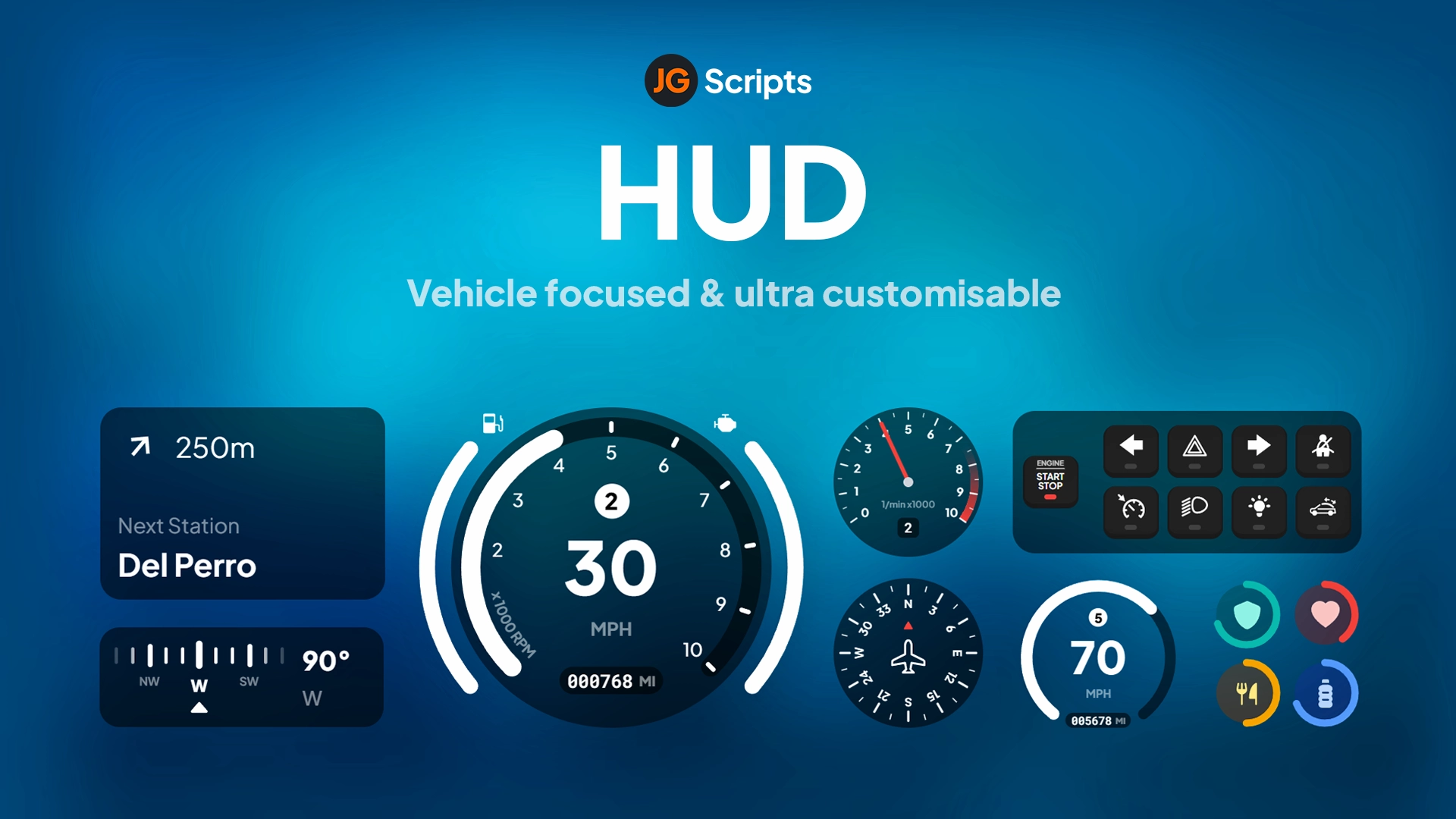
izzy HUD v5 - The izzy HUD v5 sets new standards on FiveM - You can fully customize this HUD. Compatible with ESX framework for FiveM servers.
Instant Access
14-day refund policy
Secure Checkout
2 product images available.
izzy HUD v5 - The izzy HUD v5 sets new standards on FiveM - You can fully customize this HUD. Compatible with ESX framework for FiveM servers.
Use the published facts on this page to confirm whether izzy HUD v5 matches your server before checkout.
Only the facts published on this page should be treated as confirmed. If you need more detail, review the description, requirements, changelog, reviews, and product Q&A before checkout.
esx, qbcore, qbox, standalone
Published on this page
Available
Card, Klarna and supported wallets via Stripe. More local methods may appear when available for your region.
Support expectation
Support covers download access, missing delivered files, and questions based on the published setup notes.
Custom installation, framework conversion, live server setup, and custom feature work are not included unless stated on the product page.
Ask before buying if your server uses heavily modified framework, inventory, or database resources.
Use this checklist to decide quickly whether the resource fits your current server build, framework, and support expectations.
Server-owner payoff
izzy HUD v5 is positioned to reduce HUDs instead of making you rebuild the same system from scratch.
Compatibility
Works with esx, qbcore, qbox, standalone. Check the requirements block before adding it to a live stack.
Purchase confidence
Instant download, Stripe checkout, support access, and refund policy context are shown before payment.
Decision assets
Requirements, installation details, Preview video, Product Q&A
HUDs are tricky. You want something clean that doesn't dominate the screen, but you also need it to display health, armor, hunger, stress, and notifications without feeling cluttered. izzy HUD v5 handles all of that plus adds progress bars for actions. It's designed specifically for QBCore, with built-in exports that replace the default notification and progress bar systems.
You get a complete HUD replacement with status bars (health, armor, hunger, thirst, stress), a notification system with multiple types (success, error, inform), and progress bars for timed actions. Everything integrates with QBCore's native functions, so you don't have to rewrite your existing scripts. The HUD is fully customizable—colors, positions, visibility—all configurable.
Replace your existing QBCore notification function with this:
function QBCore.Functions.Notify(text, texttype, length)
    texttype = texttype == success and success or texttype == error and error or inform
    length = length or 5000
    if type(text) == 'table' then
        local ttext = text.text or 'Placeholder'
        local caption = text.caption or 'Placeholder'
        exports['izzy-hudv5']:addNotification(type, ttext, caption, length)
    else
        exports['izzy-hudv5']:addNotification(type, texttype == 'error' and 'Error' or texttype == 'success' and 'Success' or 'Notify', text, length)
    end
end
For progress bars, use:
function QBCore.Functions.Progressbar(name, label, duration, useWhileDead, canCancel, disableControls, animation, prop, propTwo, onFinish, onCancel)
    exports['izzy-hudv5']:Progress({
        name = name:lower(),
        duration = duration,
        label = label,
        useWhileDead = useWhileDead,
        canCancel = canCancel,
        controlDisables = disableControls,
        animation = animation,
        prop = prop,
        propTwo = propTwo,
    }, function(cancelled)
        if not cancelled then
            if onFinish then onFinish() end
        else
            if onCancel then onCancel() end
        end
    end)
end
Most HUDs force you to rewrite your scripts. izzy HUD v5 works as a drop-in replacement—you modify two functions in QBCore and everything else just works. The progress bar system is particularly solid because it handles animations, props, and control disables all in one call. That means you can make a lockpicking minigame that freezes player movement, shows a lockpick prop, and plays the picking animation without juggling three different script calls. And since it's designed for QBCore specifically, you don't have to deal with framework compatibility issues.
Direct replacement for QBCore.Functions.Notify and QBCore.Functions.Progressbar. Existing scripts work without modifications.
Supports success, error, and inform notification styles with both simple text and dual-text format (caption + message).
Shows progress for tasks like lockpicking, crafting, or eating with support for animations, props, and cancel functionality.
Built-in stress gain and relief events that work with QBCore's stress mechanics or can be adapted for custom systems.
Displays health, armor, hunger, thirst, and other status indicators in a clean visual design that doesn't block gameplay.
0 questions
No Questions
Be the first to ask a question!
Learn more about setting up, configuring, and using this type of resource.

Choosing a framework is the single most consequential decision when building a FiveM server. It determines which scripts you can use, how your developers write code, the…

FiveM frameworks form the backbone of roleplay servers. They're not just code libraries—they're complete systems that manage player identity, jobs, inventory, permissions,…
QBox has firmly established itself as the natural successor to QBCore in the FiveM roleplay ecosystem.
Use this product as part of a larger setup. Explore related categories, alternative frameworks, premium bundles, and free companion downloads.