



QBCore Inventory System – Modern Item Management for FiveM Servers
Upgrade your QBCore server with a fully-featured inventory system that brings intuitive drag-and-drop item management to FiveM. This comprehensive inventory solution replaces basic item lists with a visual grid interface where players can organize their belongings, transfer items between containers, and interact with storage systems naturally. It’s the foundation for immersive roleplay economies, crafting systems, and player interactions that feel modern and polished.
The QBCore Inventory System handles everything from player pockets to vehicle trunks, stash houses to shop displays. Items have weight, take up inventory space, and can be visually organized however players prefer. The system integrates seamlessly with QBCore jobs, shops, and item usage, creating a cohesive experience where inventory management feels like a natural part of gameplay rather than a menu-diving chore.
Video preview not loading? Click here
What’s Included
You’re getting a complete inventory framework with player inventory, hotbar slots, item tooltips, weight management, and container systems. The visual interface shows item icons, quantities, and metadata at a glance. Players can drag items between slots, split stacks, and quick-transfer with keyboard shortcuts. The system includes inventory access for vehicles (trunks, gloveboxes), properties (stashes, fridges), dropped items (ground loot), and shops.
The backend handles all the complexity – item durability, metadata storage (weapon attachments, item quality, owner information), weight calculations, slot management, and permission checks. Everything syncs properly in multiplayer, prevents duplication exploits, and integrates with QBCore’s existing item system without breaking compatibility with your current scripts.
Key Features
- Drag-and-Drop Interface – Visual grid inventory with smooth dragging, dropping, and item swapping between slots
- Weight & Slot Management – Each item has weight, inventory has capacity limits, with clear visual indicators when full
- Hotbar System – Quick-access slots for frequently used items, bound to number keys for instant use
- Item Metadata – Store custom data per item (weapon serial numbers, food quality, crafted-by info, durability)
- Container Support – Access vehicle trunks, property stashes, dropped bags, and shared storage with the same interface
- Stack Splitting – Right-click to split item stacks into custom quantities, perfect for trading or distribution
- Item Tooltips – Hover over items to see detailed information, stats, and usability
- Drop & Pickup System – Drop items on the ground as physical objects, see dropped loot bags at crime scenes
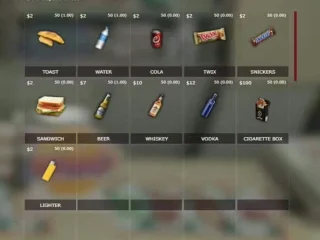
- Shop Integration – Visual shop interfaces where you drag items to buy/sell, with price displays and transaction confirmations
- Weapon Attachment Display – See equipped weapon attachments directly in inventory, manage loadouts visually
- Inventory Shortcuts – Keyboard controls for quick item use, transfer all, sort inventory, and fast looting
- Item Durability System – Items degrade with use, requiring repair or replacement over time
- Search Functionality – Filter large inventories by item name for quick access
- Permission Controls – Set who can access specific containers, useful for gang stashes or police evidence lockers
- Exploit Protection – Server-side validation prevents item duplication, weight manipulation, and inventory hacking
Perfect For
- Roleplay Servers – Provides immersive inventory interaction for jobs, trading, and daily activities
- Economy Servers – Essential foundation for player trading, shops, crafting, and item-based economies
- Survival Servers – Weight limits and inventory management add survival challenge to looting and resource gathering
- Criminal Roleplay – Visual drug dealing, weapon trading, and contraband transport with realistic inventory constraints
- Job Systems – Mechanics carrying parts, chefs managing ingredients, cops organizing evidence – all use the same intuitive system
How It Works
Players open their inventory with a configurable key (default I or Tab depending on setup). The interface displays available slots in a grid, with occupied slots showing item icons and quantities. Hovering over an item reveals detailed information – what it is, what it does, any special properties or metadata. Clicking and dragging lets you reorganize, move items to different inventories (vehicle trunk, other player, shop), or drop them on the ground.
The weight system provides realistic constraints – you can’t carry 500 weapons and unlimited drugs. Each item has a configured weight, and your total carry capacity is limited. When you’re at max weight, you’ll need to drop items or store them in a vehicle before picking up more. This creates meaningful decisions about what to carry and encourages use of storage systems.
Vehicle inventories work identically to player inventory. Open a trunk and you’ll see both your personal inventory and the vehicle’s storage side-by-side. Drag items between them to load/unload. Different vehicles have different storage capacities – a sports car has minimal trunk space while a van can haul serious cargo. Property stashes work the same way, letting you organize safe houses with stored weapons, drugs, or legitimate business inventory.
Installation
- Extract qb-inventory resource to your server resources folder
- Replace or disable your existing inventory system (qb-core’s basic inventory)
- Add “ensure qb-inventory” to server.cfg after qb-core loads
- Import the SQL file to create necessary database tables for item storage
- Configure inventory settings in config.lua (max weight, slot count, item images path)
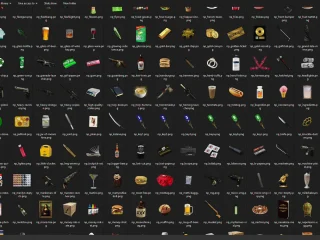
- Add item images to the html/images/ folder (PNGs for each item in your server)
- Restart server – players will now use the new inventory system
- Update any custom scripts to use qb-inventory exports instead of old inventory functions
Framework Compatibility
- ✅ QBCore – Native integration, designed specifically for QBCore framework
- ✅ QBOX – Compatible with QBOX (QBCore fork), works with minimal changes
- ❌ ESX – Built for QBCore, would require significant restructuring for ESX compatibility
Configuration & Customization
The config file lets you adjust inventory capacity (default 50 slots), max weight limits (varies by setup, typically 120-150kg), and hotbar slot count. You can set different capacities for vehicle types – motorcycles get less storage than trucks. Configure whether dropped items create physical props or just interaction zones. Set inventory access permissions for jobs, gangs, or specific properties.
Item configuration is handled through QBCore’s shared items table, where you define each item’s weight, usability, and metadata fields. The inventory system reads this data and applies it automatically. Want weapons to have durability? Enable it in config and add durability tracking to weapon items. Need food to have quality ratings? Add quality metadata to consumable items. The system is flexible enough to support whatever item properties your server needs.
Visual customization is straightforward – the HTML/CSS interface can be restyled to match your server’s theme. Item images are simple PNG files that you can replace or add as needed. The layout, colors, fonts, and animations are all customizable if you want the inventory to have a unique look for your server brand.
What Makes It Stand Out
This isn’t just another inventory script – it’s become the community standard for QBCore servers because it handles the complexity properly. Item duplication bugs are prevented through server-side validation. Weight calculations work correctly with fractions. Containers sync properly in multiplayer scenarios. The UI is responsive and doesn’t lag when managing large inventories. These details matter when you’re running a populated server where inventory bugs can destroy your economy.
The developer has clearly used this system on production servers, because it handles edge cases that other inventory systems miss. What happens when two players try to take the last item from a stash simultaneously? What if someone disconnects while dragging an item? What about vehicles despawning while items are in the trunk? All of these scenarios are handled gracefully without item loss or duplication. That’s the polish that separates a working script from a reliable production system.
Technical Details
- Client Performance: Lightweight UI with optimized rendering, minimal FPS impact when open
- Server Performance: Efficient database queries, cached inventory data reduces lookup overhead
- Database: Uses MySQL tables for persistent storage, properly indexed for performance
- Network Optimization: Only syncs changed slots, not entire inventory on every update
- Item Images: Supports PNG format, recommended 150x150px for optimal display
- Multiplayer Safe: All actions validated server-side, prevents client manipulation exploits
Integration with Other Systems
The inventory system exports functions that other resources can call – AddItem, RemoveItem, GetInventory, CanCarryItem, and more. This means your job scripts, crafting systems, and shops can all interact with player inventory programmatically. A mechanic job can check if the player has repair parts before allowing a fix. A drug script can verify inventory space before adding product. Everything connects through standardized exports.
For developers building custom scripts, the inventory provides events and callbacks. Trigger an event when items are used, removed, or dropped. Hook into inventory opening to add custom validation. Listen for item metadata changes to update external systems. The framework is extensible without needing to modify core files, keeping your setup upgrade-friendly when new versions release.
Vehicle inventory integrates with most vehicle keys/ownership systems. Only authorized players can access a vehicle’s trunk, preventing random players from looting your car. Property stashes tie into housing/gang territory systems, so only gang members can access the gang stash. Shop inventories can be restocked by authorized players, creating player-run business opportunities. The permission system is flexible enough to support any access control scenario your server needs.
Support & Updates
As one of the most widely-used QBCore resources, the inventory system benefits from community testing and feedback. Bugs get identified and fixed quickly because thousands of servers are running this code. Updates maintain compatibility with QBCore framework changes, so you won’t find yourself stuck on old versions because inventory broke. The codebase is also well-documented, making it easier to troubleshoot issues or add custom features specific to your server.

Bette (verified owner) –
Great item! It provides too many things compared to its price charged.
Luciano (verified owner) –
This is the best support for a product I had so far, they reply quickly and solve themselves the problems most of the time. Kudos guyz
Augustine (verified owner) –
Great balance between simplicity and customization. You can use it immediately or configure every detail.
AlexDrift (verified owner) –
Good performance, clean interface, and helpful support. Nothing to complain about.
London (verified owner) –
This resource saved me a lot of development time. It worked almost immediately after installation.
Dahlia (verified owner) –
Everybody skips this, but it’s actually a good item, I’ll remove 1 star for the customer support
Trace (verified owner) –
4* :)
Christian (verified owner) –
Very satisfied with this purchase.
AmyStorm252 (verified owner) –
Our players noticed the improvement immediately. It adds a lot of quality to the server.