

  • Instant digital delivery
  • Lifetime updates on selected products
  • Trusted by server owners
FiveMX
Shop
Full ServersBundlesNew releases
FiveMX

Start building your server today.

Curated FiveM resources, instant delivery, free starter mods, and practical guides in one calm marketplace.

Browse the shopsupport@fivemx.com

Shop

  • Shop
  • FiveM Mods
  • All Products
  • Free Mods
  • Best Scripts & Mods
  • FiveM Scripts

Frameworks

  • QBCore Scripts
  • ESX Scripts
  • QBox
  • Standalone

Community

  • Blog
  • Support
  • Creators
  • Affiliate

Legal

  • Privacy Policy
  • Terms of Service
  • Refund Policy
  • Digital Delivery
  • Cookie Policy
  • GDPR Compliance
  • DMCA
  • Imprint
  • Editorial Policy

Server Templates

  • QBCore Server Template
  • ESX Server Template
  • NoPixel Server Template
  • Server Packs
  • Free Server Templates
  • Tebex Alternative
© 2026 FiveMX. All rights reserved.·FiveMX is not affiliated with Rockstar Games, Take-Two Interactive, or CFX.re. All trademarks are property of their respective owners.
DiscordDocs
Compatibility:

AC Radio

$5.49

Secure Checkout

Cards, Apple Pay, Google Pay, iDEAL/Wero, Bancontact, EPS, Przelewy24, and optional Crypto where available via Stripe.

Instant file access after paymentSupport and refund policy shown before checkout
Ask support before buyingRead refund policy
Instant Access
SSL Encrypted
Cards, wallets, bank redirects
Frameworksesx, qbcore, qbox, standalone, vrp
Setup

Requires a FiveM server, ESX or QBCore, access to server resources, and permission to restart the resource after configuration.

RequirementsPublished on this page
PreviewAvailable

Description

AC Radio - Advanced Radio Communication System for FiveM

The AC Radio delivers a professional radio communication system for FiveM servers, providing realistic walkie-talkie functionality with multiple channels, signal quality effects, and authentic radio mechanics. This comprehensive radio script allows players to communicate across distances using handheld or vehicle-mounted radios, complete with channel management, signal interference, battery systems, and proper radio etiquette features. Perfect for roleplay servers where departments need secure communication, gangs require coordinated operations, or any community wanting immersive long-range voice communication.

What's Included

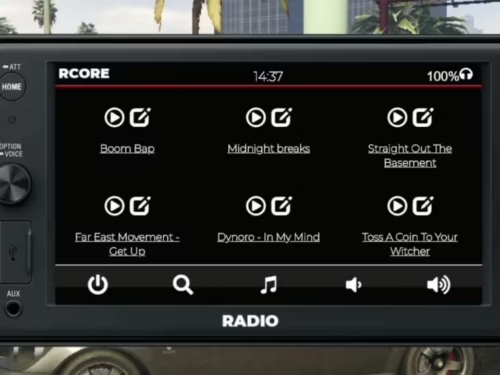
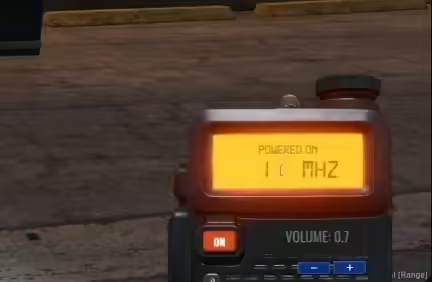
This radio system provides full walkie-talkie functionality with customizable channel management, allowing players to create private channels, join department frequencies, or use public channels. The system includes realistic signal degradation over distance, radio static effects, battery consumption mechanics, and configurable transmission ranges. Players can use handheld radios, vehicle-mounted systems, or specialized long-range equipment depending on their role and equipment. The interface is clean and intuitive, showing current channel, signal strength, and battery level at a glance.

Key Features

  • Multiple Channels - Create and join unlimited radio frequencies
  • Department Frequencies - Dedicated channels for police, EMS, fire, and other jobs
  • Private Channels - Password-protected frequencies for gangs and organizations
  • Signal Quality System - Radio clarity degrades with distance and obstacles
  • Radio Static Effects - Authentic radio sounds for transmission start/end
  • Battery Management - Radios require charging or battery replacement
  • Range Types - Handheld, vehicle, and long-range radio variants
  • Channel Scanning - Scan through frequencies to find active transmissions
  • Emergency Broadcast - Panic button for emergency alerts
  • Voice Integration - Works with pma-voice, mumble-voip, and saltychat

Perfect For

  • Roleplay servers with police, EMS, and fire departments
  • Gang warfare servers requiring secure communication
  • Military or tactical roleplay communities
  • Heist servers where coordination is essential
  • Any server wanting realistic long-range voice communication

Radio Types & Ranges

  • Handheld Radio - Standard walkie-talkie with medium range (500-1000m)
  • Vehicle Radio - Mounted car radio with extended range (1500-2000m)
  • Long-Range Radio - Specialized equipment for maximum distance (3000m+)
  • Emergency Radio - Department-issued radios with enhanced features
  • Encrypted Radio - Secure communications for sensitive operations

Installation Guide

  1. Extract the AC Radio resource to your server's resources folder
  2. Ensure you have a compatible voice system installed (pma-voice recommended)
  3. Configure framework integration (ESX/QBCore) in the config file
  4. Set up radio items in your framework's items database
  5. Configure department frequencies and default channels
  6. Customize radio ranges, battery drain rates, and signal mechanics
  7. Add the resource to server.cfg after your voice system
  8. Restart and test radio functionality with multiple players

Framework Compatibility

  • ✅ ESX - Full integration with ESX jobs and item system
  • ✅ QBCore - Compatible with QB jobs and inventory
  • ✅ QBOX - Works with QBOX job management
  • ✅ Standalone - Can function with basic item system

What Makes It Stand Out

AC Radio focuses on realism and usability, creating an immersive radio experience without unnecessary complexity. The signal quality system means radios work perfectly close by but degrade with distance or when inside buildings, forcing players to find better positions for clear communication. The battery mechanic adds resource management - officers must keep radios charged, and criminals might run out of battery during extended operations. Unlike basic radio scripts that just add a voice channel, this system includes proper radio etiquette features like transmission start/end sounds, channel identification, and squelch controls.

Channel Management

  • Public Channels - Open frequencies anyone can join
  • Department Channels - Job-restricted frequencies (auto-join for department members)
  • Private Channels - Password-protected for gangs and organizations
  • Temporary Channels - Create one-time use channels for specific operations
  • Emergency Channels - High-priority frequencies for critical situations
  • Channel Scanning - Automatically cycle through channels to monitor activity

Technical Specifications

  • Performance: Optimized for low resource usage (~0.01ms idle)
  • Voice System: Compatible with pma-voice, mumble-voip, saltychat
  • Database: Minimal database usage (stores channels only)
  • UI: Clean, minimal interface with essential information
  • Audio: High-quality radio sound effects included

Customization Options

  • Configure transmission ranges for each radio type
  • Set battery drain rates and charging mechanics
  • Customize radio sound effects (static, beeps, transmission tones)
  • Define department frequencies and default channels
  • Set channel capacity limits (max users per frequency)
  • Configure signal degradation rates based on distance/obstacles
  • Customize UI position, size, and styling

Realistic Radio Mechanics

  • Signal Interference - Buildings and terrain affect signal quality
  • Battery Drain - Active transmission consumes more power than idle
  • Radio Check - Test signal strength with other users
  • Transmission Limits - Prevent radio spamming with cooldowns
  • Push-to-Talk - Realistic transmission activation mechanics
  • Channel Busy - Prevent multiple simultaneous transmissions

Department Integration

  • Automatic channel assignment when clocking in to jobs
  • Department-specific frequencies (police on 1, EMS on 2, etc.)
  • Rank-based access to encrypted or command channels
  • Cross-department channels for multi-agency operations
  • Dispatch integration for emergency broadcasts

Gang & Organization Features

  • Create password-protected private channels
  • Share channel codes with trusted members
  • Change frequencies quickly if compromised
  • Use encrypted radios for secure communications
  • Coordinate heists and operations without interference

Emergency Features

  • Panic Button - Send emergency alert to all department members
  • Emergency Broadcast - Override normal channels with critical messages
  • Location Ping - Automatically transmit location with emergency activation
  • Priority Channels - Emergency transmissions override routine traffic

User Interface Elements

  • Current channel number and name display
  • Signal strength indicator (bars or percentage)
  • Battery level indicator with low battery warnings
  • Active transmission indicator (your mic or others)
  • Channel participant count
  • Radio power on/off status

Related vRP Scripts

  • Bike Jump Ability
  • RTX Waterpark
  • GFX Secondhand Vehicle Shop
  • Opticom Traffic Light System

Installation notes

Requires a FiveM server, ESX or QBCore, access to server resources, and permission to restart the resource after configuration.
Installation notes
Requires a FiveM server, ESX or QBCore, access to server resources, and permission to restart the resource after configuration.

Buy this when it saves setup time

Use this checklist to decide quickly whether the resource fits your current server build, framework, and support expectations.

Server-owner payoff

AC Radio is positioned to reduce UI & Communication instead of making you rebuild the same system from scratch.

Compatibility

Works with esx, qbcore, qbox, standalone, vrp. Check the requirements block before adding it to a live stack.

Purchase confidence

Instant download, Stripe checkout, support access, and refund policy context are shown before payment.

Decision assets

Requirements, Preview video, Product Q&A

Product fit, setup, and proof at a glance

Use the published facts on this page to confirm whether AC Radio matches your server before checkout.

Compatibility

Frameworks
ESX, QBCore, QBOX, Standalone, vRP
Category
UI & Communication

Setup & requirements

Install flow
Download → resources folder → ensure in server.cfg
Requirements
Published on this page
File size
855.59 KB

Proof & buyer questions

Reviews
No reviews yet
Answered Q&A
Ask before buying

Only the facts published on this page should be treated as confirmed. If you need more detail, review the description, requirements, changelog, reviews, and product Q&A before checkout.

DescriptionRequirementsPreview video
UI & Communication
Compatibility:
ESX
QBCore
QBOX
Standalone
vRP

AC Radio

Review process
$5.49

Secure Checkout

Cards, Apple Pay, Google Pay, iDEAL/Wero, Bancontact, EPS, Przelewy24, and optional Crypto where available via Stripe.

Instant file access after paymentSupport and refund policy shown before checkout
Ask support before buyingRead refund policy
Instant Access
SSL Encrypted
Cards, wallets, bank redirects
Frameworksesx, qbcore, qbox, standalone, vrp
Setup

Requires a FiveM server, ESX or QBCore, access to server resources, and permission to restart the resource after configuration.

RequirementsPublished on this page
PreviewAvailable
Home
Shop
UI & Communication
UI & Communication
ESX
QBCore
QBOX
Standalone
vRP
Review process

Key Features

  • Multiple Channels with Unlimited Frequencies

    Create and join unlimited radio frequencies, including public channels, department-specific frequencies, password-protected private channels, temporary channels for specific operations, and emergency channels for critical situations.

  • Signal Quality System with Distance Degradation

    Radio clarity degrades with distance and obstacles, forcing players to find better positions for clear communication rather than having perfect audio at any range.

  • Battery Management Mechanics

    Radios require charging or battery replacement, adding resource management where officers must keep radios charged and criminals might run out of battery during extended operations.

  • Multiple Radio Equipment Types

    Handheld radios (500-1000m), vehicle-mounted radios (1500-2000m), long-range radios (3000m+), emergency radios with enhanced features, and encrypted radios for secure communications.

  • Authentic Radio Etiquette Features

    Includes transmission start/end sound effects, channel identification, squelch controls, and a panic button for emergency alerts to create immersive radio communication.

Frequently Asked Questions

Related Products

$18.99
$21.99
$12.49
$7.49

Related Tutorials & Guides

Learn more about setting up, configuring, and using this type of resource.

ESX vs QBCore vs QBOX: Technical Framework Comparison 2026

ESX vs QBCore vs QBOX: Technical Framework Comparison 2026

Choosing a framework is the single most consequential decision when building a FiveM server. It determines which scripts you can use, how your developers write code, the…

FiveM Frameworks Explained: Complete Guide to ESX, QBCore & QBOX

FiveM Frameworks Explained: Complete Guide to ESX, QBCore & QBOX

FiveM frameworks form the backbone of roleplay servers. They're not just code libraries—they're complete systems that manage player identity, jobs, inventory, permissions,…

QBox Framework Guide: Migrate from QBCore and Boost Performance (2026)

QBox Framework Guide: Migrate from QBCore and Boost Performance (2026)

QBox has firmly established itself as the natural successor to QBCore in the FiveM roleplay ecosystem.

Continue Building Your FiveM Server

Use this product as part of a larger setup. Explore related categories, alternative frameworks, premium bundles, and free companion downloads.

Browse all scriptsUI & Communication scriptsesx scriptsTry QBCore insteadTry QBox insteadFree FiveM modsCompare bundles
Audio Speaker Script

Audio Speaker Script

Origen Radio

Origen Radio

KQ Shell Builder

KQ Shell Builder

2NA Chat

2NA Chat