5 product images available.
Secure Checkout
Cards, Apple Pay, Google Pay, iDEAL/Wero, Bancontact, EPS, Przelewy24, and optional Crypto where available via Stripe.
Requires a FiveM server, ESX or QBCore, access to server resources, and permission to restart the resource after configuration.
Description
CodeM TextUI — Premium Interaction UI System for FiveM
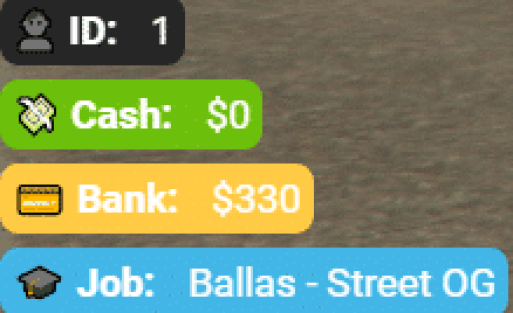
CodeM TextUI is a polished, lightweight TextUI and contextual notification system for FiveM servers by CodeM Studio. It displays elegant on-screen prompts that tell players which key to press and what action will be performed — essential for any professional roleplay server.
With 10 built-in visual themes, clean animations, and a dead-simple two-export API (OpenTextUI / CloseTextUI), it drops into any server in minutes with zero framework dependencies.
Features
- 10 unique visual themes — from minimalist dark cards to icon-accented styles (thema-1 through thema-10)
- Custom key binding display — show any keyboard key alongside the action label
- Smooth open/close animations — polished NUI transitions with sound feedback
- Proximity-based triggers — built-in example for distance-based show/hide using markers
- Two simple exports —
OpenTextUI(message, key, theme)andCloseTextUI()— integrates with any script in seconds - Lua 5.4 support — modern Lua runtime, optimised performance
- Standalone — no ESX, QBCore, or any framework required
- Custom font & icon support — TTF fonts and PNG icons bundled per theme
- Sound effects — audio feedback on open/close included
What's Included
client/main.lua— core TextUI logic and NUI callbacksclient/example.lua— ready-to-use proximity trigger demo with DrawMarkerhtml/— full NUI frontend (HTML, CSS, JS, fonts, images, sounds)fxmanifest.lua— pre-configured manifest (Lua 5.4,/assetpacksdependency)
Compatibility
| | | |---|---| | Framework | Standalone (works with ESX, QBCore, QBox, vRP, or any custom framework) | | Game | GTA V / FiveM | | Lua | 5.4 | | Version | 1.0.2 |
Installation
1. Extract the codem-textui folder into your server resources directory 2. Add ensure codem-textui to your server.cfg 3. Use the exports in any script:
-- Show TextUI
exports['codem-textui']:OpenTextUI('Open Door', 'E', 'thema-1')

-- Hide TextUI exports['codem-textui']:CloseTextUI()
> Created by CodeM Studio — professional FiveM script developers.
Installation notes
Buy this when it saves setup time
Use this checklist to decide quickly whether the resource fits your current server build, framework, and support expectations.
Server-owner payoff
CodeM TextUI — Stylish Text UI Notifications is positioned to reduce HUDs instead of making you rebuild the same system from scratch.
Compatibility
Works with standalone. Check the requirements block before adding it to a live stack.
Purchase confidence
Instant download, Stripe checkout, support access, and refund policy context are shown before payment.
Decision assets
Requirements, Preview video, Product Q&A
Product fit, setup, and proof at a glance
Use the published facts on this page to confirm whether CodeM TextUI — Stylish Text UI Notifications matches your server before checkout.
Compatibility
- Frameworks
- Standalone
- Category
- HUDs
- Version
- v1.0.2
Setup & requirements
- Install flow
- Download → resources folder → ensure in server.cfg
- Requirements
- Published on this page
- File size
- 3.6 MB
Updates & maintenance
- Last updated
- June 15, 2026
- Preview
- Available