



Why Server Branding Matters
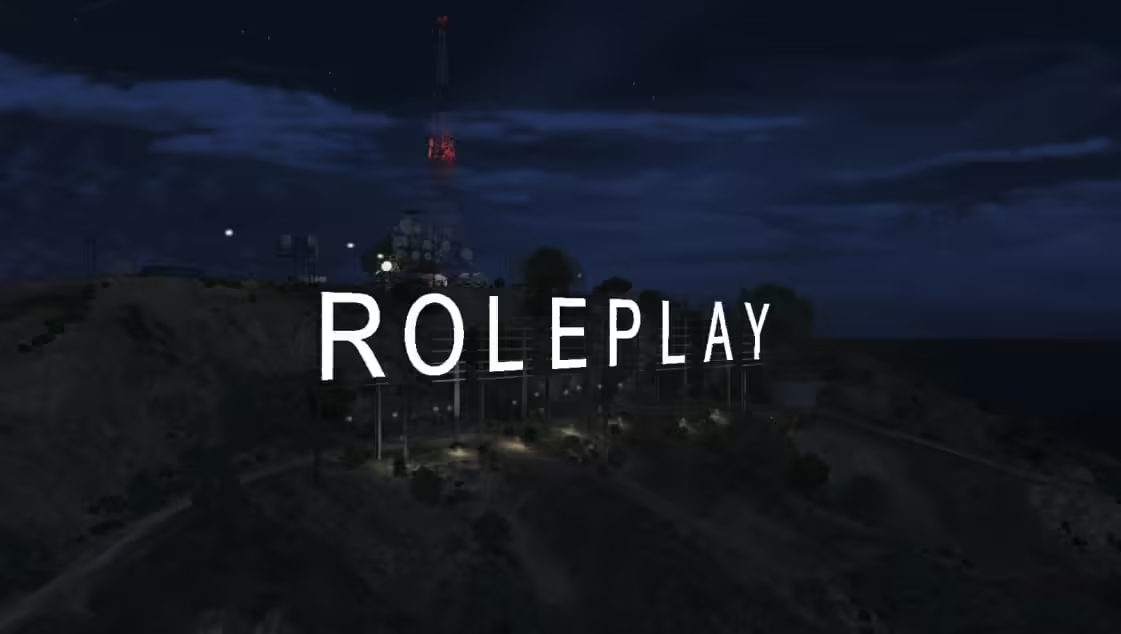
The Vinewood sign is one of the most recognizable landmarks in GTA V, visible from nearly every part of the map. By customizing it with your server name, you create instant brand recognition that reinforces your server identity every time players explore the city. It’s the equivalent of having a massive billboard that never stops advertising your community.
Key Features
- Fully Customizable Text – Replace “VINEWOOD” with your server name or any text up to 9 characters
- High-Quality Textures – Crisp, detailed 4K textures that look great from any distance or angle, matching GTA V’s quality
- Multiple Color Options – Choose from various pre-made color schemes or create custom colors using RGB values
- Day/Night Lighting – Proper illumination system that adapts to game time with realistic glow effects
- LOD Support – Multiple levels of detail for seamless long-distance viewing without performance loss
- Weather Integration – Textures respond to weather conditions with appropriate wetness and reflections
Complete Package Includes
- MLO Package – Complete ready-to-install modification files with proper collision and placement
- PSD Template – Layered Photoshop template for easy text and color customization
- Multiple Presets – 10+ pre-made designs showcasing different styles and color schemes
- Installation Guide – Detailed step-by-step instructions with screenshots for every stage
- Texture Tools – Batch scripts for easy texture replacement and YTD compilation
- Backup Files – Original sign backup allowing easy restoration to vanilla
- Font Pack – Collection of fonts matching the original Vinewood style
- Video Tutorial – Visual walkthrough of the customization process
Technical Specifications
- Type – Map Loader Object (MLO) with custom texture streaming
- Compatibility – All FiveM frameworks (ESX, QBCore, Standalone, VRP, custom)
- File Size – Under 10MB optimized package with compressed textures
- Installation Time – Less than 5 minutes for basic install, 15-20 minutes for custom design
- Texture Resolution – 4096×2048 base resolution, downscaling supported
- Draw Distance – Visible across entire Los Santos with proper LOD transitions
Customization Options
- Text Content – Any text up to 9 characters (longer names can be abbreviated)
- Font Styles – 15+ font options included, import custom fonts supported
- Color Schemes – Unlimited RGB color possibilities with preset palettes
- Lighting Effects – Adjustable glow intensity, color temperature, and spread
- Material Types – Choose from metallic, matte, weathered, or glossy finishes
- Damage States – Optional worn or damaged appearances for dystopian servers
- Background Options – Modify hillside vegetation and surroundings if desired
Step-by-Step Customization Process
1. Design Phase: Open the included PSD template in Photoshop or GIMP, select your desired font from the pack or import your own, type your server name (max 9 characters), adjust letter spacing and positioning to match original layout, choose colors for letters and glow effects.
2. Export Phase: Export texture as DDS format (DXT5 recommended), use included compression tool for optimization, verify texture resolution matches template specifications.
3. Installation Phase: Replace texture file in MLO package using provided tool, rebuild YTD file with batch script, add resource to server resources folder, ensure proper loading order in server.cfg, restart server and verify sign appears correctly.
Branding Impact & Community Value
Players will see your server name every time they drive through Vinewood Hills, fly over in helicopters, or view the city from high vantage points. This constant brand reinforcement creates strong server identity and community pride. Players often take screenshots at the sign, creating organic social media promotion for your server.
Advanced Customization
For experienced modders, the package supports advanced modifications including animated lighting sequences, RGB cycling effects, damage states that change based on server events, integration with server scripts for dynamic text changes, and multi-texture systems for seasonal variations.
Seasonal & Event Variations
Create multiple versions for different occasions – Halloween themed with spooky colors, Christmas version with snow and lights, anniversary celebration designs, special event branding, or faction-controlled variations for gang war servers. Simply swap texture files to update the sign.
Framework Compatibility
- Universal MLO – Works with any FiveM server regardless of framework
- ESX – No conflicts with ESX resources or scripts
- QBCore – Fully compatible with QB framework
- VRP – Works perfectly with VRP servers
- Standalone – No framework dependencies required
- Custom Frameworks – Pure MLO, framework-agnostic
Professional Design Tips
Keep text under 8 characters for best visual balance, use high-contrast colors for maximum visibility from distance, match your sign colors to your server’s Discord and website branding, test appearance at different times of day before finalizing, and consider readability from various angles and distances.
Support & Resources
Includes comprehensive documentation with troubleshooting guide for common issues, template customization tutorials, font pairing recommendations, color scheme examples, and community showcase gallery. Access to update notifications when new features or presets are released.
Installation Requirements
- Photoshop, GIMP, or Paint.NET for texture editing
- Basic understanding of FiveM resource installation
- Server file access (FTP or local)
- Approximately 15-20 minutes for first-time setup
Make your mark on Los Santos with this essential branding tool – because first impressions matter in the world of FiveM roleplay, and nothing says “unique server” like your own custom Hollywood sign.
What’s Included
- MLO Package: Complete ready-to-install modification files
- PSD Template: Photoshop template for easy text customization
- Multiple Presets: Several pre-made designs to choose from
- Installation Guide: Step-by-step instructions with screenshots
- Texture Tools: Scripts for easy texture replacement
- Backup Files: Original sign backup for easy restoration
Easy Customization Process
Simply edit the included PSD template with your desired text, export the texture, and follow our straightforward installation guide. No advanced modding knowledge required – if you can use basic photo editing software, you can customize this sign.
Make your mark on Los Santos with this essential branding tool – because first impressions matter in the world of FiveM roleplay.
Reviews
There are no reviews yet.