$50.00Original price was: $50.00.$30.00Current price is: $30.00.
-40%
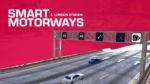
London Studios Smart Motorways
Live Updates – You can make live updates to signs around the map with our in-game menu.
Multiple Icons – We’ve got multiple icons including speeds (20, 30, 40, 50, 50 & National Speed (UK)) along with arrow left, arrow right and lane closed.
Textures Editable – You can re-texture the speeds should you wish to do so.
Custom Menu – We’ve designed an in-game menu which is realistic for you to easily update the lanes.
Fully Synced – This is fully synced to all players.
Permissions – We’ve added support for QBCore, ESX and vRP permissions straight out of the box.
Control Panel – Our in-game control panel allows your players to easily set the icon or speed used above lanes in real time.
Remote Changes – Motorway gantries can be updated all around the map using one command, with a map allowing you to select your intended location to edit.
CCTV System – Easily view and move CCTV cameras on gantries all over the map from the control panel.
US / UK / EU Mode – Smart Motorways has support for three modes, including US, UK and EU. This means we support a wide range of different speeds straight out of the box for your server.
Smart Signs Integration – Smart Motorways is integrated with Smart Signs, meaning if you have a copy of both you will be able to add messages/icons on a new board above each gantry.
Smart Speed Cameras Integration – Smart Motorways is integrated with Smart Speed Cameras, meaning if you have a copy of both, the cameras on all gantries will become active and will adjust dynamically to the speed limit set above each individual lane, helping with speed enforcement.
Icon Support – As well as support for the speeds, we have icons including arrow left and lane closed.
Discord Logging – Our resource can integrate into Discord with logging by webhooks. This can log any changes on the motorway gantries and keep a record for the future.
Pre-Configured Signs – We’ve pre-configured over 60 locations around the map, meaning Smart Motorways is ready to use straight out of the box.
Memory Saving – Any changes made to Smart Motorways around the map will be saved in memory, meaning they will still be there after restarts. You can easily clear all signs with our /resetsmartmotorways command.
Emissive Textures – These icons are bright both at day and night, making them bound to grab the attention of drivers at all times of the day.
Multi Lane Support – We have support for two, three and four laned roads.
Add Locations Easily – With our developer command, you can easily add new locations in-game which are automatically saved for the next restart.
Config
config = {

    -- We've included speed options for the UK, EU, and US based servers
    -- Simply type "UK", "EU", or "US" to change the speed options
    iconPack = "UK",

    -- If you add custom icons, you can add them here
    -- Speed-related icons will be used for speed cameras, and must contain the speed limit in the name as numbers only.
    -- E.g. an icon of speed_60 will be used for a speed limit of 60. An icon of 3_speed_40 would result in a speed limit of 340.
    -- Do NOT edit this section unless you know what you are doing and have modelled custom icons.
    iconPacks = {
        ["UK"] = {
            "arrow_left",
            "arrow_right",
            "red_x",
            "speed_20",
            "speed_30",
            "speed_40",
            "speed_50",
            "speed_60",
            "national_speed",
        },
        ["EU"] = {
            "arrow_left",
            "arrow_right",
            "red_x",
            "speed_20",
            "speed_30",
            "speed_40",
            "speed_50",
            "speed_60",
            "speed_70",
            "speed_80",
            "speed_90",
            "speed_100",
            "speed_110",
            "speed_120",
            "speed_130",
            "speed_140",
            "speed_150",
        },
        ["US"] = {
            "arrow_left",
            "arrow_right",
            "red_x",
            "bv_motorway_speed_15",
            "bv_motorway_speed_20",
            "bv_motorway_speed_25",
            "bv_motorway_speed_30",
            "bv_motorway_speed_35",
            "bv_motorway_speed_40",
            "bv_motorway_speed_45",
            "bv_motorway_speed_50",
            "bv_motorway_speed_55",
            "bv_motorway_speed_60",
            "bv_motorway_speed_65",
            "bv_motorway_speed_70",
            "bv_motorway_speed_75",
            "bv_motorway_speed_80",
            "bv_motorway_speed_85",
        },
    },


    cctvKeys = {
        up = {0, 172},
        down = {0, 173},
        left = {0, 174},
        right = {0, 175},
        leaveCam = {0, 200},
    },

    -- The distance in which the sign and its speed limits will load/unload at
    loadDistance = 200.0,

    -- This will enable debug printing on both the client and the server. This should be set to false most of the time.
    developerMode = false,

    integrations = {

        smartSpeedCameras = {
            enabled = false, -- Only enable if you have the Smart Speed Cameras resource installed and up to date
            resourceName = "SmartSpeedCameras", -- This is the name of the resource which Smart Speed Cameras is installed under
            cooldown = 60, -- This is the cooldown in seconds between speed camera detections. This is to prevent spam fines.
        },

        smartSigns = {
            enabled = false, -- Only enable if you have the Smart Signs resource installed and up to date
            resourceName = "SmartSigns", -- This is the name of the resource which Smart Signs is installed under
        }

    },

    saveSpeedsOnChange = true, -- If this is set to true, the speeds will be saved to locations.json when changed. If false, the speeds will reset on restart.
    saveTextOnChange = true, -- If this is set to true, the text will be saved to locations.json when changed. If false, the text will reset on restart.
    saveIconOnChange = true, -- If this is set to true, the icon will be


    closeMenuButton = {0, 177},

    -- This allows you to enable Discord logging for the signs
    -- You must add your webhook in sv_utils.lua
    logging = {
        enabled = false,
        displayName = "Smart Motorways",
        colour = 31487,
        title = "**New Sign Log**",
        icon = "https://i.imgur.com/dcOQmpA.jpg",
        footerIcon = "https://i.imgur.com/n3n7JNW.png",
        dateFormat = "%d-%m-%Y %H:%M:%S", -- Day-Month-Year Hour-Minute-Second
    },

    resetSignsCommand = {
        enabled = true,
        commandName = "resetsmartmotorway",
        Permissions = {
                EnablePermissions = false, -- If set to false, all below job checks will be disabled, even if they are enabled in the config.lua
                AcePermissions = {
                    Permission = "update.motorway.sign",
                    Enabled = false,
                },

                ESX = {
                    Enabled = false,
                    CheckJob = {
                        Enabled = false, -- Enable this to use ESX job check
                        Jobs = {"police"} -- A user can have any of the following jobs, allowing you to add multiple
                    }
                },
                -- We've added vRP integration. All you need to do is enable it below. Then, configure if you wish to check for groups or permissions, or even both
                vRP = {
                    Enabled = false,
                    CheckGroup = {
                        Enabled = false, -- Enable this to use vRP group check
                        Groups = {"police"}, -- A user can have any of the following groups, meaning you can add different jobs
                    },
                    CheckPermission = {
                        Enabled = false, -- Enable this to use vRP permission check
                        Permissions = {"police"} -- A user can have any of the following permissions, allowing you to add multiple
                    },
                },
                -- We've added QBCore integration. All you need to do is enable it below. Then, configure if you wish to check for jobs or permissions, or even both
                QBCore = {
                    Enabled = false,
                    CheckJob = {
                        Enabled = false, -- Enable this to use QBCore job check
                        Jobs = {"police"}, -- A user can have any of the following jobs, meaning you can add different jobs
                    },
                    CheckPermission = {
                        Enabled = false, -- Enable this to use QBCore permission check
                        Permissions = {"police"}, -- A user can have any of the following permissions, allowing you to add multiple
                    },
                },
                -- We've added QBX integration. All you need to do is enable it below. Then, configure if you wish to check for jobs or permissions, or even both
                QBX = {
                    Enabled = false,
                    CheckJob = {
                        Enabled = false, -- Enable this to use QBX job check
                        Jobs = {"police"}, -- A user can have any of the following jobs, meaning you can add different jobs
                    }
                },
        },
    },

    selectSignCommand = {
        commandName = "selectsign",
        Permissions = {
                EnablePermissions = false, -- If set to false, all below job checks will be disabled, even if they are enabled in the config.lua
                AcePermissions = {
                    Permission = "update.motorway.sign",
                    Enabled = false,
                },

                ESX = {
                    Enabled = false,
                    CheckJob = {
                        Enabled = false, -- Enable this to use ESX job check
                        Jobs = {"police"} -- A user can have any of the following jobs, allowing you to add multiple
                    }
                },
                -- We've added vRP integration. All you need to do is enable it below. Then, configure if you wish to check for groups or permissions, or even both
                vRP = {
                    Enabled = false,
                    CheckGroup = {
                        Enabled = false, -- Enable this to use vRP group check
                        Groups = {"police"}, -- A user can have any of the following groups, meaning you can add different jobs
                    },
                    CheckPermission = {
                        Enabled = false, -- Enable this to use vRP permission check
                        Permissions = {"police"} -- A user can have any of the following permissions, allowing you to add multiple
                    },
                },
                -- We've added QBCore integration. All you need to do is enable it below. Then, configure if you wish to check for jobs or permissions, or even both
                QBCore = {
                    Enabled = false,
                    CheckJob = {
                        Enabled = false, -- Enable this to use QBCore job check
                        Jobs = {"police"}, -- A user can have any of the following jobs, meaning you can add different jobs
                    },
                    CheckPermission = {
                        Enabled = false, -- Enable this to use QBCore permission check
                        Permissions = {"police"}, -- A user can have any of the following permissions, allowing you to add multiple
                    },
                },
                -- We've added QBX integration. All you need to do is enable it below. Then, configure if you wish to check for jobs or permissions, or even both
                QBX = {
                    Enabled = false,
                    CheckJob = {
                        Enabled = false, -- Enable this to use QBX job check
                        Jobs = {"police"}, -- A user can have any of the following jobs, meaning you can add different jobs
                    }
                },
        },
    },

    directionColours = {
        ["north"] = 17,
        ["south"] = 18,
        ["east"] = 17,
        ["west"] = 18,
    },

    -- Here you can translate the resource into another language
    translations = {
        selectSignHelp = "Select a smart motorways sign",
        editingSign = "Now editing sign ID: ",
        hasBeenSetTo = " has been set to: ",
        speedLimitOfLane = "Speed limit of lane ",
        symbolOfLane = "Symbol of lane ",
        speedUnit = "mph",
        resetAll = "All lanes have been reset.",
        resetSignsHelp = "Reset all Smart Motorways",
    },

    -- We do not recommend editing below this section:
    -- The offsets which the signs are placed at in comparison to the sign
    spawnOffsets = {
        -- Offsets for two lane setups
        [2] = {
            [1] = {x = -3.9, y = -2.1, z = 3.65},
            [2] = {x = 1.61, y = -2.1, z = 3.65}
        },
        -- Offsets for three lane setups
        [3] = {
            [1] = {x = -6.04, y = -2.2, z = 3.65},
            [2] = {x = -0.925, y = -2.2, z = 3.65},
            [3] = {x = 3.82, y = -2.2, z = 3.65}
        },
        -- Offsets for four lane setups
        [4] = {
            [1] = {x = -9.7801, y = -2.2, z = 3.65},
            [2] = {x = -3.21, y = -2.2, z = 3.65},
            [3] = {x = 2.52, y = -2.1, z = 3.65},
            [4] = {x = 8.0501, y = -2.1, z = 3.65}
        }
    },

    -- Here you can define the various locations of the signs around the map.
    -- Here you can configure the sound effect which is played when a sign is successfully updated
    soundEffect = {
        enabled = true,
        name = "CONFIRM_BEEP",
        dict = "HUD_MINI_GAME_SOUNDSET",
    },

    gantryModels = {
        [2] = `2_lane`,
        [3] = `3_lane`,
        [4] = `4_lane`,
    },
}
Setup guide
The delivered package includes a London Studios documentation shortcut; these local notes preserve the essential deployment boundary.
Requirements and preparation
Choose ACE, ESX, QBCore or QBX permissions for motorway controls.
A map/location review before enabling the preconfigured gantries.
Installation
Extract SmartMotorways and open the package documentation shortcut.
Configure permissions, commands and enabled gantry locations in config.lua.
Start the resource and add any custom locations with its developer workflow on staging.
Configuration checkpoints
Verify remote sign changes, persistence after restart and reset behavior.
Safety: Back up the affected resource and database tables, use credentials owned by your server, and complete a staging test before replacing a live resource. The full configuration remains in the download package.