11 product images available.
Secure Checkout
Cards, Apple Pay, Google Pay, iDEAL/Wero, Bancontact, EPS, Przelewy24, and optional Crypto where available via Stripe.
Requires a FiveM server, standalone, access to server resources, and permission to restart the resource after configuration.
Description
okok TextUI - Clean Player Notification System for FiveM
Display clean, modern text notifications to your FiveM players with this simple yet effective TextUI system. Perfect for servers needing a professional way to show interaction prompts, status messages, or contextual information without cluttering the screen. This lightweight notification framework gives you complete control over message appearance and positioning while maintaining optimal performance.
What It Does
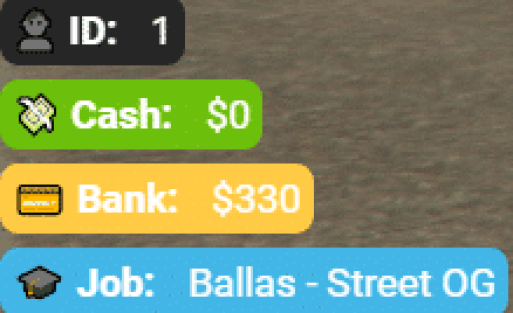
This TextUI script creates sleek notification boxes that appear on-screen to communicate information to players. Whether showing interaction prompts like Press E to open door, displaying status updates like Vehicle locked, or presenting contextual information during gameplay, the system delivers messages in a clean, readable format. The notifications automatically appear and disappear based on triggers you define, creating a polished user experience.
Core Features
- Custom Messages - Display any text message you want to communicate to players
- Color Options - Choose from blue, red, green, or gray color schemes to match message importance
- Position Control - Place notifications on left or right side of screen based on your UI design
- Clean Design - Modern, minimal appearance that doesn't distract from gameplay
- Easy Integration - Simple export functions for triggering from other scripts
- Lightweight - Minimal performance impact even with frequent notifications
Customization Options
The script offers three essential customization parameters that cover most notification needs:
- Message Content - Set any text string for the notification body
- Color Scheme - Select blue, red, green, or gray to indicate different notification types (info, error, success, neutral)
- Screen Position - Choose left or right side placement to avoid conflicts with other UI elements
Perfect For
- Interaction prompts for doors, vehicles, and objects
- Job-specific instructions and task notifications
- Status updates for vehicle locks, alarm states, and system messages
- Contextual hints during missions or activities
- Error messages and validation feedback
- Success confirmations for completed actions
- Tutorial messages for new player onboarding
Implementation Examples
Use blue notifications for general information like Press E to enter building or Job location marked on GPS. Red notifications work perfectly for errors and warnings such as Insufficient funds or Access denied. Green notifications indicate successful actions like Vehicle purchased or Item crafted successfully. Gray notifications suit neutral system messages that don't require color coding.
Position notifications on the left side if your server uses right-side UI elements like minimaps or status displays. Place them on the right if you have left-side menus or inventory systems. This flexibility prevents UI overlap and maintains a clean screen layout.
Installation
- Download the okok TextUI script files
- Place the resource folder in your server's resources directory
- Add ensure okok-textui to your server.cfg file
- Restart your server to load the TextUI system
- Import the TextUI exports into your other scripts where needed
Integration with Other Scripts
The TextUI system works through simple export functions that other scripts can call. When a player approaches an interactive object, your script triggers the TextUI with the appropriate message and color. When they move away or complete the action, your script hides the notification. This event-driven approach keeps the screen clean by only showing relevant information when needed.
Usage in Different Scenarios
For job scripts, display instructions like Press E to start mining when players enter work zones, then show Processing ore... during the activity, and finally Mining complete - $500 earned in green when finished. For vehicle scripts, show Press H to lock/unlock near owned vehicles with color indicating current lock state. For housing scripts, display Press E to enter apartment at entrance points with green for owned properties and red for inaccessible ones.
Framework Compatibility
- ✅ ESX - Perfect for ESX job scripts and interaction systems
- ✅ QBCore - Compatible with QB drawtext and notification replacements
- ✅ QBOX - Works as modern notification alternative
- ✅ Standalone - Functions independently with any script using exports
Performance Benefits
Unlike heavier notification systems with animations and complex styling, this TextUI focuses on efficiency. The lightweight code means notifications appear instantly without lag. Multiple simultaneous notifications won't impact frame rates. The simple render approach minimizes client-side processing, making it ideal for servers prioritizing performance or supporting players with lower-end hardware.
What Makes It Stand Out
Sometimes simple is better. While many notification systems offer dozens of customization options, complex animations, and elaborate styling, okok TextUI provides exactly what most servers actually need: clean text messages in readable colors at logical screen positions. The three-parameter system (message, color, position) covers the vast majority of use cases without overwhelming server owners with configuration options. It's the kind of utility script that just works reliably without requiring ongoing maintenance or troubleshooting.
Documentation
Check the showcase video linked above to see the TextUI system in action with different colors and positions. The video demonstrates how notifications appear, their visual styling, and typical usage patterns for various scenarios.
Technical Details
- Type: Client-side UI script with export functions
- Colors: Blue, Red, Green, Gray
- Positions: Left or Right side of screen
- Performance: Lightweight with minimal resource usage
- Integration: Export-based for easy use in other scripts
Buy this when it saves setup time
Use this checklist to decide quickly whether the resource fits your current server build, framework, and support expectations.
Server-owner payoff
okok TextUI is positioned to reduce HUDs instead of making you rebuild the same system from scratch.
Compatibility
Works with standalone. Check the requirements block before adding it to a live stack.
Purchase confidence
Instant download, Stripe checkout, support access, and refund policy context are shown before payment.
Decision assets
Requirements, Preview video, Product Q&A
Product fit, setup, and proof at a glance
Use the published facts on this page to confirm whether okok TextUI matches your server before checkout.
Compatibility
- Frameworks
- Standalone
- Category
- HUDs
Setup & requirements
- Install flow
- Download → resources folder → ensure in server.cfg
- Requirements
- Published on this page
- File size
- 82.14 KB
Proof & buyer questions
- Reviews
- No reviews — be the first
- Sales
- 1
Only the facts published on this page should be treated as confirmed. If you need more detail, review the description, requirements, changelog, reviews, and product Q&A before checkout.