• Instant digital delivery
  • Lifetime updates on selected products
  • Trusted by server owners
FiveMX
Shop
Full ServersBundlesNew releases
FiveMX

Start building your server today.

Curated FiveM resources, instant delivery, free starter mods, and practical guides in one calm marketplace.

Browse the shopsupport@fivemx.com

Shop

  • Shop
  • FiveM Mods
  • All Products
  • Free Mods
  • Best Scripts & Mods
  • FiveM Scripts

Frameworks

  • QBCore Scripts
  • ESX Scripts
  • QBox
  • Standalone

Community

  • Blog
  • Support
  • Creators
  • Affiliate

Legal

  • Privacy Policy
  • Terms of Service
  • Refund Policy
  • Digital Delivery
  • Cookie Policy
  • GDPR Compliance
  • DMCA
  • Imprint
  • Editorial Policy

Server Templates

  • QBCore Server Template
  • ESX Server Template
  • NoPixel Server Template
  • Server Packs
  • Free Server Templates
  • Tebex Alternative
© 2026 FiveMX. All rights reserved.·FiveMX is not affiliated with Rockstar Games, Take-Two Interactive, or CFX.re. All trademarks are property of their respective owners.
DiscordDocs
Compatibility:

Shmanworks Airport

$16.99

Secure Checkout

Cards, Apple Pay, Google Pay, iDEAL/Wero, Bancontact, EPS, Przelewy24, and optional Crypto where available via Stripe.

Instant file access after paymentSupport and refund policy shown before checkout
Ask support before buyingRead refund policy
Instant Access
SSL Encrypted
Cards, wallets, bank redirects
Frameworksesx, qbcore, qbox, standalone
Setup

Requires a FiveM server, esx or qbcore or qbox or standalone, access to server resources, and permission to restart the resource after configuration.

RequirementsPublished on this page
PreviewAvailable

Description

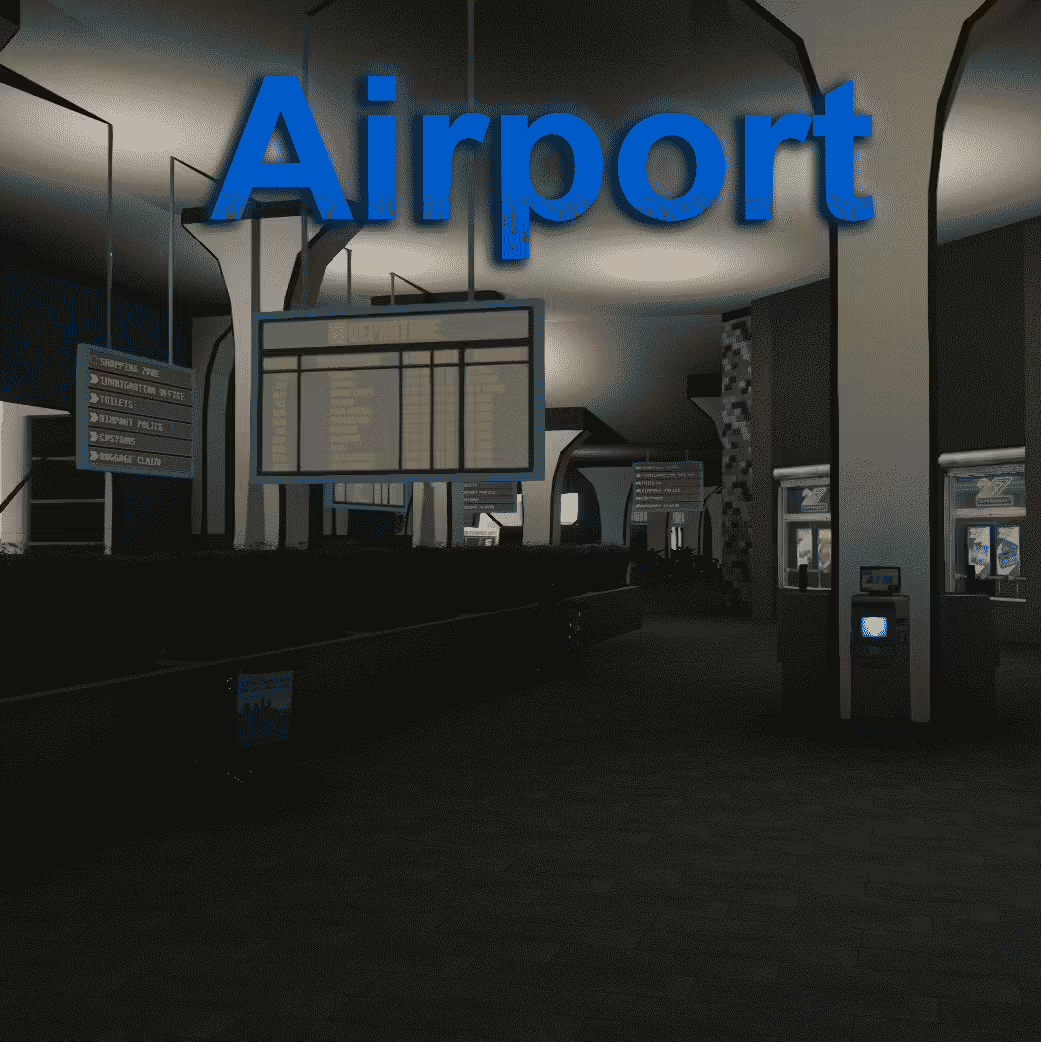
Shmanworks Airport - Premium Los Santos International Airport MLO

Transform Los Santos International Airport into a fully functional, highly detailed interior with this premium MLO from Shmanworks. This comprehensive airport package includes terminals, gates, security checkpoints, baggage claim areas, and operational spaces that bring authentic aviation roleplay to your server. Perfect for communities wanting to add travel roleplay, smuggling operations, or private jet services.

What's Included

This extensive airport interior features multiple terminals with realistic gate areas, TSA security checkpoints, baggage claim zones, check-in counters, and airline offices. The design focuses on creating authentic airport atmosphere while maintaining excellent performance for servers with high player counts. Every area has been carefully optimized to balance visual quality with server efficiency, making it suitable for busy international airport roleplay scenarios.

Key Features

  • Multiple Terminals - Realistic terminal layout with gates and boarding areas
  • Security Checkpoints - TSA-style screening areas for law enforcement roleplay
  • Baggage Claim - Functional carousel areas for luggage collection scenes
  • Check-In Counters - Airline service desks for customer service roleplay
  • Airline Offices - Behind-the-scenes workspace for aviation employees
  • Customs Area - International arrival processing zones
  • VIP Lounges - Premium passenger areas for exclusive travel
  • Retail Spaces - Shops and restaurants throughout the terminal
  • High-Quality Textures - Detailed materials creating realistic airport atmosphere
  • Optimized Performance - Efficient design suitable for high-traffic servers

Perfect For

  • Servers with travel roleplay systems (flying between cities/servers)
  • Criminal organizations running smuggling operations through the airport
  • Law enforcement focused on customs, TSA, and border security
  • Civilian job systems (airline staff, security, customs agents)
  • Private jet charter services and luxury travel businesses
  • Immigration and visa processing roleplay

Technical Details

  • Location: Los Santos International Airport
  • Performance: Optimized for high player count servers
  • Compatibility: Works with all frameworks (ESX, QBCore, QBOX, Standalone)
  • Type: Interior MLO (Map Loaded Object)
  • Creator: Shmanworks (known for high-quality airport interiors)
  • File Size: Large package with extensive interior spaces

Installation

  1. Download and extract the Shmanworks Airport files to your resources folder
  2. Add the resource to your server.cfg file
  3. Restart your server to load the airport interiors
  4. Configure any teleport markers between exterior and interior spaces
  5. Set up job permissions for airline, security, and customs positions
  6. Test all terminal areas to ensure proper collision and navigation
  7. Integrate with any travel or smuggling scripts you use

Framework Compatibility

  • ✅ ESX - Compatible with all ESX versions, integrate with airline job scripts
  • ✅ QBCore - Works with QB job system for airport employees
  • ✅ QBOX - Full compatibility with QBOX framework
  • ✅ Standalone - Functions independently of any framework

Roleplay Opportunities

The Shmanworks Airport opens up numerous roleplay scenarios beyond basic travel. Law enforcement can conduct customs inspections, TSA screenings, and smuggling investigations. Criminal organizations can use the airport for international drug trafficking, weapons smuggling, or fugitive escapes. Civilian jobs include airline customer service agents, security guards, customs officers, and baggage handlers. The VIP lounge areas create exclusive spaces for high-society characters, while the retail zones offer business opportunities.

What Makes It Stand Out

Unlike simple airport exteriors or basic terminal shells, the Shmanworks Airport delivers a complete international airport experience with all the functional areas you'd find in a real aviation hub. The attention to detail in security checkpoints, baggage systems, and terminal layouts creates immersion that generic MLOs can't match. The optimization allows your server to maintain stable performance even during busy travel periods with dozens of players. For servers serious about travel mechanics, smuggling operations, or aviation-themed roleplay, this MLO transforms the airport from a backdrop into a central gameplay location with endless possibilities.

https://www.youtube.com/watch?v=ZgZ368nZRF8

Related FiveM MLOs

  • Molo Medical Center
  • O Block v2 (+38 Interiors)
  • City Hall MLO Fluroine
  • Yellow Jack Reworked (MLO)

Installation notes

Requires a FiveM server, esx or qbcore or qbox or standalone, access to server resources, and permission to restart the resource after configuration.
Installation notes
Requires a FiveM server, esx or qbcore or qbox or standalone, access to server resources, and permission to restart the resource after configuration.

Buy this when it saves setup time

Use this checklist to decide quickly whether the resource fits your current server build, framework, and support expectations.

Server-owner payoff

Shmanworks Airport is positioned to reduce Garages & Industrial instead of making you rebuild the same system from scratch.

Compatibility

Works with esx, qbcore, qbox, standalone. Check the requirements block before adding it to a live stack.

Purchase confidence

Instant download, Stripe checkout, support access, and refund policy context are shown before payment.

Decision assets

Requirements, Preview video, Product Q&A

Product fit, setup, and proof at a glance

Use the published facts on this page to confirm whether Shmanworks Airport matches your server before checkout.

Compatibility

Frameworks
ESX, QBCore, QBOX, Standalone
Category
Garages & Industrial

Setup & requirements

Install flow
Download → resources folder → ensure in server.cfg
Requirements
Published on this page
File size
36.26 MB

Proof & buyer questions

Reviews
No reviews yet
Answered Q&A
Ask before buying

Only the facts published on this page should be treated as confirmed. If you need more detail, review the description, requirements, changelog, reviews, and product Q&A before checkout.

DescriptionRequirementsPreview video
Garages & Industrial
Compatibility:
ESX
QBCore
QBOX
Standalone

Shmanworks Airport

Review process
$16.99

Secure Checkout

Cards, Apple Pay, Google Pay, iDEAL/Wero, Bancontact, EPS, Przelewy24, and optional Crypto where available via Stripe.

Instant file access after paymentSupport and refund policy shown before checkout
Ask support before buyingRead refund policy
Instant Access
SSL Encrypted
Cards, wallets, bank redirects
Frameworksesx, qbcore, qbox, standalone
Setup

Requires a FiveM server, esx or qbcore or qbox or standalone, access to server resources, and permission to restart the resource after configuration.

RequirementsPublished on this page
PreviewAvailable
Home
Shop
Garages & Industrial
ESX
QBCore
QBOX
Standalone
Review process

Key Features

  • Multiple Terminals

    Realistic terminal layout with gates and boarding areas for comprehensive airport navigation

  • Security Checkpoints

    TSA-style screening areas enabling law enforcement roleplay and security operations

  • Baggage Claim

    Functional carousel areas for luggage collection scenes and airport operations

  • Check-In Counters

    Airline service desks supporting customer service roleplay and civilian job systems

  • Customs Area

    International arrival processing zones for customs inspections and TSA screenings

Frequently Asked Questions

Related Products

$13.49
$14.99
$16.99

Related Tutorials & Guides

Learn more about setting up, configuring, and using this type of resource.

ESX vs QBCore vs QBOX: Technical Framework Comparison 2026

ESX vs QBCore vs QBOX: Technical Framework Comparison 2026

Choosing a framework is the single most consequential decision when building a FiveM server. It determines which scripts you can use, how your developers write code, the…

FiveM Frameworks Explained: Complete Guide to ESX, QBCore & QBOX

FiveM Frameworks Explained: Complete Guide to ESX, QBCore & QBOX

FiveM frameworks form the backbone of roleplay servers. They're not just code libraries—they're complete systems that manage player identity, jobs, inventory, permissions,…

QBox Framework Guide: Migrate from QBCore and Boost Performance (2026)

QBox Framework Guide: Migrate from QBCore and Boost Performance (2026)

QBox has firmly established itself as the natural successor to QBCore in the FiveM roleplay ecosystem.

Continue Building Your FiveM Server

Use this product as part of a larger setup. Explore related categories, alternative frameworks, premium bundles, and free companion downloads.

Explore Car DealersExplore Mechanic ScriptsBrowse all scriptsGarages & Industrial scriptsesx scriptsTry QBCore insteadTry QBox insteadFree FiveM modsCompare bundles
CD Garage

CD Garage

$18.99
FiveM Airport Map (MLO)

FiveM Airport Map (MLO)

Tuning Garage - SportRacer

Tuning Garage - SportRacer

JG Advanced Garages

JG Advanced Garages