Requires a FiveM server, esx, access to server resources, and permission to restart the resource after configuration.
RequirementsPublished on this page
PreviewAvailable
Description
T1ger Mechanic Job - Professional Vehicle Repair System for FiveM
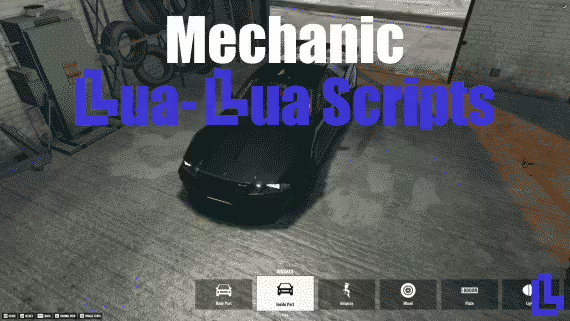
Transform your FiveM server's vehicle repair system with T1ger Mechanic Job, a comprehensive mechanic roleplay script built by T1ger Scripts. This professional-grade resource provides players with a fully-featured automotive repair job complete with diagnostic systems, part replacement mechanics, customer service interactions, and realistic repair pricing. Whether fixing engine damage, replacing body panels, or performing routine maintenance, mechanics have all the tools needed for immersive automotive roleplay.
What's Included
T1ger Mechanic Job delivers a complete vehicle repair business system with advanced features designed for serious roleplay servers. The script includes a diagnostic scanning tool that identifies specific vehicle damage, a parts inventory system for ordering and installing replacement components, customer interaction mechanics for both NPC and player clients, dynamic pricing based on damage severity, and a progression system that unlocks advanced repairs as mechanics gain experience. Mobile mechanics can operate roadside service calls while shop-based mechanics manage full-service garage operations.
Key Features
Advanced Diagnostic System - Scan vehicles to identify engine damage, body damage, and mechanical issues with detailed reports
Realistic Repair Mechanics - Step-by-step repair processes for engines, transmissions, body panels, tires, and electronic systems
Parts Inventory Management - Order, stock, and track replacement parts with realistic supply chain mechanics
Custom Repair UI - Modern interface showing vehicle condition, required parts, labor time, and cost estimates
Mobile Mechanic Mode - Roadside assistance with portable toolkits for on-location repairs
Shop Management - Full garage operations with customer queue, work order tracking, and service bay management
Dynamic Pricing - Configurable labor rates and parts markup for realistic business economics
Customer Interaction - Serve player clients or NPC customers with realistic service requests
Experience Progression - Unlock advanced repair capabilities as mechanics complete jobs successfully
Tool Requirements - Different repairs require specific tools (wrenches, welders, diagnostic computers)
Quality System - Repair quality affects vehicle performance and customer satisfaction
Earnings Tracking - Detailed income reports showing labor charges, parts sales, and profit margins
Perfect For
Roleplay servers with realistic economy and business systems
Communities wanting immersive vehicle repair mechanics beyond simple health restoration
Servers with player-owned mechanic shops and automotive businesses
Whitelisted mechanic jobs requiring professional service roleplay
Servers seeking alternatives to simplistic press E to repair mechanics
How It Works
Mechanics clock in at their designated garage or activate mobile service mode with a portable toolkit. When a customer arrives (player or NPC), the mechanic uses the diagnostic tool to scan the vehicle and generate a damage report. The system identifies specific issues: engine block damage from overheating, transmission failure from racing, body panel damage from collisions, tire wear, electrical system problems, and more.
Based on the diagnostic report, the mechanic creates a work order listing required parts and estimated labor time. If parts aren't in stock, they must be ordered from suppliers (with configurable delivery times). The mechanic then performs repairs through an interactive system - replacing damaged engine components requires the engine repair tool, body work needs the welding equipment, electrical fixes require diagnostic computers.
Each repair takes realistic time to complete (configurable per repair type) and affects the vehicle's performance. Quality matters: rushed repairs at low skill levels may not fully restore vehicle performance, while experienced mechanics deliver professional results. Customers are charged for parts (with mechanic shop markup) plus labor rates. The mechanic and shop owner split earnings according to configured percentages.
Mobile Mechanic Operations
T1ger Mechanic Job includes a robust mobile mechanic system for roadside assistance. Players can request mechanic services via phone, creating a service call that appears in the mechanic's dispatch system. Mobile mechanics respond with portable toolkits, perform on-site diagnostics, and complete repairs without requiring towing to a shop. This creates emergency response roleplay opportunities and additional income streams beyond shop-based work.
Installation
Download and extract the t1ger-mechanic-job resource
Place the folder in your server resources directory
Import the SQL file to create job database tables
Configure garage locations, tool requirements, and pricing in config.lua
Set up parts inventory items and supplier delivery times
Configure job permissions and progression system
Add 'ensure t1ger-mechanic-job' to server.cfg
Restart server and assign mechanic job to test accounts
Framework Compatibility
✅ ESX - Full integration with ESX job system, society accounts, and inventory
✅ QBCore - Native QBCore support with duty system, stash integration, and banking
✅ QB-Inventory - Compatible with QB-Core inventory for parts management
✅ OX Inventory - Supports OX Inventory system for tool and parts tracking
Technical Details
Performance: Optimized T1ger code with 0.01-0.03ms resmon impact
Vehicle Damage: Works with native FiveM vehicle damage system
Database: Stores work orders, parts inventory, earnings, and mechanic experience
Sync: Server-side validation prevents repair exploits and ensures fair pricing
Customization: Extensive config for all repair types, tools, parts, and pricing
What Makes It Stand Out
T1ger Mechanic Job elevates vehicle repair from a simple health restoration script to a complete automotive business simulation. The diagnostic system creates genuine problem-solving roleplay - mechanics must identify issues, source parts, and perform proper repairs rather than just clicking a button. The parts inventory system adds business management depth: shop owners must maintain stock levels, balance parts costs against markup prices, and manage supplier relationships. The progression system rewards dedicated mechanics with advanced capabilities over time. Quality mechanics build reputations for professional service, attracting more customers and commanding higher rates. This script transforms the mechanic job from a basic utility into a central pillar of server economy and roleplay.
Requires a FiveM server, esx, access to server resources, and permission to restart the resource after configuration.
Installation notes
Requires a FiveM server, esx, access to server resources, and permission to restart the resource after configuration.
Buy this when it saves setup time
Use this checklist to decide quickly whether the resource fits your current server build, framework, and support expectations.
Server-owner payoff
T1ger Mechanic Job is positioned to reduce Mechanic Scripts instead of making you rebuild the same system from scratch.
Compatibility
Works with esx. Check the requirements block before adding it to a live stack.
Purchase confidence
Instant download, Stripe checkout, support access, and refund policy context are shown before payment.
Decision assets
Requirements, Preview video, Product Q&A
Product fit, setup, and proof at a glance
Use the published facts on this page to confirm whether T1ger Mechanic Job matches your server before checkout.
Compatibility
Frameworks
ESX
Category
Mechanic Scripts
Setup & requirements
Install flow
Download → resources folder → ensure in server.cfg
Requirements
Published on this page
File size
135.63 KB
Proof & buyer questions
Reviews
No reviews yet
Answered Q&A
Ask before buying
Only the facts published on this page should be treated as confirmed. If you need more detail, review the description, requirements, changelog, reviews, and product Q&A before checkout.