Vipex HUD
Secure Checkout
Cards, Apple Pay, Google Pay, iDEAL/Wero, Bancontact, EPS, Przelewy24, and optional Crypto where available via Stripe.
Requires a FiveM server, esx or qbcore or qbox or standalone, access to server resources, and permission to restart the resource after configuration.
Description
Vipex HUD - Modern Interface Design for Professional FiveM Servers
The Vipex HUD brings contemporary user interface design to your FiveM server with a clean, minimalist approach that prioritizes information clarity without overwhelming players. This isn't another cluttered HUD that covers half the screen - it's a carefully designed information system that shows players exactly what they need, when they need it, without distraction.
Built for both ESX and QBCore frameworks, Vipex HUD has quickly become a favorite among server owners who want a premium feel without sacrificing functionality. The interface adapts to different playstyles and server types, making it equally at home on serious roleplay servers or action-oriented freeroam communities.
What Makes Vipex HUD Stand Out
Modern HUD design requires balancing visual appeal with practical functionality. Vipex HUD achieves this through intelligent information hierarchy - critical data like health and armor are immediately visible, while secondary information appears contextually when relevant. Players aren't buried under constant notifications and status indicators.
The interface uses smooth animations and transitions that feel responsive without being distracting. When your health drops, the HUD provides clear visual feedback. When you enter a vehicle, speedometer elements fade in naturally. Everything feels intentional and polished, creating the premium experience players expect from high-quality servers.
Core Interface Components
- Health & Armor Display - Clean circular indicators show your vital stats at a glance. The design uses color psychology effectively - green for health, blue for armor - making split-second assessments effortless during intense situations.
- Hunger & Thirst System - Integrated survival indicators that display your character's needs without cluttering the interface. Icons are universally recognizable and the fill states are immediately clear.
- Stamina Indicator - Shows remaining stamina during physical activities like running, swimming, or climbing. Only appears when relevant, keeping the interface clean during normal gameplay.
- Vehicle HUD - Comprehensive speedometer with speed display, fuel gauge, gear indicator, and vehicle health. The interface adapts between metric and imperial units based on your configuration.
- Minimap Enhancement - Subtle refinements to the minimap presentation that improve readability without dramatic changes. Street names, coordinates, and directional indicators are cleanly integrated.
- Notification System - Modern notification cards that slide in with relevant information, then fade away without requiring manual dismissal. Supports different notification types with appropriate styling.
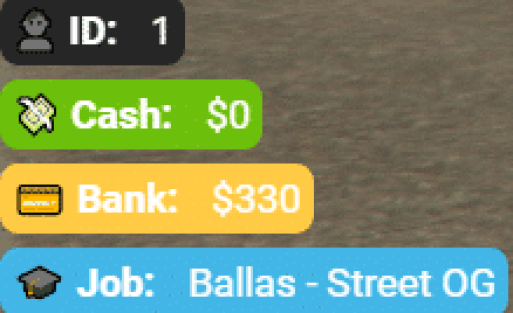
- Money Display - Shows bank balance, cash on hand, and black money with clear separation. Updates in real-time as transactions occur, with smooth number transitions.
- Job & Status Indicators - Displays current job, job grade, and active status effects. Designed to be informative without drawing attention away from gameplay.
Customization and Branding Options
Server owners have extensive control over Vipex HUD's appearance through the comprehensive config file. Change colors to match your server's branding, adjust element positions to accommodate other UI scripts, or enable/disable specific features based on your server's needs. The HUD adapts to your vision rather than forcing a one-size-fits-all approach.
Color customization extends beyond simple hue changes. You can define accent colors, background opacity, text colors, and icon tints independently. Create a cohesive visual identity that makes your server immediately recognizable. Popular branding approaches include cyberpunk neon aesthetics, clean corporate styling, or subtle earth tones for immersive roleplay.
Performance Optimization
Despite its rich feature set, Vipex HUD maintains exceptional performance through efficient rendering techniques. The script uses optimized update intervals - checking critical information like health every frame while updating less time-sensitive data like money every second. This intelligent approach prevents unnecessary calculations that would impact client FPS.
Resource usage typically registers below 0.02 ms on resmon, making it one of the most efficient HUDs available. Even on lower-end systems running dozens of other scripts, Vipex HUD delivers smooth animations without contributing to performance problems. This efficiency is crucial for maintaining stable framerates during high-intensity gameplay scenarios.
Framework Integration
- ✅ ESX Legacy - Fully integrated with ESX's money, inventory, job, and status systems. Supports all standard ESX features out of the box.
- ✅ QBCore - Native QB-Core support with proper integration for all core features. Works with both standard QB-Core and QBOX forks.
- ✅ Standalone Elements - Many components can function independently, allowing mixed framework setups or gradual migration.
The HUD integrates seamlessly with popular resource dependencies like ox_lib, esx_status, and qb-core systems. It respects existing player data structures and update events, making installation straightforward even on heavily customized servers.
Perfect For These Server Types
- Professional Roleplay Servers - The clean aesthetic supports immersive roleplay without breaking character immersion with gamey UI elements.
- Community Servers - Easy customization helps create unique server identity that players remember.
- Public Servers - Clear information hierarchy helps new players understand game mechanics quickly.
- Themed Servers - Flexible styling adapts to cyberpunk, realistic, futuristic, or any other thematic direction.
- Competitive Servers - Crucial information display helps players make split-second decisions during PvP encounters.
Installation Process
- Extract the
vipex-hudfolder to your server'sresourcesdirectory - Configure framework selection in
config.lua(ESX or QBCore) - Customize colors, positions, and enabled features to match your preferences
- Add
ensure vipex-hudto yourserver.cfg - Restart your server and verify the HUD loads correctly
- Fine-tune settings based on player feedback and server aesthetics
The installation includes detailed comments in the configuration file explaining each option. Even admins without extensive scripting knowledge can customize their HUD effectively. Common customization tasks like color changes or position adjustments require only simple number or color code edits.
Mobile & Console Compatibility
While designed primarily for PC gameplay, Vipex HUD's responsive design principles mean it scales appropriately for different screen resolutions and aspect ratios. Players using ultrawide monitors, 4K displays, or unconventional resolutions see properly positioned UI elements without overlap or cutoff issues.
Technical Specifications
- File Size: ~5 MB including all assets
- Performance Impact: <0.02 ms resmon (highly optimized)
- Dependencies: ESX or QBCore framework
- Language Support: Multi-language ready with locale system
- Updates: Regular updates for new features and framework compatibility
What You Receive
Your purchase includes the complete Vipex HUD script with full source code, comprehensive configuration options, all UI assets, installation documentation, and lifetime updates. As FiveM and framework standards evolve, you'll receive updated versions ensuring long-term compatibility.
The source code is clean, well-documented, and structured logically for easy modification. If you want to add custom features or integrate with proprietary server systems, the codebase provides a solid foundation. You own the script outright with no ongoing licensing fees or usage restrictions.
Developer Support and Documentation
The included documentation covers installation, configuration, troubleshooting common issues, and framework-specific integration notes. Code comments explain the purpose of major functions and systems, making customization accessible even to developers with limited Lua experience.
Why Choose Vipex HUD
At $20, Vipex HUD delivers professional-grade interface design that would cost thousands to develop in-house. Rather than settling for free HUDs with limited features or dated designs, you get a modern solution that makes your server feel premium and well-maintained.
Players judge server quality within minutes of joining, and the HUD is part of that critical first impression. A polished, functional interface signals that you care about quality and player experience. That perception drives player retention and community growth far beyond the initial investment.
The HUD receives regular updates as new FiveM features become available and as framework standards evolve. Your investment continues delivering value long after purchase, with improvements and optimizations rolled out to all users automatically.
https://www.youtube.com/watch?v=2ojSQyp2Nt4